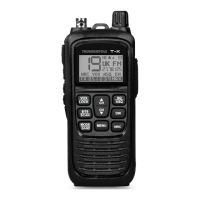
Controls and operation
1. Belt Clip
Used to secure the radio to a belt.
2. Backlight Button
A short press of this button illuminates the backlight for a few seconds.
A long press of this button disables the backlight, another long press enables it again.
3. Monitor Button
A short press of this button puts the radio into ‘Monitor Mode’ which allows all signals (including white
noise) to be heard, MON will appear on the display. Another short press turns off monitor mode.
4. BNC Antenna
Always ensure this antenna is attached when using the radio, unless you are using the radio with the
vehicle adaptor plugged into the base(24) in which case the top antenna MUST be removed.
5. PTT (Push-to-Talk) Button
Transmitter button, press this button to transmit and release it to return to the receive mode.
6. Hi / Lo Power Button
A long (3 second) press of this button will toggle the transmission power between High (4 Watts) and
Low (1 Watt). Low power mode will prolong battery life but the transmission range will be shorter.
7. Channel Down Button
A short press of this button will move the channel down by one.
A long press will allow you to scroll down the channels more quickly.
Please note: This button can also be used to change menu options.
8. VOX / Lock Button
A short press of this button will toggle ‘Vox Mode’ on and off. In Vox Mode the radio will transmit
automatically when a sound is picked up by the microphone (or accessory plugged into 16).
Note: Vox sensitivity can be changed from 1 - 5 in the menu (21).
A long press of this button will put the radio into ‘Lock Mode’, where the only usable button is the PTT
Button (5). Another long press will exit ‘Lock Mode’.
9. Channel 9/19 (Emergency) / Scan Button
A short press of this button will change the channel to 9, short press again for channel 19, then again to
go back to your chosen channel. Please note: Display will show ‘EM’ when on Emergency channel.
A long press of this button will toggle ‘Scan Mode’ and the channels will scan until a
transmission is found. Channel Up (17) and Down (7) buttons can be used to change scan direction.
Please note: When in Scan Mode ‘SC’ will ash on the screen.
- 3 -


 To Next Page
 Loading...