Controls and operation
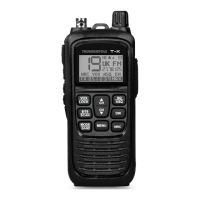
10. Mode / Band Button
A short press of this button will switch between FM and AM (and EU Frequency when set to UK Band).
A long press of this button will allow you to change between frequency bands (see page 8 for bands).
11. Internal Microphone
Talk into here when transmitting (unless using external microphone accessory).
12. Internal Speaker
High quality speaker for listening to incoming signals (unless using external speaker accessory).
13. On / Off / Volume Control
Use this knob to switch radio ON and OFF, as well as to adjust the receiver volume to the desired level.
14. Indicator LED
Displays green when receiving a signal and red when transmitting a signal (or when radio is charging).
15. LCD Display
Shows functions of the radio, see page 6 for more information.
16. Accessory Socket
Compatible with 2 Pin (Kenwood wired) speaker and microphone accessories.
17. Channel UP Button
A short press of this button will move the channel up by one.
A long press will allow you to scroll up the channels more quickly.
Please note: This button can also be used to change menu options.
18. SQ / ASQ (Squelch) Button
A short press of this button allows you to change the squelch (SQ) or auto-squelch (ASQ) level using the
Up / Down buttons (7 / 17). Lower levels allow weaker signals to be heard.
A long press of this button will toggle the ‘Auto Squelch’ function on (or off), this automatically silences
receiver noise, avoiding squelch manual adjustment, when auto squelch is switched on ‘ASQ’ will be
displayed on the screen.
Squelch (SQ) Levels:
0 = Squelch off (hear all signals and noise)
25 = Highest Squelch level (hear only the strongest signals)
Auto Squelch (ASQ) Levels:
1 = Lowest Auto Squelch level (hear weak signals but also maybe noise)
5 = Highest Auto Squelch level (hear no noise but only the strongest signals)
- 4 -


 To Next Page
 Loading...