APPENDIX E. CONNECTING TO THE SERIAL INTERFACE
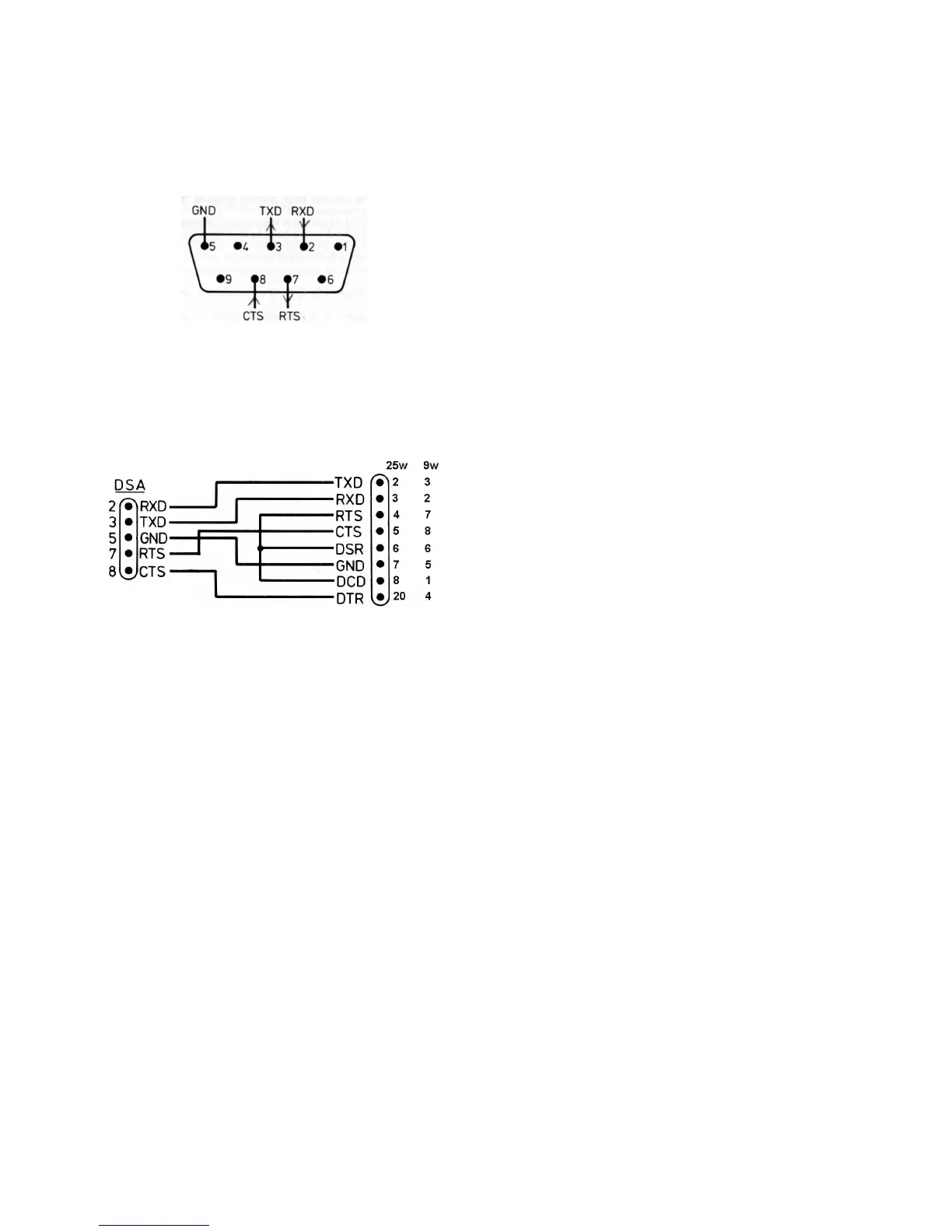
The interface uses a female 9-pin D connector and has five active
connections: pin 2 (RXD) is the data input line, pin (TXD) is the
data output line, pin 5 is signal ground, pin 8 (CTS) is the
hardware handshake input, pin 7 (RTS) is the hardware
handshake output. RTS can be disabled and forced permanently
high by using FUNCTION 83 on the DSA, it can be re-enabled by
using FUNCTION 82.
Unfortunately, although there are connection standards for
modems and for terminals, there is no single connection standard
applying to other equipment fitted with an RS-232C interface. It
will therefore be necessary to refer to the technical handbook of
the equipment concerned before a suitable connection cable can
be made up. The most commonly used connector system is a 25
pin "D" connector in a "terminal" configuration, and a suitable
cable wiring scheme for this is shown below.
Where bi-directional transfer of data is required, the TXD of the
DSA should be connected to the RXD of the other equipment and
the RXD of the DSA should be connected to the TXD of the other
equipment. Where unidirectional data transfer is required (i.e.
when connecting to a printer or plotter), the RXD of the DSA can
be left unconnected (unless X-ON/X-OFF handshaking is used).
Unless the baud rate is set very low, some form of handshaking
connection will probably be necessary. If hardware handshaking
is not being used, pin 8 (CTS) on the DSA cannot be left uncon-
nected and must be taken permanently high. This can be done by
connecting pin 8 to pin 7 (RTS) and using FUNCTION 83 to force
RTS permanently high. RTS can be re-enabled for normal
handshaking operation using FUNCTION 82.
Handshaking is necessary when the receiving equipment cannot
accept the data as fast as the sending device is sending it. Hand-
shaking allows the receiving device to tell the sending device
when to send data and when not to send data, thus controlling
the effective rate at which data is transmitted.
Handshaking is not always needed. The receiving equipment may
be able to keep up with the incoming data without needed to
interrupt it, either because the baud rate is set low enough that it
can act on the data as fast as it is being sent, or because it has a
large enough data-input buffer to accept all of the transmitted
data in one stream. However, even when a large data buffer is
available, handshaking can sometimes still be needed at high
baud rates because the RS-232 hardware of the equipment
cannot transfer data bytes into the buffer fast enough.
The DSA has a 40 byte data input buffer. When transmitting data
to the DSA baud rates up to 9600 can be used without
handshaking, above this handshaking will be needed for strings in
excess of 40 characters.
When making connection to a printer or plotter, the need for
handshaking will depend upon the characteristics of that device.
Because the amount of data transmitted is large (approx. 30K
bytes for a "print") the baud rate needs to be kept high to mini-
mise transmission time. Since the device is unlikely to have a
buffer large enough to accept the data in one stream, hand-
shaking will almost certainly be needed.
There are two basic types of handshaking, hardware handshak-
ing and X-ON/X-OFF handshaking. Both types are provided on
the DSA.
Hardware handshaking uses the RTS and CTS lines of the DSA.
When the RTS line is set to a 0 (a positive voltage level) the
DSA is ready to receive data, when it is set to a 1 (a negative
voltage level) the DSA is not ready to receive data. When CTS is
pulled to a 0 (positive) the DSA is enabled to send data, when it
is pulled to a 1 (negative) the DSA is disabled from sending
data.
X-ON/X-OFF handshaking uses the TXD line of the receiving
device to send messages to the transmitting device telling it to
stop or to start sending data. The X-OFF message (ASCII 13)
stops transmission, the X-ON command (ASCII 11) starts trans-
mission.
The protocol of the DSA is fixed (8 data bits, 1 start bit, 1 stop
bit, no parity) and therefore any incompatibility must be
removed by adjusting the protocol of the other equipment.
Most computers have fully adjustable protocol but some
printers and plotters do not.
It is not essential to have exactly the same protocols on both
interconnected interfaces. The other interface must use 8 data
bits and 1 start bit, but parity can be even, odd or none, and
stop bits can be 1, 2 or more.
The wide range of baud rates available from the DSA should
ensure compatibility with virtually all equipment. Where the
other equipment also provides a choice of baud rates there are
a number of points to bear in mind when choosing which rate
to use.
Some types of equipment cannot handle incoming data at high
baud rates even when handshaking is correctly established.
Such problems are minimised at lower baud rates but waveform
data will take a long time to transfer. High baud rates will give
shorter transmission times but may produce problems with
missing bytes.
APPENDIX F. SOFTWARE COMMANDS
The RS-423 and IEEE-488 interfaces provide identical facilities
for control and data transfer. The commands listed below are
common to both interfaces. The DSA is controlled by sending it
ASCII strings. Each string must be terminated with a carriage
return (shown in examples as CR). All commands are case sen-
sitive.
When the DSA receives a valid command string it responds by
sending back the string "OK CR". If the command string is not
valid the DSA responds by sending back the string "ERROR N
CR" where N is the number of the first apparently invalid byte
of the command string.
1. Controlling the DSA front panel set up.
For controlling the front panel, each ASCII string must consist
of a primary command followed by a comma followed by one or
more secondary commands (separated by commas) followed by
a carriage return.
There are seven primary commands for control of the front
panel. Each one defines a control area to which the secondary
command (or commands) will apply. The primary commands
are as follows:-
CH1 This defines the control area as channel 1
CH2 This defines the control area as channel 2
TRG This defines the control area as trigger
TMB This defines the control area as timebase
TRA This defines the control area as trace A
TRB This defines the control area as trace B
KEY This is a Global control command


 To Next Page
 Loading...
