2)
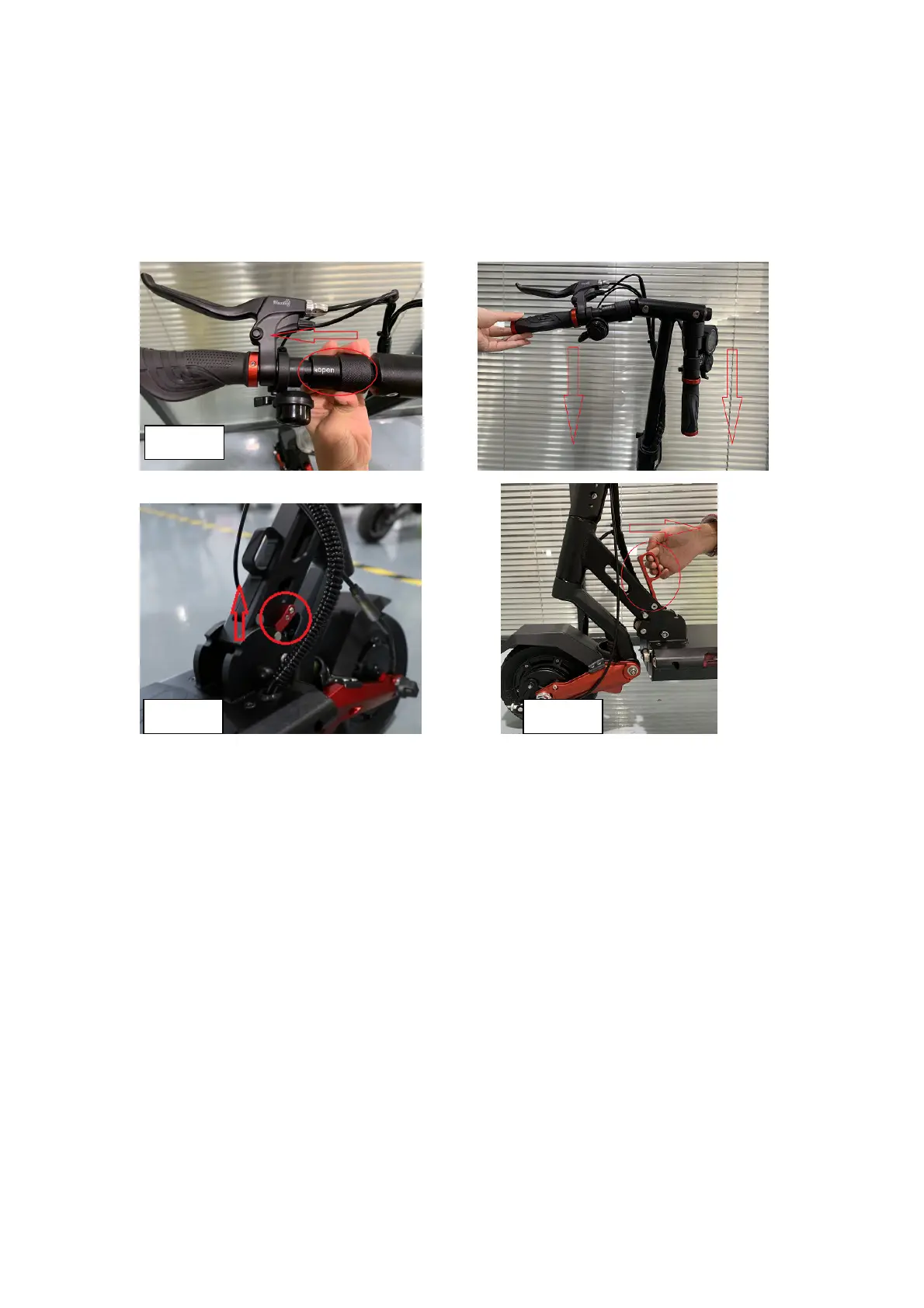
Product folding
Step 1.Move the “folding rings” on T-bar like shown in picture, and lift down them.
Step 2.Unlock the “stem lock”.
Step 3.Move the “folding lock” upwards.
Step 4. Right hand pull the folding handle, left hand pull the stem at same time, and fold
the scooter.
3)
Assembling the display, and brake lever
- Adjust the position of the brake, display and tighten the fixing bolts with a 5mm
hexagon wrench.
4
)
))
)
How to start
Step1. Press the POWER button on the display for 3 seconds to turn on the display.
*
The power of the display will turn off automatically after a few minutes of inactivity. At this time,
the LED lamp is also turned off, so turn it off with the LED lamp button before you turn it on again.
Step 2. Stance for driving
After tilting the kickstand, find a stable position on the footrest and then hold the handle
grip comfortably. Be careful not to raise your foot on the rear fender.
* Scooter are regularly with “zero start” when out of factory, users need to kick ground to start
ride
.
Step 3. Acceleration
Acceleration can be performed by using the throttle of the display while driving, and the
deceleration or stop can be performed by holding the brakes on the handle.


 To Next Page
 Loading...