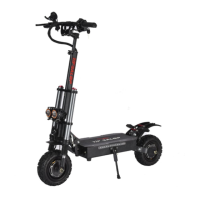
This document is a user manual for the TIFGALOP T108 electric scooter, providing instructions for operation, maintenance, and safety.
Function Description
The TIFGALOP T108 is an electric scooter designed for personal transportation. It features a display panel that provides information such as battery capacity, speed, gear, and mode. The scooter supports both single and dual motor operation, as well as different speed modes (ECO for limited speed and TURBO for normal speed). It has a folding mechanism for portability and storage.
Important Technical Specifications
- Battery Voltage: Full power at 67V, no power at 50V (as indicated by the red number on the key lock).
- Speed Modes:
- ECO: Limited speed, max 25km/h.
- TURBO: Normal speed.
- Motor System:
- SINGLE: Rear engine working.
- DUAL: Dual engines working (front and rear two-wheel rotation).
- Parameter Settings (via display panel):
- P0: Wheel diameter setting (default P00: 11).
- P1: Undervoltage point setting (e.g., 315 means 31.5 volts; default P01: 60V:50).
- P2: Magnetic pole logarithm setting (default P02: 14).
- P3: Speed measurement signal selection setting (0 for motor Hall signal, 1 for external signal; default P03: 1).
- P4: KM or MILE selection setting (0 for kilometers, 1 for miles; default P04: 0).
- P5: Non-zero start and zero start selection setting (0 for zero start, 1 for non-zero start; default P05: 0).
- P6: Cruise and no cruise selection setting (0 for no cruise, 1 for cruise; default P06: 0).
- P7: Soft start and hard start choose settings (0 for soft start, 1 for hard start; default P07: 0).
- P8: 100% speed limit ratio (default P08: 100).
- P9: EBS brake intensity adjustment (default P09: 2).
- Charging: Maximum continuous charging time not exceeding 18 hours.
- Waterproofing: The product is waterproof but not completely waterproof; immersion in deep water or direct water spray is prohibited.
Usage Features
- First Use: Fully charge the scooter before the first use.
- Folding Instructions:
- Pull the safety button.
- Step on the folding button with your foot and raise the handlebar.
- Close the handles on both sides and tighten the screws in the middle.
- Display Panel Operation:
- Power On/Off: Long press the power button to turn on. The panel automatically turns off after 3 minutes of no signal input, or after a 2-hour countdown (indicated by "CA 2:00"). Long press the power button to turn off.
- Mode Selection: Short press the function button to cycle through display content: TIME, TRIP (single mileage), ODO (accumulated mileage), DST (remaining mileage), VOL (battery voltage), CH 2:00 (2-hour shutdown countdown).
- Gear Change: When the panel is on, long press the power button, then short press the mode button to change gears (1: slow speed, 2: medium speed, 3: faster speed).
- Parameter Setting: Simultaneously press the function button and power button to enter parameter setting state. Short press the function button to cycle through P0-P9. Use the power button to decrease values and the function button to increase values.
- Riding Safety:
- Wear a safety helmet and other protective equipment.
- Practice in flat, wide outdoor areas with low traffic.
- Adhere to local traffic laws.
- Do not turn off power while riding.
- Avoid riding in deep water or trying to pass steps with gaps greater than 5 cm.
- Do not use in environments below -5°C.
- Maintain balance and keep feet on the scooter.
- Slow down on rough or uneven roads.
- Avoid surfaces with oil or ice.
- Adjust product height and ensure all parts are locked before riding.
- Check brakes, frame, handlebars, wheels, and saddle are securely locked.
- Charging Procedure:
- Connect the charger to the scooter's charging port first.
- Charge in a ventilated, dry area, away from children and flammable materials.
- Use only the company's special charger.
- Do not connect the charger to power without load.
- After charging, first pull out the power plug from the wall, then from the scooter.
- Red light indicates charging; green light indicates charging complete.
Maintenance Features
- Regular Inspection & Maintenance Schedule:
- 60 days:
- Handlebar rotation, steering parts looseness/wear: Adjust/Tighten.
- Tire inflation/wear: Check.
- Braking effect: Check.
- Horn and headlights: Check.
- Charger/charging plug: Check.
- Tightening screws: Adjust.
- 180 days:
- Handlebar rotation, steering parts looseness/wear: Check/Tighten.
- Tire inflation/wear: Check.
- Front/rear axle gears, wheel axles deformation/wear: Lubricate/Tighten.
- Brake pad wear: Replace.
- Rim deformation/deflection: Check.
- Frame/front fork deformation/bruises: Check.
- Braking effect: Check.
- Horn and headlights: Check.
- Charger/charging plug: Check.
- Tightening screws: Adjust.
- 360 days:
- Handlebar rotation, steering parts looseness/wear: Check/Lubricate.
- Tire inflation/wear: Replace.
- Front/rear axle gears, wheel axles deformation/wear: Lubricate/Tighten.
- Brake pad wear: Replace.
- Rim deformation/deflection: Check.
- Frame/front fork deformation/bruises: Check.
- Braking effect: Check.
- Horn and headlights: Check.
- Charger/charging plug: Check.
- Tightening screws: Adjust.
- Fault Display: The display panel will show failed accessories (e.g., brake failure, motor failure, handlebar failure, controller failure) if a breakdown occurs.
- Troubleshooting: The manual provides a table for common faults and their solutions, including issues with the display panel, motor not working, insufficient cruising range, charger problems, and other general issues.
- Warranty:
- 1-year warranty for non-human damage: Motor, Instrument accelerator, Controller.
- 6-month warranty for non-human damage: Charger, Frame, Shock-absorbing front fork.
- 3-month warranty for non-human damage: Lamp pedal.
- 1-month warranty for non-human damage: Trumpet, Tire, Power lock.
- Battery: 6 months, normal attenuation not covered by warranty.
- Exclusions: Expired warranty, commercial rental, gifts, unauthorized modification, consumables after one month, improper maintenance, collision damage, water ingress, burnout, overloaded use, abnormal riding, force majeure.
- Internal damage to motor, controller, battery, etc., should not be opened without authorization to avoid voiding the warranty.

 Need help?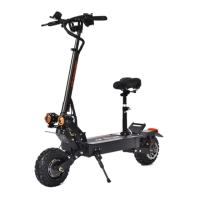

 To Next Page
 General