EasyManua.ls Logo

Tigers TIS001 - Status Icons

Default Icon
33 pages
Print Icon
To Next Page IconTo Next Page
To Previous Page IconTo Previous Page
Loading...
7
To move an icon or other item on the Home screen, you must first touch & hold it
to enter move mode. The object will magnify when it’s ready to be moved.
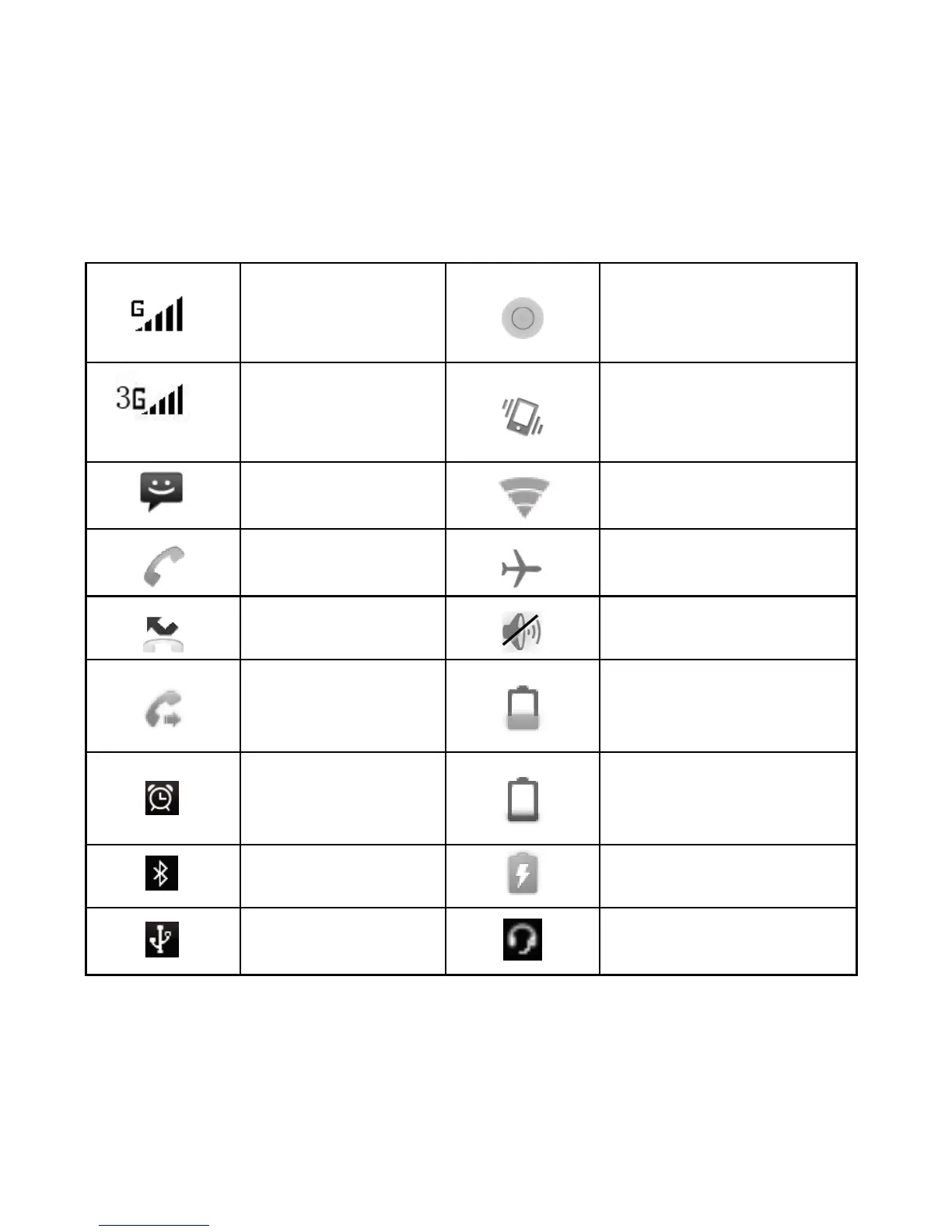
1.5 Status Icons
Connection status icons
Along the top of your phone screen is the status bar.
EDGE service
connected, data
flowing
Song is playing
GPS service
connected, data
flowing
Ringer is off
(Silent mode)
SMS/MMS
WLAN service
connected
Call in progress
Wireless services are
off (Airplane mode)
Missed call
Phone on mute
Call forward
Battery is low
Alarm is set
Battery is very low!
Bluetooth is on
Battery is charging
Connected the
PC
Connected the
earphone
Read your notifications
When you see a notification in the status bar, touch the bar and slide your finger
down the screen to open the list of notifications displayed in the sliding window.
You can clear notifications list by selecting ‘Clear notifications at the top of the