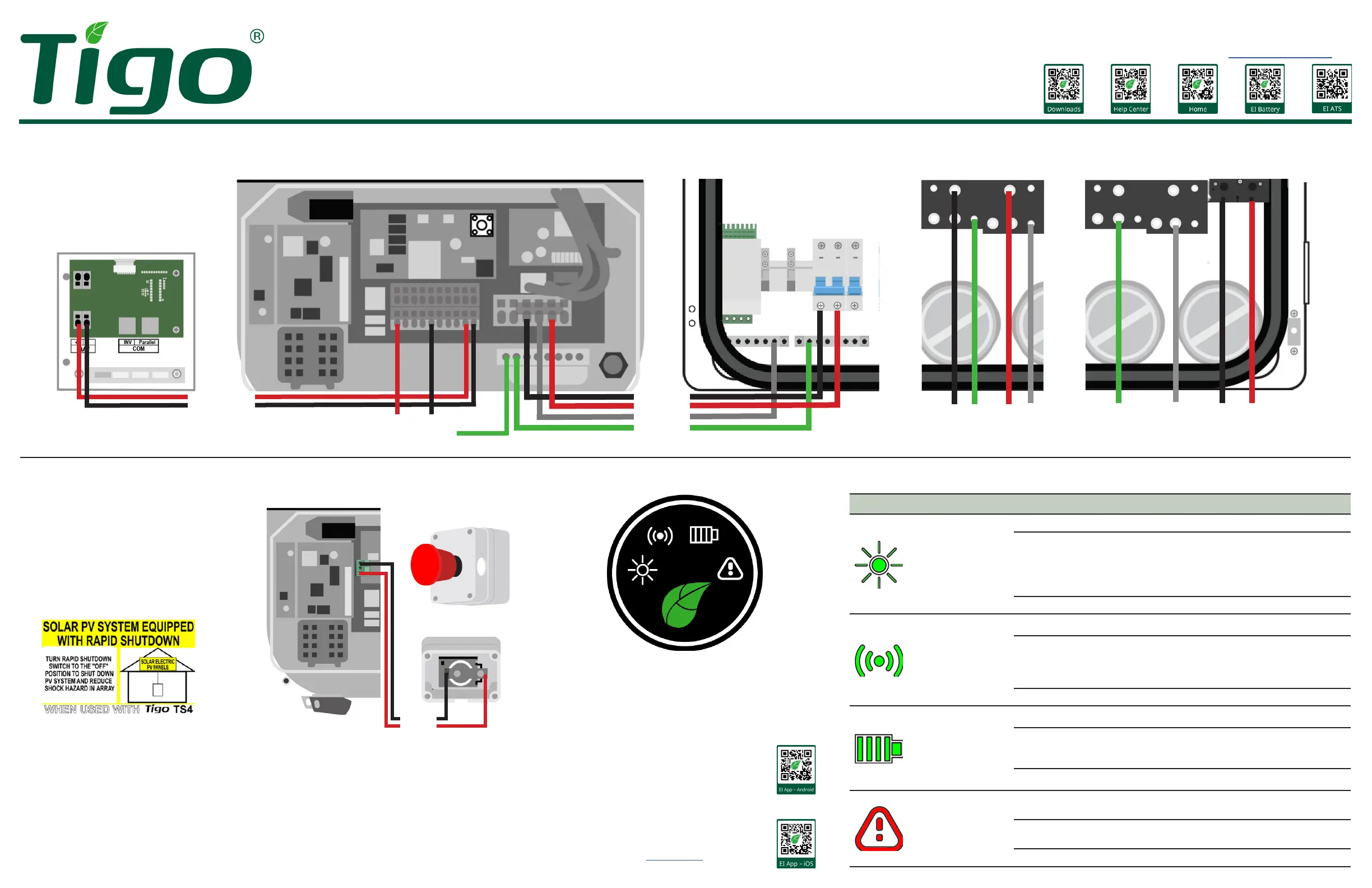
E-Stop Rapid Shutdown Switch
Inverter E-Stop Switch
Required if using a battery.
Mount the E-Stop switch within a few feet
of the inverter or service entrance outside
the residence. It must be clearly visible
and accessible to rst responders and
maintenance workers.
Ax the rapid shutdown label within 3ft of
the E-Stop switch.
20 – 18
AWG
Commissioning
Inverter System Status Indicators
Power Connections Use copper, non-stranded wire with ferrules.
EI Battery EI Inverter ATS Torque AC terminals to 22.5Nm.
Tigo Energy, Inc.
655 Campbell Technology Pkwy.
Campbell, CA 95008
+1 408 402 0802
www.tigoenergy.com
Symbol Action Description
Power
Continuous Feed in grid
Flashing
.3s on/1s o
1s on/3s o
.5s on/.5s o
2s on/2s o
DC on/AC o
DC o/AC on
Checking
Standby mode
O Disconnected
Communications
Continuous 4G/WiFi, local WiFi ok
Flashing
.5s on/.5s o
1s on/1s o
1s on/3s o
Local WiFi connecting
4G/WiFi failure, local WiFi ok
Local WiFi failure, 4G/WiFi ok
O Failure
Battery
Continuous Operating normally
Flashing
1s on/3s o
.5s on/.5s o
Low charge state
Fault detected
O Disconnected
Fault
Continuous
with audible alarm
Fault
Arc fault
Flashing
1s on/1s o
Warning
O No faults detected
EI Residential Solar Solution
Quick Start Guide – EI Inverter
To PV array
12 – 8 AWG
12 – 8 AWG
To load panel
8 – 6 AWG to double-pole breaker:
3.8kW: 20A/7.6kW: 40A/11.4kW: 60A
L1
L2
To grid
1/0 – 4/0 AWG
L1
L2
8 – 6 AWG
Inverter
ATS
G G
N N
G
N
L2L1
PV+
BAT
1 2 3 4 1 2 3 4+ –
PV–
L1 L2N
Commission the system after double-checking all connections and
installing the Tigo EI mobile app.
1. Turn ATS breakers
and the inverter and battery DC disconnects to
ON.
2. Turn on disconnects/breakers between the grid and the ATS.
3. Ensure the E-Stop shutdown button is not engaged.
4. If the inverter does not start, force-start the battery by removing
the start button cover and pressing until the green leaf status LED
ashes rapidly.
5. Ensure Bluetooth is enabled on your mobile device, open the Tigo
EI app, and tap + to create a new system.
6. Open
Select Equipment
, tap
Scan
, and select
EI Inverter
.
7. Complete the commissioning process in the Tigo EI app. For
detailed instructions, visit the tigoenergy.com Help Center.
To battery
12 – 8 AWG
To ATS
12 – 8 AWG



 To Next Page
 Loading...