
 Need help?
Do you have a question about the Tiiwee X1 Home Alarm Starter Kit and is the answer not in the manual?
Overview of the X1-siren's buttons, indicators, and functions.
Details the functions of the remote control buttons for alarm system operation.
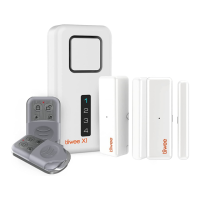
Instructions for unpacking all kit components and arranging them for installation.
Guide to removing the battery protection strip from the X1-siren to activate it.
Guides on using door sensors, motion detectors, and remote controls.
Instructions for physically mounting the X1-siren unit to a wall.
Procedure for switching the Tiiwee X1-siren unit on and off using the power button.
Steps to activate (arm) the Tiiwee alarm system using the siren or remote control.
Instructions for deactivating (disarming) the alarm system via the siren or remote control.
Procedure for pairing additional door sensors to the X1-siren system.
Steps for pairing PIR motion detectors with the Tiiwee alarm system.
Guide on how to connect up to 10 remote controls to the X1-siren.
Instructions for expanding the system with more X1 or A3 outdoor sirens.
Procedure to delete all sensors from a specific zone.
Steps to reconnect a door sensor to zone 1 after deletion or re-assignment.
Information on expected battery life and how to identify low battery status.
Detailed steps for replacing batteries in the remote control, X1-siren, door sensors, and PIR detectors.
Procedure to erase all paired sensors and remote controls from the X1-siren.
Key recommendations for optimal placement and alignment of door sensors and magnets.
Explanation of how door sensors detect magnetic field changes and signal the alarm unit.
Visual examples of door sensor mounting for various door and frame configurations.
Detailed instructions on mounting door sensors and magnets, with reference to alignment marks.
Instructions for installing the magnetic components of the door sensor.
Steps to verify the correct setup and operation of an installed door sensor.
Explanation of PIR sensor technology and basic activation.
Recommendations for optimal placement to avoid false alarms and interference.
Guidance on positioning PIR motion sensors for effective heat difference detection.
Steps to test the PIR sensor's detection range and signal transmission.
Explanation of what the PIR sensor's indicator light signifies.
Details on accessing and adjusting internal switches for sensor functions.
Guide to modifying switch settings for LED behavior, delay, and battery saving.
 General
| Number of Sensors | 4 |
|---|---|
| Control Panel | Yes |
| Mobile App Support | Yes |
| Wireless Frequency | 433MHz |
| Siren Volume | 120 dB |
| Connectivity | Wireless |
| Power Source | Battery |
| Battery Life | Up to 1 year |
| Range | 100 meters |
| Wireless Range | 100 m |
| Power Supply | Battery |
| Backup Battery | Yes |
| Arm/Disarm | Via remote control |
| Sensors Included | Motion sensor, door/window sensors |
| App Support | Yes |
| Installation | DIY |

 To Next Page
