1.REMARKS ON INSTALLING THE BATTERY
(1) HAND
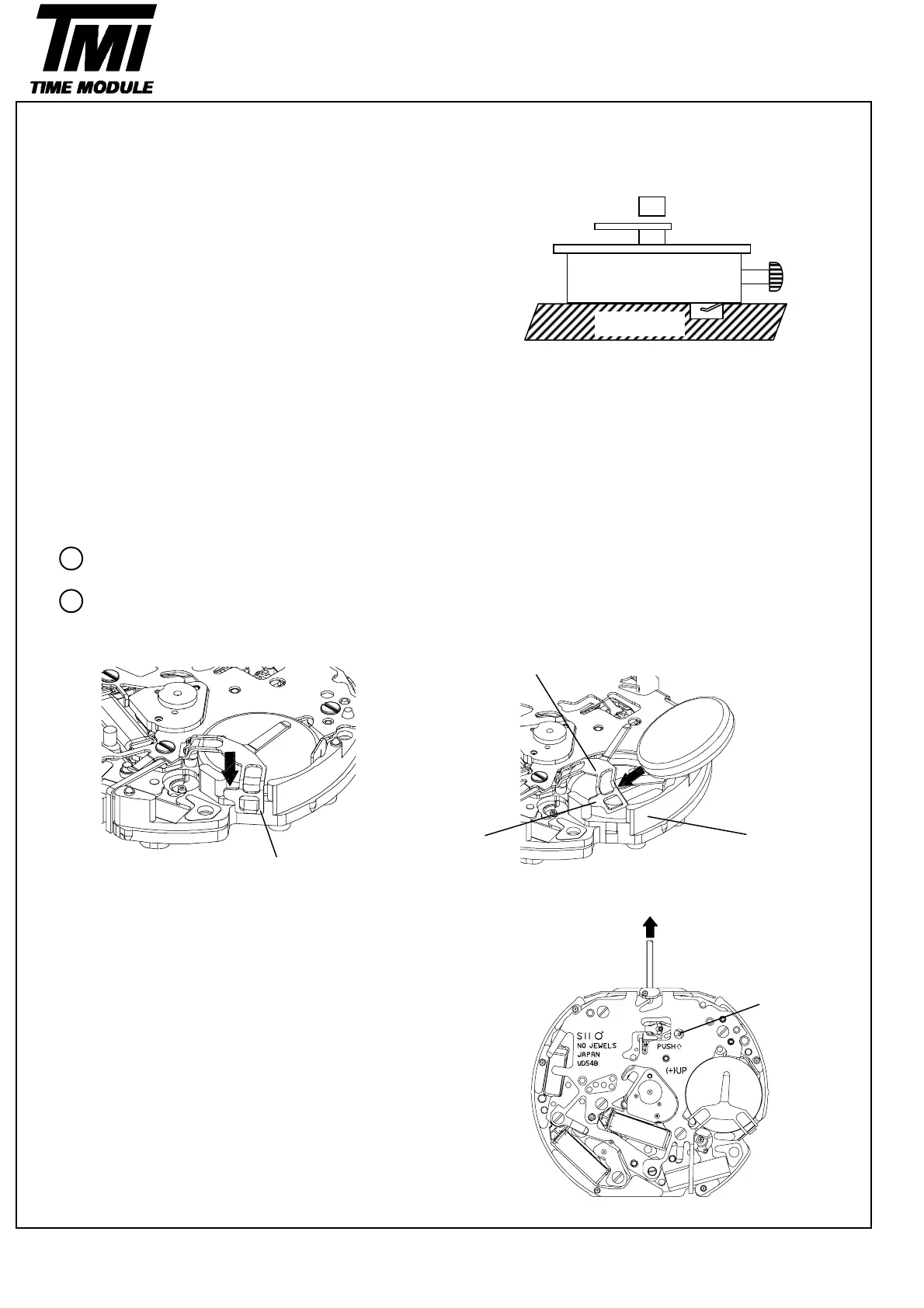
・How to install the hands
Place the movement directly on a flat metal plate or
the like and press in the hands.
* Install the hour , minute and second hands at the
"12"o'clock position.
* Install the chrono minute and second hands at the
"0"o'clock position.
*Install the 24-Hour indicator at the "24" position.
[ Reference ] The power of press hands
Minute & Hour Hands < 5kg
Second Hand < 5kg
Chrono Minute & Second < 3kg
24-Hour indicator < 3kg
(2) Battery
・How to install the batter
Remove the hook of the switch springs battery
clamp portion.
Insert the battery sideways, and have the hook of
the switch springs battery clamp portion catch
the main plate.
Battery clamp position
Hook Main plate
Hook
(3) Winding stem
・How to remove
While pushing the indented portion of the arrow pull out
the winding stem.
Push
2
6
SII Products
Version-03
D54B
TECHNICAL GUIDE
1
Metal plate



 To Next Page