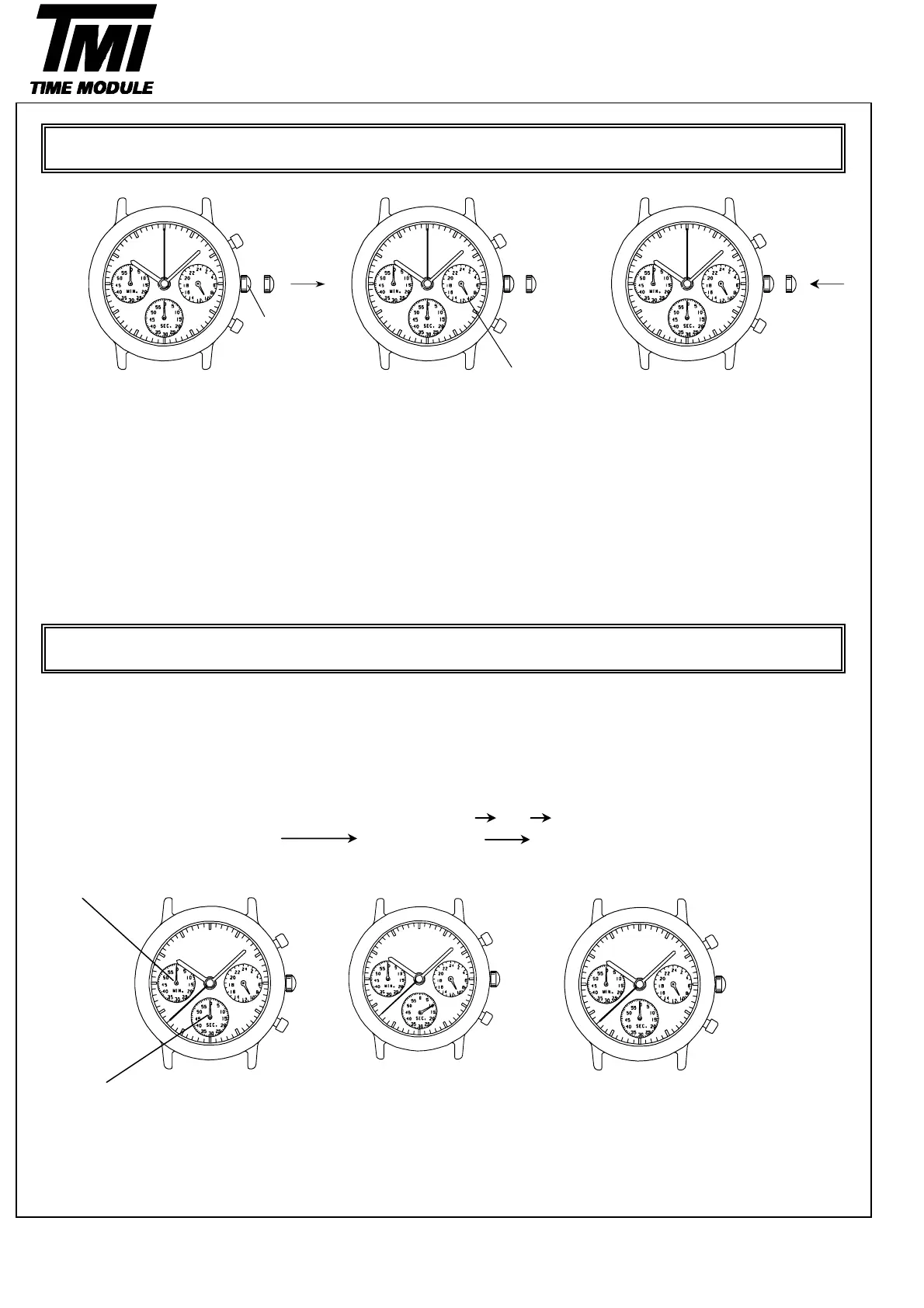
Crown
24-Hour hand
1.Pull out the crown to 2.Turn the crown to set the hour, 3.Push the crown back in to
the second hand is at minute and 24-hour hands to the the normal position in accordance
the 12 o'clock position. desired time. with a time signal.
The second hand will As the hour hand moves, the
stop on the spot. 24-hour hand also moves
correspondingly.
* Do not press any button. When setting the hour hand,
Otherwise, the chronograph check that the 24-hour hand
hands will move. is set property.
・The measured time is indicated by the stopwatch hands that move independently of the center and 24-hour hands.
・The stopwatch can measure up to 60 minutes in seconds.
(The watch indicates the measured time in second increments by ignoring off the 1/10 seconds obtained.)
(Standard measurement)
Ex) 100m race (Press the buttons in the following order
)
Stopwatch minute hand
stopwatch second hand
HOW TO USE THE STOPWATCH
AAB
Version-02
D54B
OPERATION
TIME SETTING
START STOP (Finish)
8
SII Products
10 second
RESET (Reset to "0'00")
A
A
B



 To Next Page