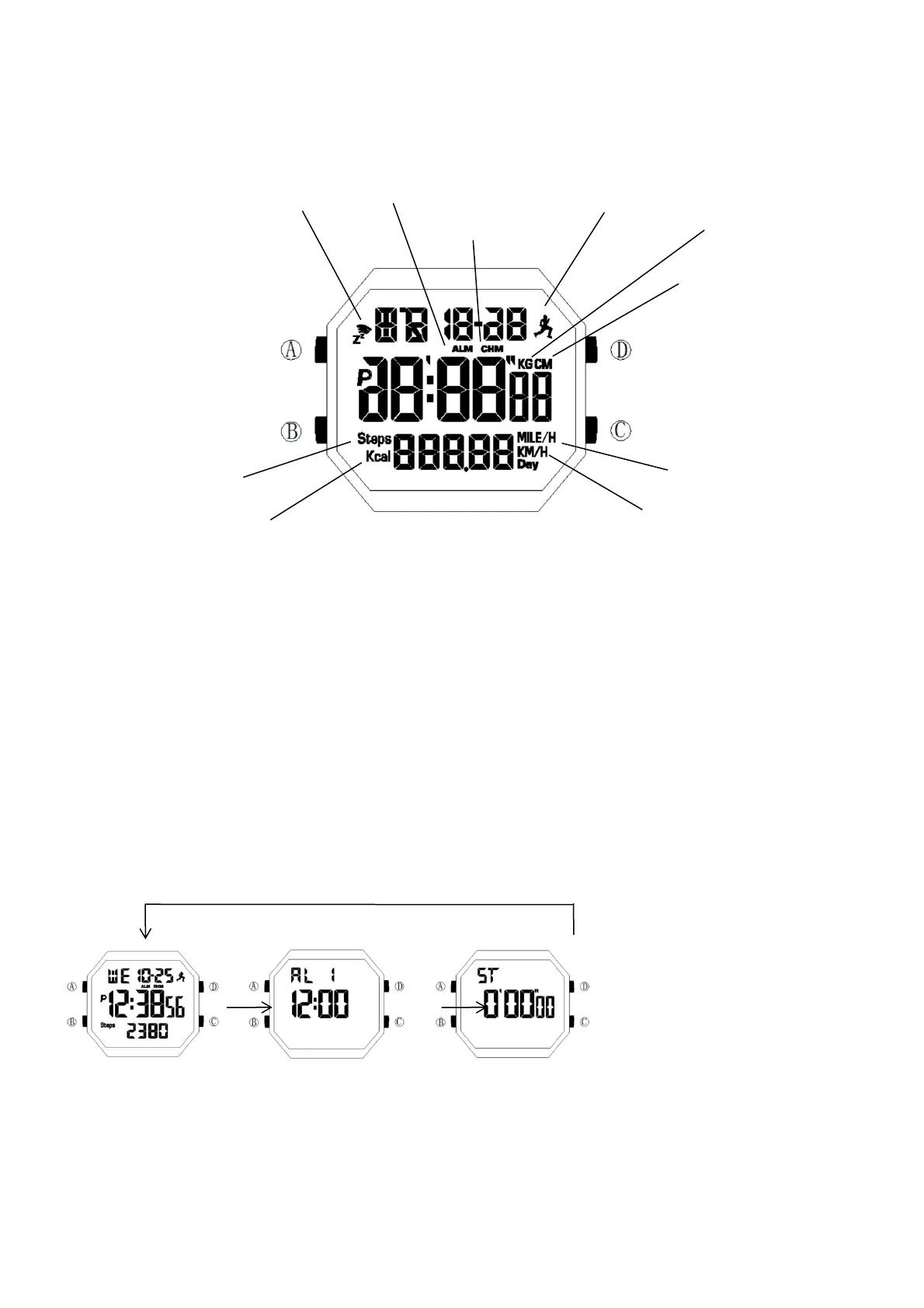
Distance in MILE or
Speed in MILE/hour Icon
Operating Instructions
Pusher A: Short press to turn on the backlight. Long press for about 3 seconds in some function modes to enter the
setting state of the function.
Pusher B: Switch between each basic function modes. In the setting state, press to select the value to be adjusted.
In Normal Time Mode, long press B Pusher for about 3 seconds to delete the current motion data.
Pusher C: In Normal Time Mode, long press for about 3 seconds to turn on or off the step counting.
Pusher D: In Stopwatch Mode, press to start or pause the running seconds. In the setting state, short press to adjust
the selected value upward; long press to fast adjust the selected value upward.
Function Modes
Normal Time Mode Alarm Mode Stopwatch Mode
1.Press Pusher B once to toggle between Normal Time Mode, Alarm Mode and Stopwatch Mode.
Step Counting Mode
1.In Normal Time Mode, long press C Pusher for 3 seconds to turn on or off Pedometer Icon. When Pedometer
Distance in KM or
Speed in KM/hour Icon


 To Next Page