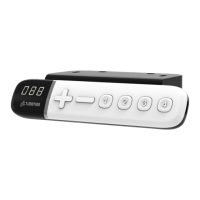
This document is a user manual for the TiMOTION TDH6 Hand Control, dated August 11, 2021 (Version 4). It provides instructions for programming and operating the TDH6 hand control, which is designed for adjustable desks.
The TDH6 hand control features a 3-digit height display, "Up" and "Down" buttons for height adjustment, and four "Memory" setting buttons (1, 2, 3, 4) along with an "M" button for saving positions.
Function Description:
The TiMOTION TDH6 hand control is primarily used to adjust the height of a desk and to store and recall preferred height positions. It also includes features for setting height limits, presetting the desk's starting height, switching between metric and imperial units, and restoring factory settings. The control box is equipped with error code displays to assist in troubleshooting and a power-saving function.
Usage Features:
- Adjusting the Height: Users can adjust the desk height by pressing and holding the "Up" or "Down" buttons until the desired height is reached.
- Reset Procedure: To reset the desk, users must simultaneously press and hold both the "Up" and "Down" buttons for 3 seconds. The buttons should be held until the desk reaches its lowest position, and the control box emits a "beep" sound. This reset is mandatory for first-time desk operation.
- Setting Memorized Positions: The TDH6 supports up to four memory positions. To save a position:
- Adjust the desk to the desired height.
- Press the "M" button for three seconds until the display flashes.
- Press one of the memory buttons (1, 2, 3, or 4) to save the current height to that position.
- To move the desk to a memorized position, press (and hold, depending on control box settings) the corresponding memory button (1, 2, 3, or 4).
- Setting Upper and Lower Height Limits:
- Setting an Upper Limit: Adjust the desk to the preferred upper height. Press and hold both "Up" and "Down" buttons for less than 3 seconds, then release the "Down" button while continuing to hold "Up". Re-press the "Up" button more than three times at a slow pace. A beeping sound confirms the setting.
- Disabling an Upper Limit: Move the desk to the set upper height limit. Repeat the setting instructions to disable it.
- Setting a Lower Limit: Adjust the desk to the preferred lower height. Press and hold both "Up" and "Down" buttons for less than 3 seconds, then release the "Up" button while continuing to hold "Down". Re-press the "Down" button more than three times at a slow pace. A beeping sound confirms the setting.
- Disabling a Lower Limit: Move the desk to the set lower height limit. Repeat the setting instructions to disable it.
- Note: Some control boxes may not support height limit functionality. Holding buttons for more than 3 seconds during this process will activate "Reset" mode.
- Presetting the Desk Starting Height:
- Press the "Down" button until the desk reaches its lowest position, then release it.
- Re-press the "Down" button for 5 seconds until the digital display flashes for 10 seconds.
- Adjust the starting height number using the "Up" or "Down" buttons.
- After 10 seconds, the display will stop flashing, confirming the new starting height.
- Switching Metric and Imperial Units:
- Press memory buttons 1, 2, and "M" simultaneously for 5 seconds. The display will show "C-I".
- To select metric (centimeters), press button 1. The display will show "C".
- To select imperial (inches), press button 2. The display will show "I".
- If no input is received within 5 seconds, the system reverts to normal operation.
- Power Saving Function - Waking Up the Control:
- The digital display automatically turns off if no buttons are pressed within 25 seconds. Pressing any button will light up the display.
- The system enters a low-power standby mode (<0.1W) if no buttons are pressed within 30 seconds. Long-pressing any button will wake the system and show the desk height. Note: 0.1W standby mode support depends on the control box.
Maintenance Features (Troubleshooting):
The TDH6 hand control displays error codes to help users identify and resolve issues. These codes are shown on the digital display:
- 000: Resetting
- E00: Not reset completely
- E01: Overuse protection
- E02: Unbalance protection
- E03: Anti-collision
- E04: T-touch Protection
- E11: M1 Motor over-current protection
- E12: M2 Motor over-current protection
- E13: M3 Motor over-current protection
- E21: No Hall sensor from M1
- E22: No Hall sensor from M2
- E23: No Hall sensor from M3
- E31: No current from M1
- E32: No current from M2
- E33: No current from M3
- Note: Some control boxes may not support the display of all error codes.
Restore Factory Setting:
After performing a reset (refer to Chapter 2), simultaneously press and hold both the "Up" and "Down" buttons for 15 seconds. The control box will emit two "beep" sounds, and the digital display will show "---". This action restores the following settings to their original factory defaults:
- Memorized positions
- Desk starting height
- Upper and lower height limits
- T-touch or TCS1 sensitivity
Important Disclaimer:
This user manual is specifically for generic TiMOTION products. Manufacturers may have customized product settings, causing them to differ from this manual. Users should contact the manufacturer for a revised manual if their product settings vary.

 Need help?
 General

 To Next Page