Management by WWW.
All functions Lan Controller v3 are available for conguration and viewing via the
website.
There are two types logon: as an administrator and user.
The administrator has access to all settings, the user only to the panel status, which
sees only what will make an administrator. In the following pages shows the settings
and congurations available after logging in as an administrator.
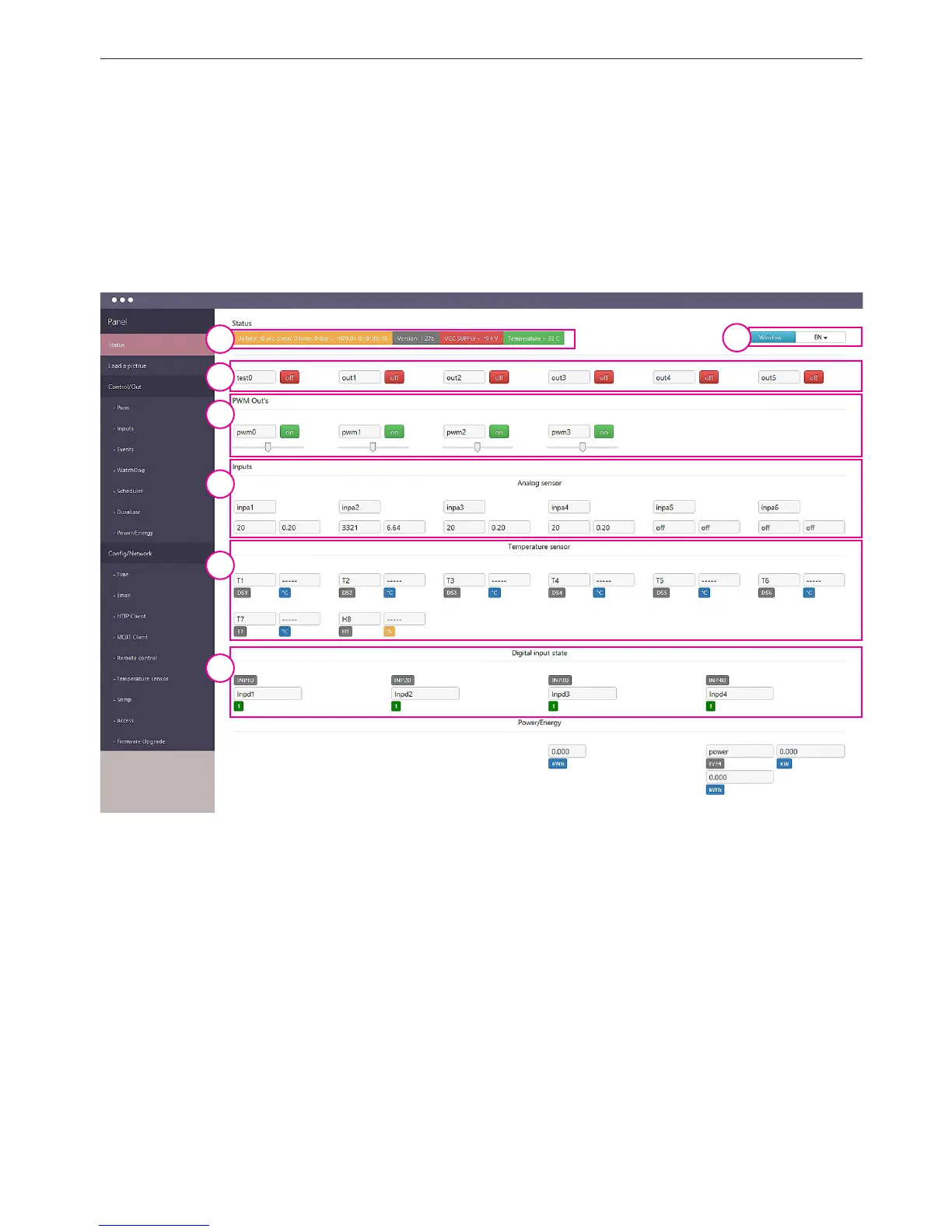
1. Status
Page that displays all the data collected from the Lan Controller indicating the name and
sensor readings, analog inputs and outputs, and logic.
From the position of administrator can in any way to remove these items, move, and add
scripts changing the displayed value (*)
Status page items
1. Information panel - displays:
- Time since last reboot: Uptime
- Date and time
- VCC supply voltage
- CPU temperature
2. Language and positions menu:
- ON/OFF - enadle / disable moving items
- SAVE - save the positions of elements
1
3
4
5
6
7
2


 To Next Page
 Loading...