Control / Events
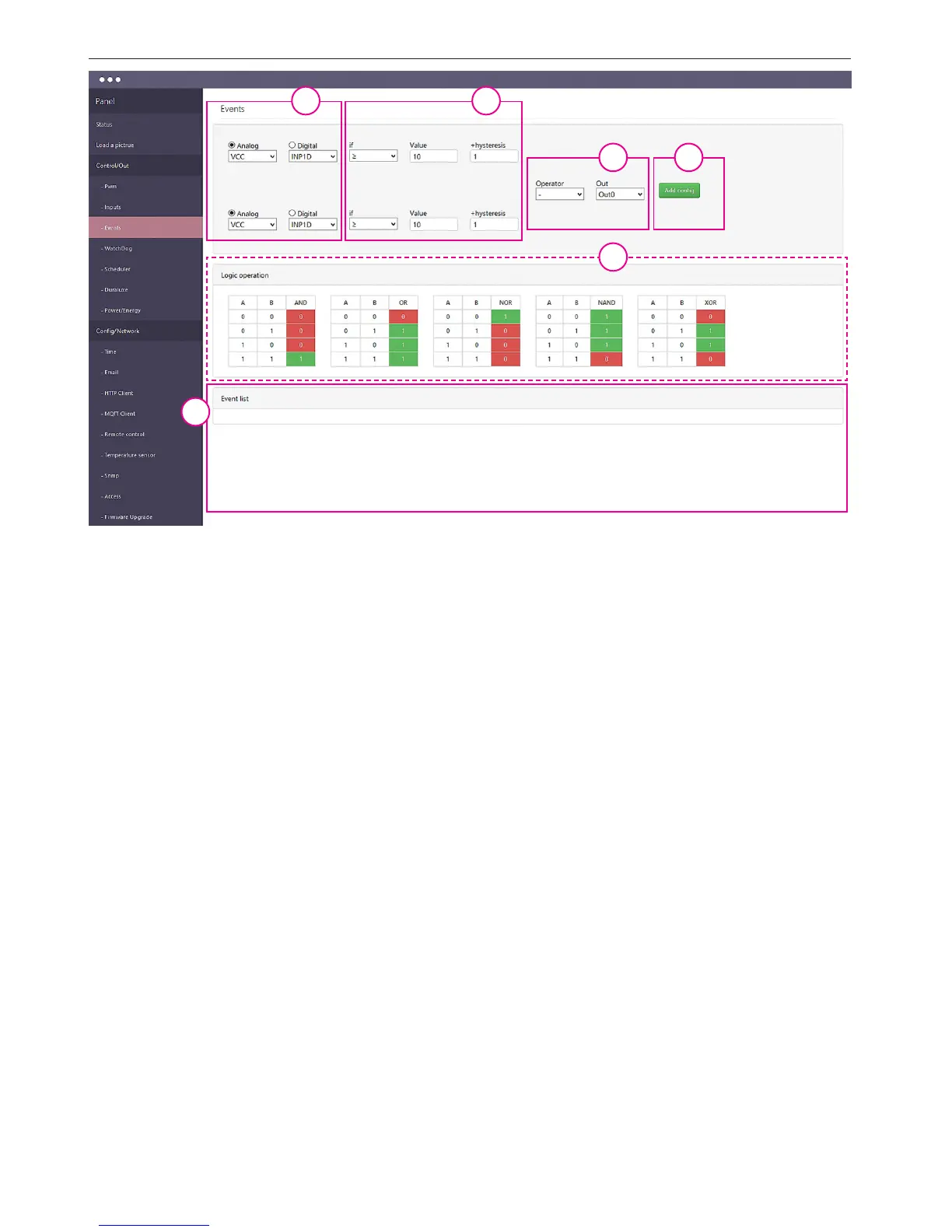
Events is a simple mechanism for the creation of Lan Controller machine performing pro-
grammed actions in the event of certain conditions, such as switching out1 when the tem-
perature exceeds the specied value, sending an e-mail when you change the logic state
etc. Innovation is the mechanism to connect using the logical operator of two conditions
the fulllment of which gives a predetermined reaction.
1. Setting condition: we can select the analog or digital. In the digital menu uses additional
virtual state EVNT types described in the Scheduler conguration.
2. In this eld we choose operator: ≥ or <, and enter the value and hysteresis.
3. Operator is used for the realization of two inputs depending on if you use only one left
to sign –. Below is an auxiliary operators action table.
4. SEt made incident to the conditions and press the button "Add cong".
5. In Event list eld it is shown input selection, the conditions and the fact that at the moment
they are met (at NO / YES). To activate events mark the checkbox On if you want the event
to be permanent (ie. Always performed after the occurrence of a condition, not just once)
- select the Per. Then please remember that we lose control, eg. On the dial - manual shut-
down if the condition does not occur. Removal of condition after pressing trash symbol.
1 2
3
3
4
5


 To Next Page
 Loading...