Control / Inputs
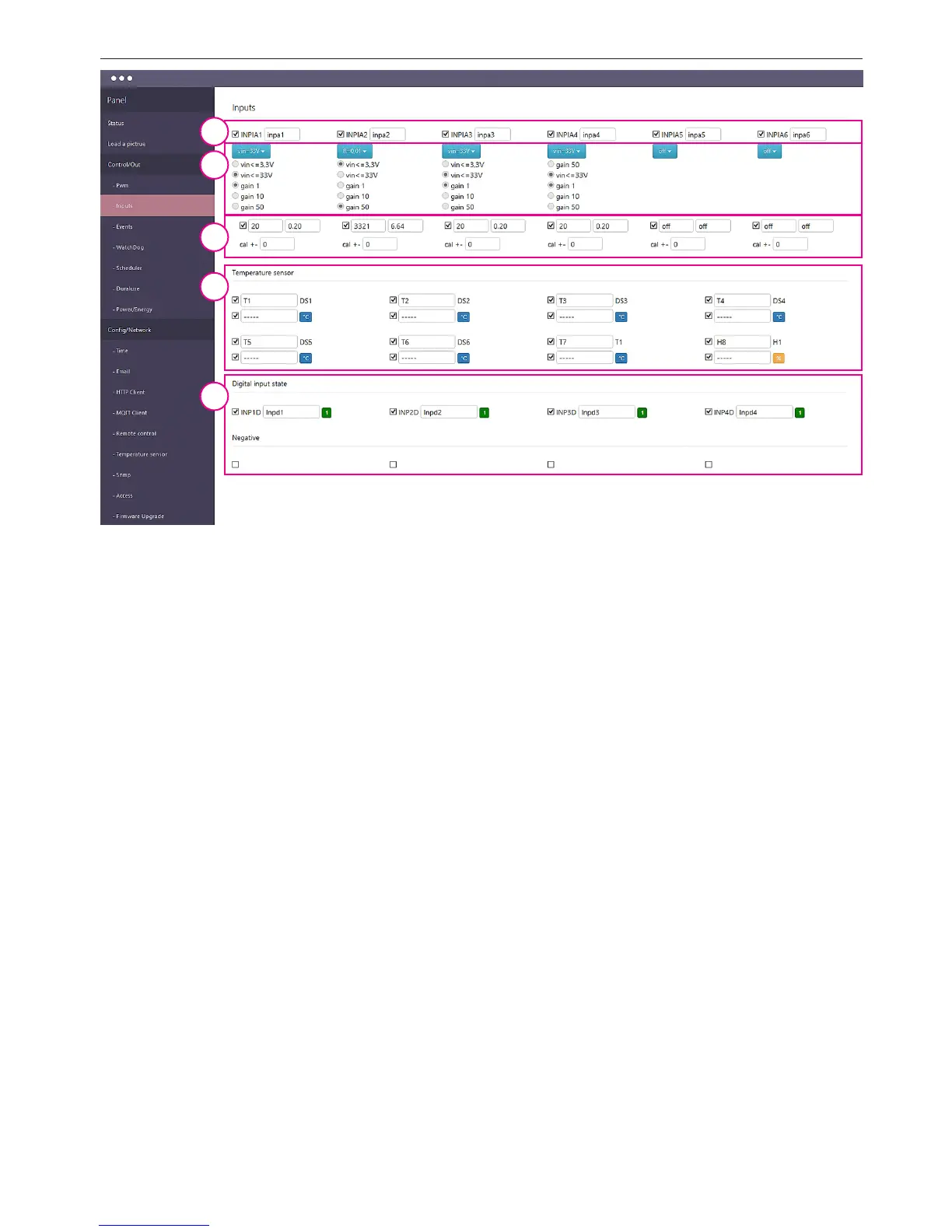
1. Input analog measurement inclusion panel and input name eld.
ATTENTION: when you save names are allowed ONLY characters: a ÷ z, A ÷ Z, 0 to 9, and "_"
(underscore) without nationality characters.
2. Selection functions menu for analog input or voltage range. After selecting the voltage
range can select a checkbox to strengthen the input. The range of useful measurements for
these reinforcements was given at the point of INPUT / OUTPUT instructions. If you select a
specic sensor for the analog input range and strengthening will set themselves.
3. Reading measurement inclusion panel - for display on the Status page. The eld can not
be displayed even when it is turned on, for example, to send readings to a remote server.
The panel also contains a eld calibration - a value that is added to or subtracted directly to
the measuring transducer and no conversion for the selected function. This makes it exac-
tly oset the impact, for example. Long cables on the measured value.
4. Temperature and humidity measurements panel - allows you to select the name eld
and the eld of temperature and humidity sensors for display on the Status page.
5. Visibility and the names logic inputs status panel. Below are checkboxes "Negative"
- if you want to change the logic of the logic input.
1
2
3
4
5


 To Next Page
 Loading...