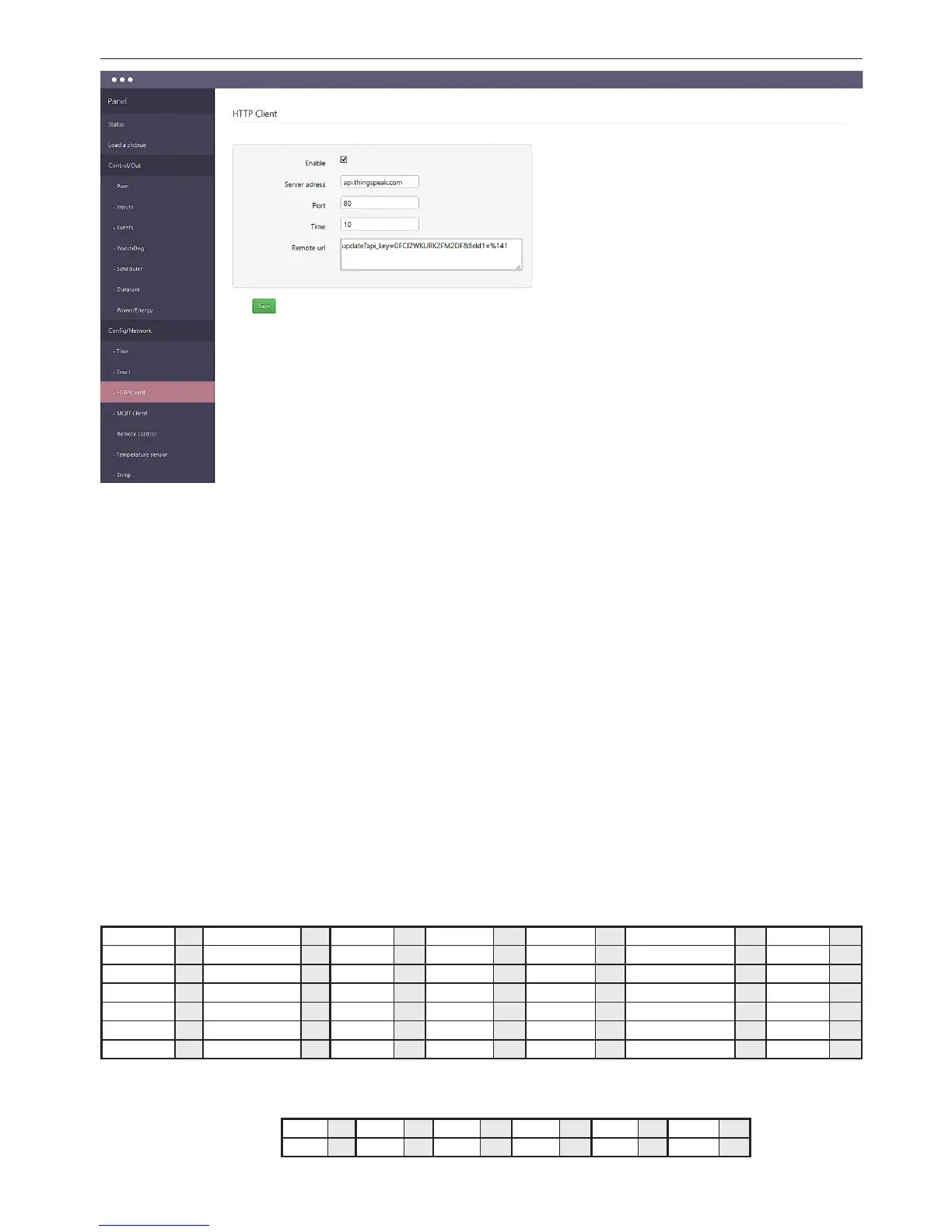
Cong / HTTP Client:
the client sends HTTP requests using
the GET to the specied server and
port at a specied time.
The way the "paste" the sensor looks
like this:
%xxy - where:
% – In this place will be inserted into the value of the selected sensor;
xx – the number of sensor, be a two-digit value (eg. 01, 05, 12);
y –
determines the divider value of the sensor and has a value from 0 to 3;
0 – do not divide values
1 – divide by 10
2 – divide by 100
3 – divide by 1000
The divider can better match the decimal place for a specic sensor, because the sensor va-
lues are returned in whole numbers, eg. Temperature 245, is 24.5, and thus for temperature
sensors DS, if we want to get ready for the result we need to set a divider by 10, that is, enter
a value of 1. eg. %161- returns sensor value DS1 divided by 10.
Examples http GET request to the server thingspeak, recording the value of the sensor
T1 to the server every 30 seconds:
update?api_key=H2PN0O35KRVRG6Q0&eld1=%141 – just type in the box "Remote url"
while the server is sent the following syntax:
update?api_key=H2PN0O35KRVRG6Q0&eld1=26.3 – here you can notice the substitu-
tion of the sensor to the indicated place.
Manually question from a Web browser without LK3 send as:
http://api.thingspeak.com/update?api_key=H2PN0O35KRVRG6Q0&eld1=26.3
query:
GET /update?api_key=H2PN0O35KRVRG6Q0&eld1=26.3 HTTP/1.0
Host: api.thingspeak.com
Connection: close
Sensors numbers:
INPA1 0 INPA1_RAW 7 T1 14 DS6 21 energy1 39 out3 46 inpd1 53
INPA2 1 INPA2_RAW 8 H1 15 DIFF1 22 energy2 40 out4 47 inpd2 54
INPA3 2 INPA3_RAW 9 DS1 16 DIFF2 23 energy3 41 out5/wy_tranz 48 inpd3 55
INPA4 3 INPA4_RAW 10 DS2 17 power1 35 energy4 42 pwm0 49 inpd4 56
INPA5 4 INPA5_RAW 11 DS3 18 power2 36 out0 43 pwm1 50
INPA6 5 INPA6_RAW 12 DS4 19 power3 37 out1 44 pwm2 51
VIN 6 TEMP 13 DS5 20 power4 38 out2 45 pwm3 52
The numbers of sensors only for inverters / inverters ongrid Duralux (eg. DS 1500-TL)
plugged into LK3.
DUX0 24 DUX2 26 DUX4 28 DUX6 30 DUX8 32 DUX10 34
DUX1 25 DUX3 27 DUX5 29 DUX7 31 DUX9 33


 To Next Page
 Loading...