2
1
service
jumper
pins
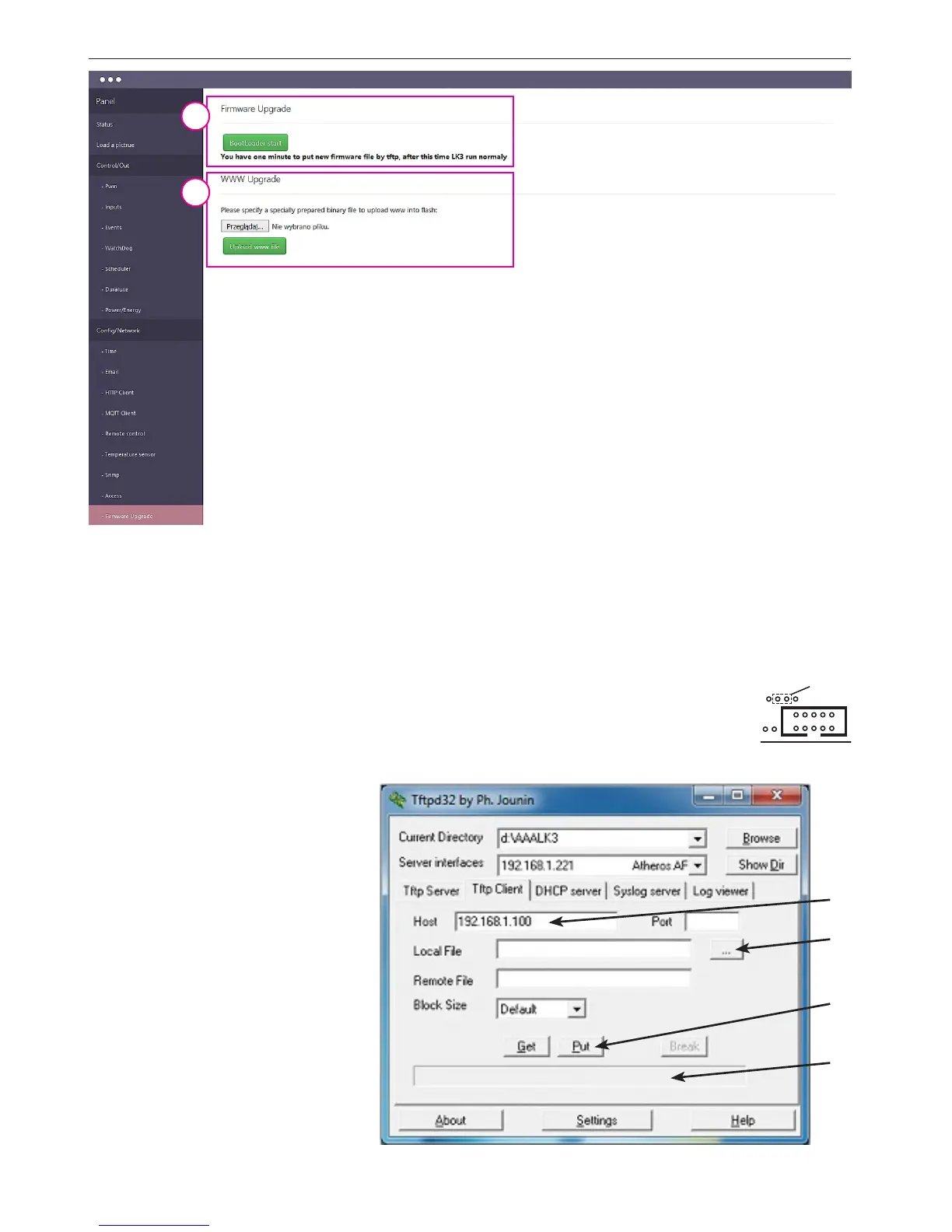
Cong / Firmware Upgrade
1. The "Bootloader start" is used to
switch the mode Lan Controller in
bootloader mode. In this mode, the
device is the TFTP server and waits for a
le sent to the TFTP client (eg. TFTPD32
program). When you press the button,
we have 1 min. to upload rmware.
2. WWW Upgrade - Lan Controller v3 is able to modify or even create a new
web interface. For this purpose use a www generator. (You can download it
from our website). If you build the interface from scratch, to communicate
with the device browser, use the command XML. (The full command set is
available in a separate document). After generating such a le with the exten-
sion .bin must be uploaded to the device. First, select the le to upload, and
then pressing the "Upload www le" followed by loading the le. After relo-
ading the browser window you should see the modied interface.
1
2
Lan Controller V3 software update
1. Download the new version of the firmware from the:
http://tinycontrol.pl/tinycontrol/lan3/instrukcja.php
2. Prepare any tftp client software (eg. tftp32) to send the downloaded file to Lan Controller being in „bootloader” mode. For this
purpose, in the Lan Controller menu „Firmware upgrade” select Bootloader Start and run the tftp client.
3. Watch progress of file loading and whether has successfully been updated. After restarting Lan Controller is ready for operation.
An alternative way of switching Lan Controller into „bootloader” mode (if we can not log in to the Lan Controller):
1. disconnect the power supply, 2. short pins „service jumper pins”, 3. connect the power supply - Lan Controller
starts in bootloader mode and will wait for the file.
Upgrade using the tftp32 or tftp64 programs (WINDOWS)
http://tftpd32.jounin.net/tftpd32_download.html
When the program starts, select computer
interface (Server interfaces) is connected to
Lan Controller and select service Tftp Client.
In the Host (1) enter the address of our Lan
Controller. Then, when Lan Controller is in bo-
otloader mode, by pressing button (2) next to
Local File, select the file to upgrade the firm-
ware (the .bin extension). Press button Put (3)
- after a moment should appear below the pro-
gress bar of the file upload (box 4). After the
message about successfully uploaded files can be
reset Lan Controller.


 To Next Page
 Loading...