Page 22 Ceramic Hob User Manual
Operation Instructions
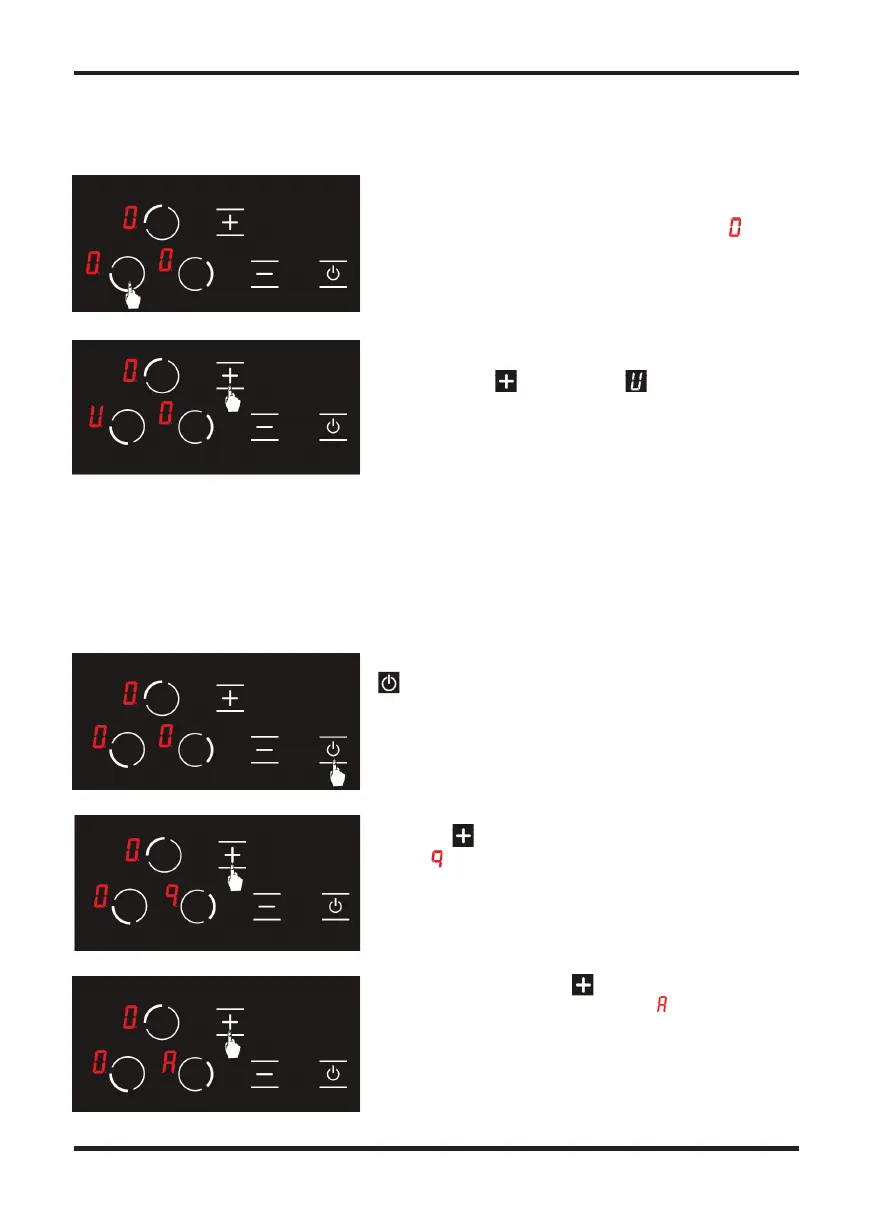
Press the relevant hob selection key once. The icon is
displayed when you touch for the rst time. (See Fig. 9)
Then, press the key once. The icon shall be
displayed in the relevant hob with this touch. (see Fig.
10) Thus, the keep warm shall be activated.
Figure 9
Figure 10
Press the relevant hob selection key once. The icon is
Then, press the key once. The icon shall be
Then, press the key once. The icon shall be
Using the key, set the cooking level of the relevant
hob as . . (See Fig. 12)
Then, when you press the key again once, auto
heating function is activated and the icon is displayed
on the screen. (See Fig. 13)
Turn the stove on by pressing the button. (See Fig. 11)
Auto heating function allows the stove to be operated at full power for a speci c period of time as
per the cooking level selected.
Figure 12
Figure 13
Figure 11
To activate the auto heating function
Auto Heating Function
Turn the stove on by pressing the button. (See Fig. 11)
Then, when you press the key again once, auto
Using the key, set the cooking level of the relevant
heating function is activated and the icon is displayed


 To Next Page
 Loading...