Page 23Ceramic Hob User Manual
Operation Instructions
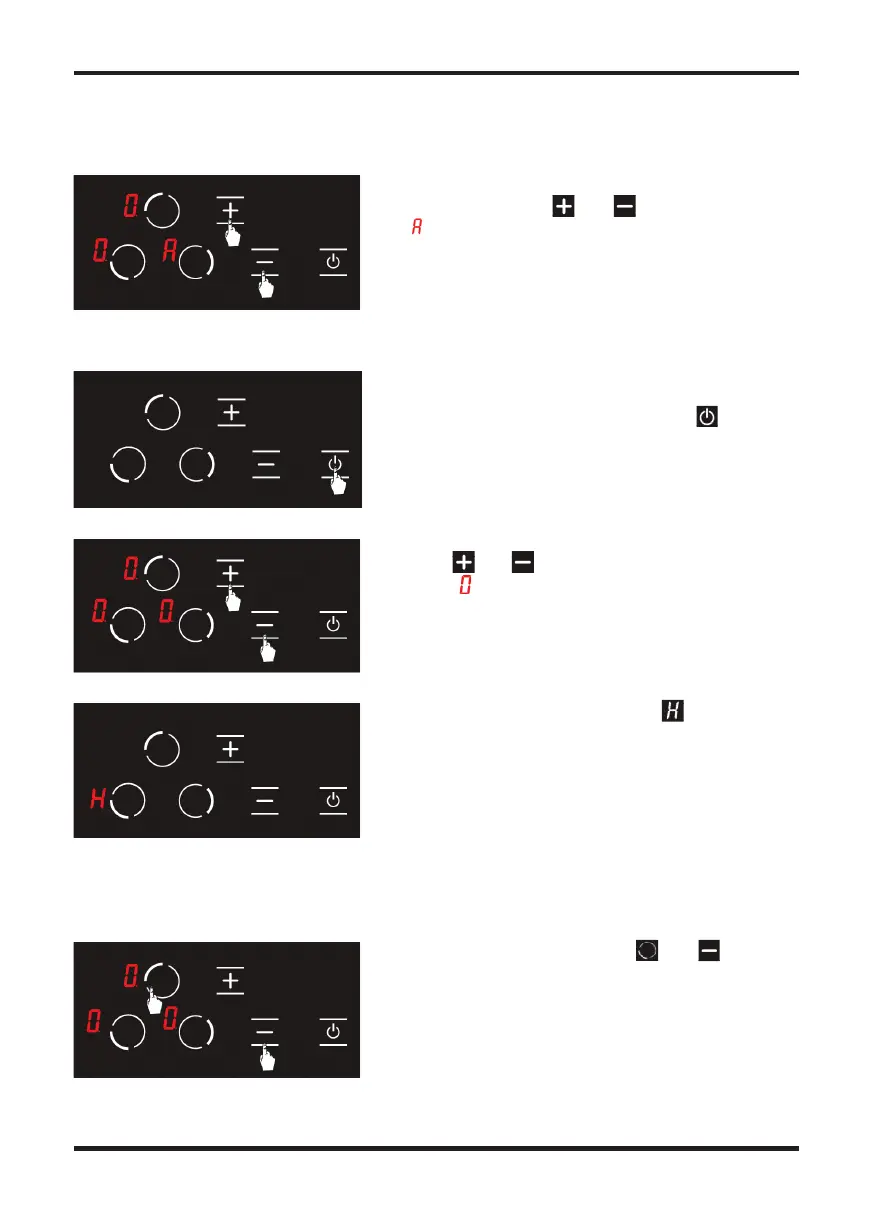
A er setting the auto heating, you may set the cooking
level desired using the and keys. (see Fig. 14)
The icon and the cooking level selected are displayed
alternatively on the screen.
You may turn the stove o by pressing the button.
(See Fig. 15)
Using the and keys, bring the temperature on
all hobs to . (see Fig. 16) Stove shall be turned o by
itself a er 20 seconds.
If any hob is still hot a er 20 seconds, symbol is
displayed until the temperature of the relevant hob
becomes lower than +60 °C. (see Fig. 17) No icon is
displayed a er the stove is turned o if the relevant hob
is not hot.
Press upper le hob selection key and minus
key simultaneously you shall hear a short warning
signal at this time. (see Fig. 18) Then, remove your
ngers from the stove control panel.
Figure 14
Figure 15
Figure 16
Figure 17
Figure 18
Turning the Stove Cooking Areas O
Turning the Stove Cooking Areas O
To activate the child lock;
Press upper le hob selection key and minus
Press upper le hob selection key and minus
The icon and the cooking level selected are displayed
A er setting the auto heating, you may set the cooking
level desired using the and keys. (see Fig. 14)
Using the and keys, bring the temperature on
A er setting the auto heating, you may set the cooking
level desired using the and keys. (see Fig. 14)
Using the and keys, bring the temperature on
You may turn the stove o by pressing the button.
all hobs to . (see Fig. 16) Stove shall be turned o by
If any hob is still hot a er 20 seconds, symbol is


 To Next Page