Page 24 Ceramic Hob User Manual
Operation Instructions
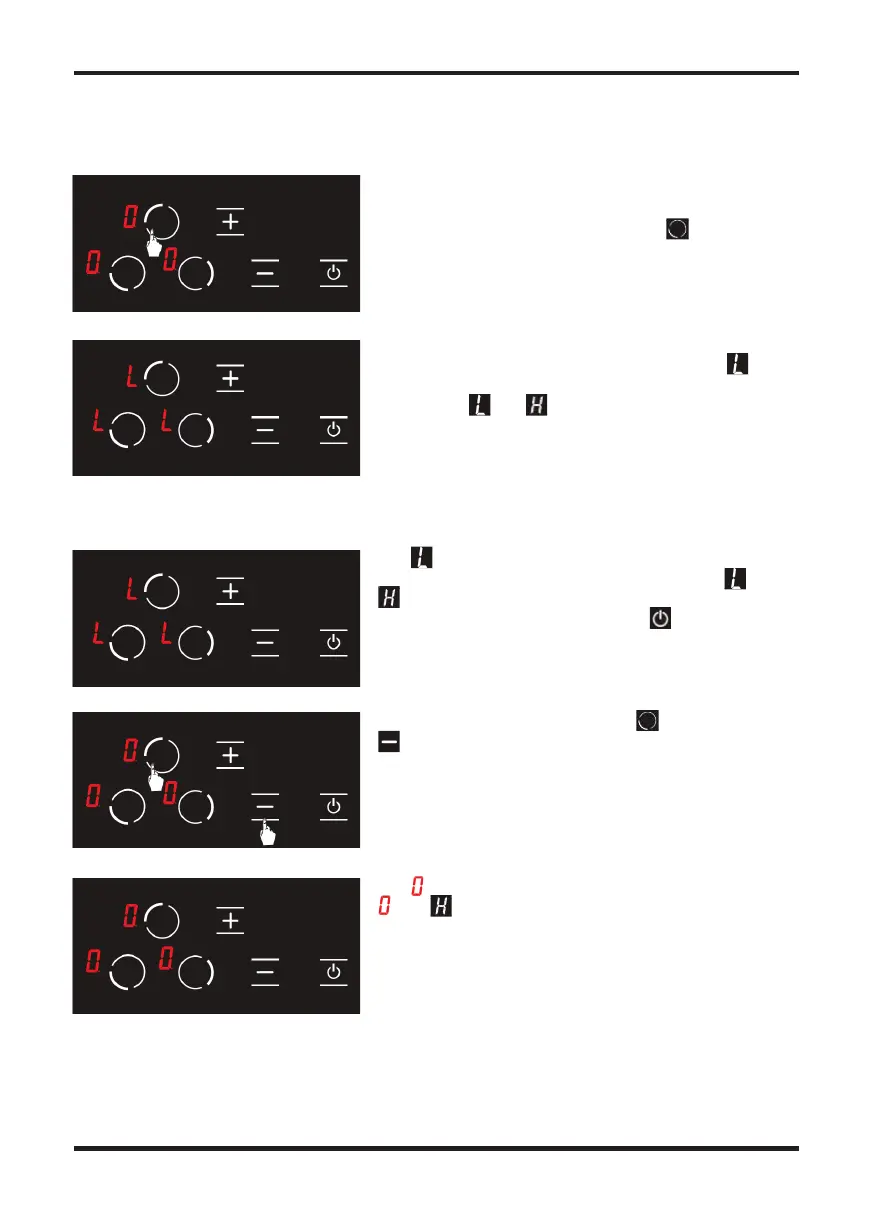
Press the upper le hob selection key again. (See
Fig. 19)
The child lock is activated at this time and the icon
is displayed on all hobs to indicate this condition. (see
Fig. 20) The and icons are displayed alternatively
if any hob is hot.
Figure 19
Figure 20
Press upper le hob selection key and minus key
simultaneously. (see Fig. 22) You shall hear a short
warning signal at this time. Then, remove your ngers
from the stove control panel.
The icon is displayed on all displays. (see Fig. 23) The
and icons are displayed alternatively if any hob
is hot.
The icon is displayed on all displays when the stove is
on and the child lock is active. (see Fig. 21) The and
icons are displayed alternatively if any hob is hot. You
may turn the stove on or o with the key only.
WARNING // Child lock is deactivated until the stove is turned o only with the steps performed in
this section. In other words, child lock shall be activated again if the unit is turned o and on again.
Thus, the child lock shall be activated whenever the stove is turned o and on.
Figure 22
Figure 23
Figure 21
To deactivate the child lock until the stove is turned o ;
The icon is displayed on all displays. (see Fig. 23) The
The icon is displayed on all displays. (see Fig. 23) The
and icons are displayed alternatively if any hob
icons are displayed alternatively if any hob is hot. You
may turn the stove on or o with the key only.
on and the child lock is active. (see Fig. 21) The and
icons are displayed alternatively if any hob is hot. You
is displayed on all hobs to indicate this condition. (see
Fig. 20) The and icons are displayed alternatively
The icon is displayed on all displays. (see Fig. 23) The
and icons are displayed alternatively if any hob
The child lock is activated at this time and the icon
on and the child lock is active. (see Fig. 21) The and
The icon is displayed on all displays when the stove is
is displayed on all hobs to indicate this condition. (see
Fig. 20) The and icons are displayed alternatively
simultaneously. (see Fig. 22) You shall hear a short
Press the upper le hob selection key again. (See
Press upper le hob selection key and minus key


 To Next Page