Need help?
Do you have a question about the Titan Controls Apollo 7 and is the answer not in the manual?
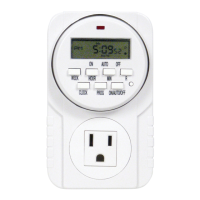
Press 'CLOCK' and 'HOUR' simultaneously to set the current hour.
Press 'CLOCK' and 'MINUTE' simultaneously to set the current minute.
Press 'CLOCK' and 'WEEK' simultaneously to set the current day of the week.
Press 'PROG' to enter programming mode, displaying '1 ON'.
Use 'HOUR', 'MIN', & 'WEEK' to set the hour, minute, and day for equipment activation.
Press 'PROG' again to set the off time, displaying '1 OFF', then repeat ON time setup.
Press 'PROG' to enter the next program ('2 ON', etc.) and repeat setup steps.
Press 'R' to cancel the current time setting; press 'R' again to resume.
Press 'WEEK' to enter daily on/off programming mode.
Press 'WEEK' repeatedly to cycle through day combinations for programming.
Press 'ON/AUTO/OFF' to cycle through modes: ON, AUTO, or OFF.
Select 'ON' for the timer to remain on continuously.
Select 'AUTO' for the timer to operate based on programmed times.
Select 'OFF' for the timer to remain off continuously.
 General
| Brand | Titan Controls |
|---|---|
| Model | Apollo 7 |
| Category | Timer |
| Language | English |

 To Next Page