7/21
5
IN ORDER FOR THE CONVEYOR TO BE STABLE, THE SUPPORTS MUST BE LAGGED
TO THE FLOOR OR SUPPORT STRUCTURE.
THIS IS THE CUSTOMER RESPONSIBILITY!!
FRAME ASSEMBLY
1. To start, along side the area where the conveyor is to be installed, layout the frame sections in their proper position
according to the ordered description or refer to your copy of the approval drawing.
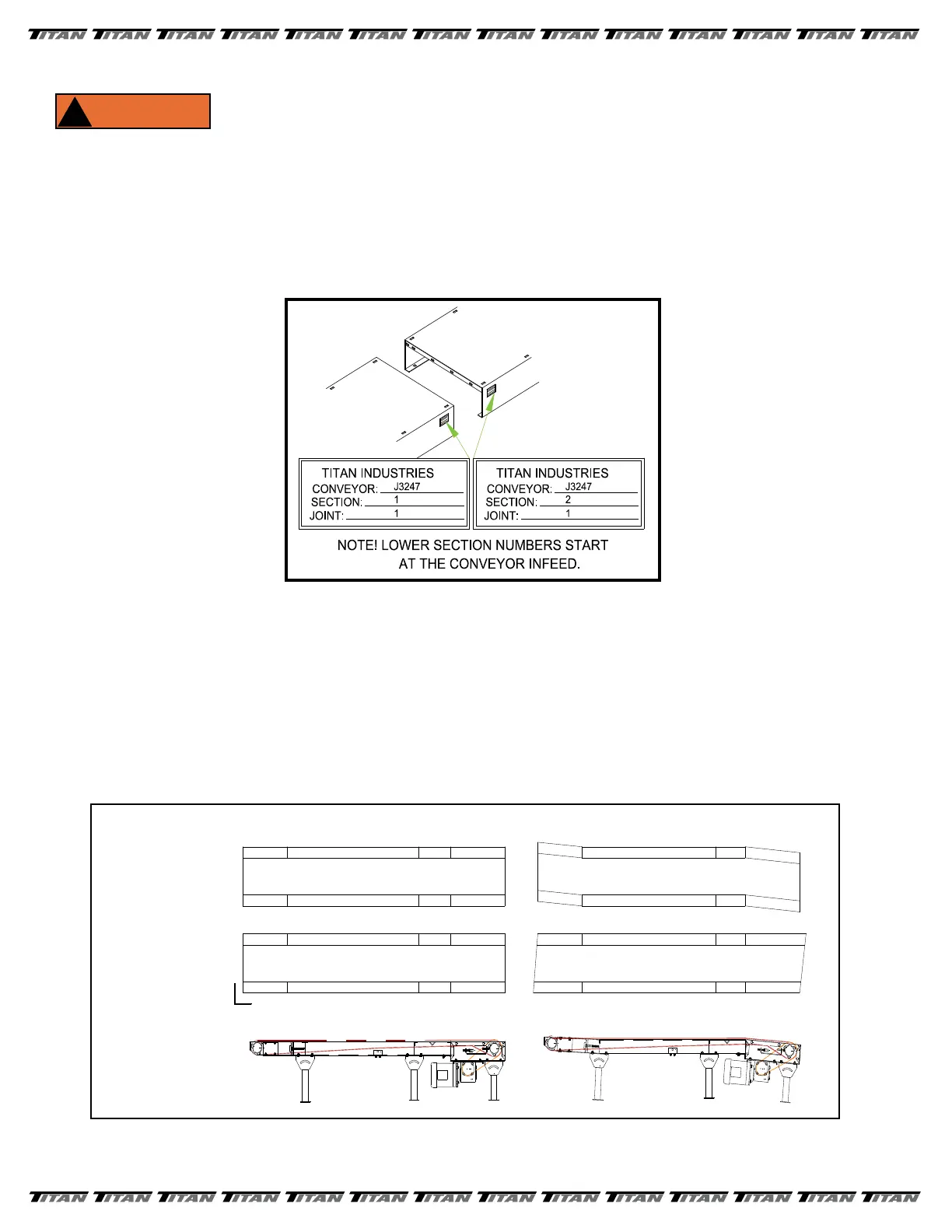
NOTE: If several sections of frame are to be joined in a particular sequence, they will be factory
matched marked. See FIGURE 2.
2. Layout a line on the oor to represent the centerline of the conveyor. As frame sections are bolted together make
sure the frame remains centered on the line.
3. Generally, if there are short sections (1’, 2’ or 4’), position them adjacent to the drive section.
4. If a center take-up or center drive and take-up section has been provided, position the section as close to the
center of the conveyor as possible.
5. Bolt together conveyor frames nger tight. Square frames and make sure all frames line up with adjacent section
before securing all bolts. See FIGURE 3.
FIGURE 2
FIGURE 3
STRAIGHT
SQUARE
LEVEL
X
X
X
YES
NO
90°


 To Next Page
 Loading...