
 Need help?
Do you have a question about the Titan MG Series and is the answer not in the manual?
Safety guidelines for equipment protection, covering handling, storage, and operating temperatures.
Safety instructions to prevent personal injury, including child safety, eye protection, and hazardous environments.
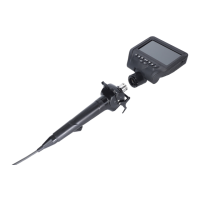
Lists all included accessories and components such as the carry case, monitor, probe, and cables.
Details the various buttons, ports, and connectors on the monitor unit for operation and connectivity.
Identifies key parts of the probe unit like connector, control stick, hook, and insertion tube.
Step-by-step instructions for securely connecting the monitor and probe units.
Explains the dual function of the hook for hanging and stabilizing the control stick.
Guides on charging the device and preparing it for first-time use.
Configuring light frequency, power saving, text, date, and time settings.
Selecting language, formatting the SD card, and resetting device settings.
Adjusting movie size, quality, seamless recording, date stamp, and audio settings.
Enables image mirroring and flipping for different viewing perspectives.
Controls for zooming, freezing images, adjusting light intensity, and image brightness.
Displays an icon indicating the camera's orientation relative to gravity.
Instructions on how to capture still images and record video clips.
Navigating and playing back recorded pictures and videos.
Options to protect files from deletion or delete individual or all files.
Guidelines for cleaning the insertion tube, distal end, and the main unit body.
Recommendations for storing the instrument under suitable environmental conditions.
Answers to common questions regarding device operation and potential issues.
Details on LCD panel, power source, effective pixels, depth of view, and weight.
Specifies recommended operating temperatures, humidity, and water resistance.

 To Next Page
 General