Need help?
Do you have a question about the Tivdio HR-11S and is the answer not in the manual?
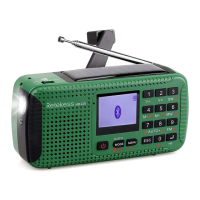
Identifies the numbered physical controls on the HR-11S unit.
Describes the operational functions of specific buttons on the HR-11S.
Explains short press, long press, and hold on operations for keys.
Details the key lock function to prevent accidental button presses.
Instructions for correctly installing the lithium battery into the radio.
Procedures for charging the battery via external adapter or PC.
How to charge the battery using the hand crank.
How to select between FM, MW, and SW radio bands.
Steps to record radio broadcasts onto a TF card.
Instructions for starting, pausing, and ending radio recordings.
How to record audio using the built-in microphone.
Instructions for connecting the radio to a Bluetooth device.
How to activate or deactivate the alarm function.
Procedure to set the specific hour and minute for the alarm.
Choosing how often the alarm should repeat (Once, Daily, Multi-day).
Selecting the sound or action for the alarm.
Procedure to reset the radio to its original factory defaults.
Steps for downloading and applying firmware updates.
Guidelines for protecting the radio from damage and environmental factors.
Safety guidelines for using the lithium battery under normal conditions.
Instructions for safe handling, storage, and avoiding damage to the battery.
Information on proper battery disposal and avoiding overheating.
Troubleshooting steps for when the radio does not power on.
Instructions on performing a factory reset on the radio.
 Memory
| micro-SD card support | 64M-32G |
|---|---|
| music format support | MP3 WMA WAV |
| access rate MP3 | 16-320Kbps |
| access rate WMA | 8-384Kbps |
 Frequency Range
| FM frequency range | 87.0-108MHz |
|---|---|
| MW frequency range | 522-1710KHz |
| SW frequency range | 3.0 -23.0MHz |
 Power
Power| max. output (Speaker) | About 600mW |
|---|---|
| max. current consumption | About 300mA |
| power source | Lithium battery 3.7V, External adapter 5V 500mA |
Battery and Charging| lithium battery consumption (MP3) | About 5H |
|---|---|
| lithium battery consumption (Radio) | About 5H |
| charging time | 4-6 hours |
Output and Ports| earphone output | ≤10mW*2 |
|---|---|
| communication standard | USB2.0(high speed) |
| earphone port diameter | D3.5mm |
Physical Dimensions| unit size | Approx.126 x 43 x 62mm |
|---|---|
| speaker diameter | D40mm |

 To Next Page