18
EOX ELEVATOR OWNER’S GUIDE
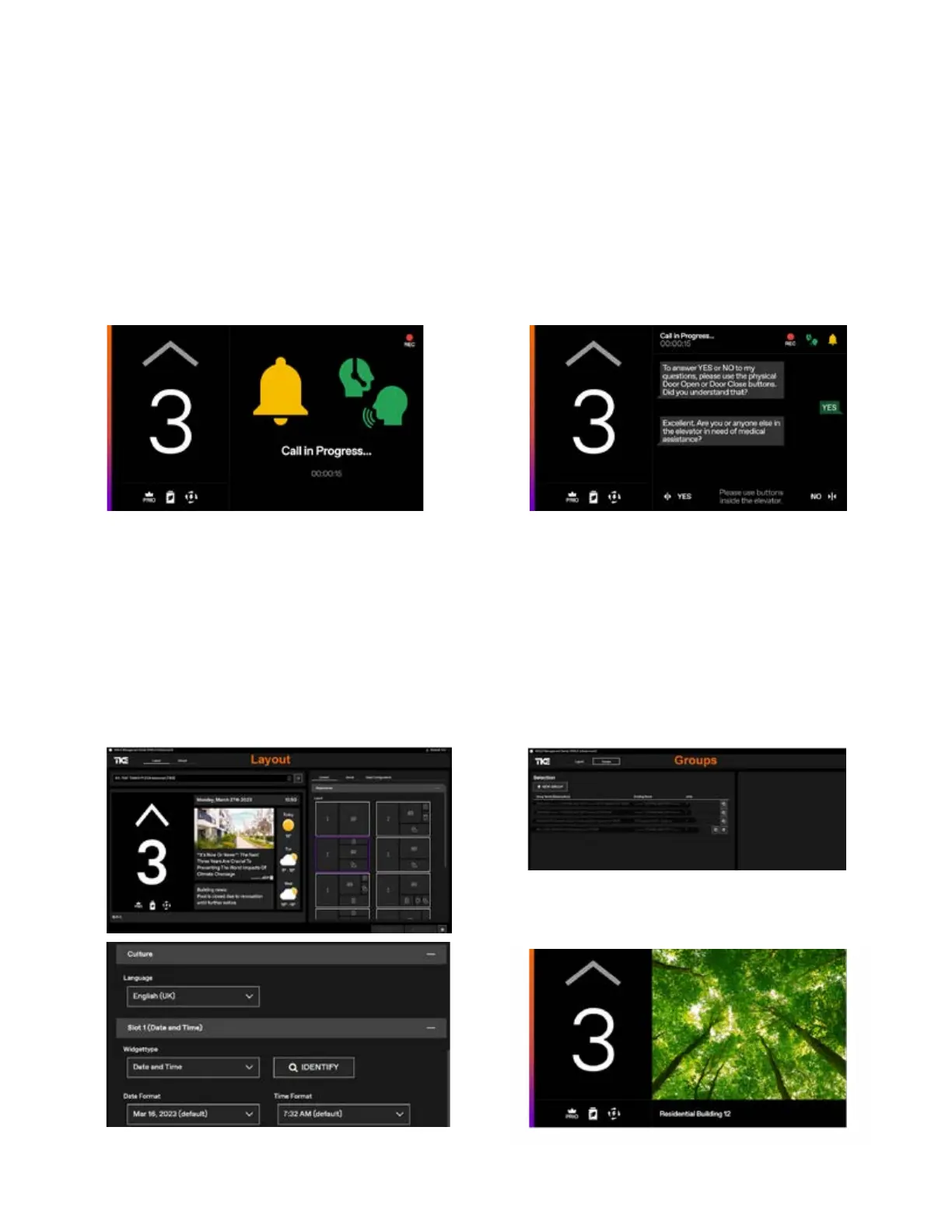
One display can provide a variety uses. Typically, the display can function as a news and information screen with a
subscription, but it also can serve as a message board for elevator and special mode status, emergency operations
and emergency communications with VoIP and two-way chat to be ASME A17.1/CSA B44 code compliant.
When the elevator help button is activated, the display works jointly with the ADA elevator telephone. The right side
of the screen displays message prompts for emergency communications and guides passengers through messages.
In an emergency or stalled elevator, a hearing- or speech-impaired passenger can reply to the emergency responder,
using the yes/no pushbuttons (DOOR OPEN and DOOR CLOSE) in the text messsages. The responder receiving the
call can also access secure live video from inside the car to help to quickly assess and address the situation.
Infotainment area of the screen can be easily customized using the AGILE management center, which allows the
building management the convenience of remotely updating the content in real time.
Even if you don't have a maintenance contract or Infotainment Plus subscription with TK Elevator, your display will
show a standard layout with a beautiful image.
Audible call when Help button is pressed.
Text communications
Setup screens for real-time changes
Standard layout without TK elevator
maintenance contract or Infotainment
Plus Subscription



 To Next Page