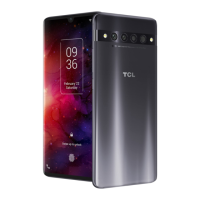
This document serves as a Quick Start Guide and user manual for the TCL 403 mobile device, providing essential information on its functions, technical specifications, usage, and maintenance.
Function Description
The TCL 403 is a mobile phone designed for general communication and multimedia use. It features a 6-inch display and supports various network technologies for connectivity. Key functions include making and receiving calls, sending messages, capturing photos and videos with its integrated camera, and listening to audio via headphones. The device is equipped with a power button, volume controls, and a headphone jack. It supports both single and dual SIM configurations, along with expandable storage via a microSD card. The device operates on an Android-based operating system, which is subject to software updates to enhance performance and security.
Important Technical Specifications
- Display: 6-inch screen.
- Connectivity:
- Bluetooth: Bluetooth SIG, Inc. licensed and certificated (Declaration ID D059652).
- Wi-Fi: Wi-Fi Alliance certified (802.11 b/g/n 2.4GHz band).
- Cellular Networks:
- GSM 900MHz, GSM 1800MHz.
- UMTS B1 (2100MHz), UMTS B8 (900MHz).
- LTE FDD B1/3/7/28 (2100/1800/2600/700MHz), LTE FDD B8 (900MHz), LTE FDD B20 (800MHz).
- SAR (Specific Absorption Rate) Information:
- Head SAR: LTE Band 20 + Wi-Fi 2.4GHz – 1.33 W/kg.
- Body-worn SAR (5 mm): GSM 1800MHz + Wi-Fi 2.4GHz – 1.46 W/kg.
- Limb SAR (0 mm): LTE Band 1 + Wi-Fi 2.4GHz – 3.29 W/kg.
- Compliance with RF exposure requirements is maintained by using an approved accessory or keeping a 5 mm distance from the body.
- Radio-frequency Power (Maximum):
- GSM 900MHz: 34.0 dBm.
- GSM 1800MHz: 31.0 dBm.
- UMTS B1 (2100MHz): 24.5 dBm.
- UMTS B8 (900MHz): 24.0 dBm.
- LTE FDD B1/3/7/28: 24.5 dBm.
- LTE FDD B8: 24.0 dBm.
- LTE FDD B20: 25.0 dBm.
- Bluetooth 2.4GHz band: 4.14 dBm.
- Bluetooth LE 2.4GHz band: 1.16 dBm.
- 802.11 b/g/n 2.4GHz band: 17.42 dBm.
- Charger Specifications (for 5V1A Charger Model: UC11/UC21EU):
- Input Voltage: 100~240V.
- Input AC Frequency: 50/60Hz.
- Output Voltage: 5.0V.
- Output Current: 1.0A.
- Output Power: 5.0W.
- Average active efficiency: 73.7%.
- No-load power consumption: 0.1W.
- Operating Temperature Range: 0°C (32°F) to 40°C (104°F) for the device and charger.
Usage Features
- SIM Card Installation: The device supports either one or two SIM cards, along with a separate slot for a microSD card for expanded storage. Instructions for inserting SIM and SD cards are provided with clear illustrations.
- Controls: The device features a power button, volume up, and volume down buttons for easy operation. A headphone jack is also present for audio output.
- Safety Guidelines:
- Driving Safety: Do not use the device while driving if it compromises safety or is illegal.
- Restricted Areas: Comply with restrictions in hospitals, planes, gas stations, and schools. Switch off the device in aircraft, healthcare facilities (unless designated areas), and near flammable liquids or gases.
- Blasting Areas: Turn off the device in blasting areas or where "two-way radios" or "electronic devices" are prohibited.
- Medical Devices: Maintain a minimum distance of 15 cm from medical devices like pacemakers, hearing aids, or insulin pumps when the device is on.
- Children: Do not allow children to use or play with the device and accessories unsupervised.
- Radio Wave Exposure Reduction: Use the device in good signal reception conditions, use a hands-free kit, limit call frequency and duration (especially for children and adolescents), and keep the device away from the belly of pregnant women and the lower abdomen of adolescents.
- Hearing Protection: Avoid listening at high volume levels for long periods to prevent hearing damage. Exercise caution when the loudspeaker is in use near the ear.
- Environmental Conditions: Avoid exposing the device to moisture, humidity, rain, liquids, dust, or sea air.
- Software Updates: The device supports automatic software updates, which require user approval for installation. These updates are crucial for performance and security. Connection costs for updates may vary based on the user's telecommunications plan.
- Electronic Labelling: Access regulatory and safety information by navigating to Settings > Regulatory & safety or by dialing *#07#.
- User Manual Access: A full user manual can be downloaded from tcl.com. Support and FAQ sections are also available on the website.
Maintenance Features
- Battery Care:
- The battery is not fully charged upon purchase and should be charged first.
- Do not attempt to open, eject, or replace non-removable batteries.
- Do not puncture, disassemble, or short-circuit the battery.
- For unibody devices, do not attempt to open or puncture the back cover.
- Avoid burning or disposing of used batteries/devices in household rubbish.
- Do not store the battery at temperatures above 60°C (140°F) or subject it to extremely low air pressure, as this can lead to explosion, leakage of flammable liquid or gas.
- Only use the battery for its designed purpose and never use damaged batteries.
- Caution: Risk of explosion if the battery is replaced by an incorrect type. Dispose of used batteries according to instructions.
- Avoid keeping the device connected to the charger with a fully charged battery for extended periods, as this can cause overheating and shorten battery life.
- Do not sleep with the device on your person or in your bed, or place it under a blanket, pillow, or your body, especially when connected to the charger, to prevent overheating.
- Charger Maintenance: Use only chargers compatible with the device model. Mains powered chargers operate within 0°C (32°F) to 40°C (104°F). Chargers are compliant with safety standards for IT equipment and ecodesign directives.
- Device Condition: Do not use a damaged device (e.g., cracked display, dented back cover) to prevent injury or harm.
- Waste Disposal and Recycling: The device, battery, and accessories must be disposed of according to local environmental regulations. The "crossed-out wheeled bin" symbol indicates that these products should not be disposed of with general household waste but taken to municipal waste disposal centers, collection bins at points of sale, or other designated recycling facilities. This ensures proper recycling and prevents environmental pollution. In EU countries, these collection points are free of charge.
- Warranty: The device comes with a limited warranty. In case of a defect preventing normal use, the user must inform the vendor immediately and present proof of purchase. The warranty terms are available on tcl.com.
- Privacy: Any personal data shared with TCL Communication Ltd. is handled in accordance with their Privacy Notice, which can be reviewed on their website.

 Need help?
 General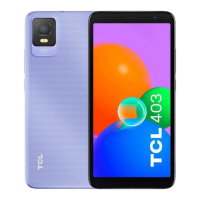

 To Next Page