EasyManua.ls Logo

TLV Pocket TrapMan PT1 - User Manual

TLV Pocket TrapMan PT1
31 pages
Print Icon
To Next Page IconTo Next Page
Loading...
172-65411MA-05 (PT1) 5 June 2019
Pocket TrapMan®
PT1
Copyright © 2019 by TLV CO., LTD.
All rights reserved
Question and Answer IconNeed help?

Do you have a question about the TLV Pocket TrapMan PT1 and is the answer not in the manual?

Summary

1. PT1 Standard Set

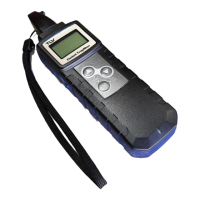
Pocket TrapMan PT1 Device

The main unit for steam trap and bearing inspection, featuring ultrasonic and temperature measurement capabilities.

Soft Case

Protective case for storing and carrying the PT1 device, ensuring visibility of the display and keypad.

Earphones

Audio output accessory for listening to measurements and operational feedback from the PT1.

Batteries

Power source for the PT1 device, typically AAA alkaline batteries, required for operation.

Carrying Strap

Strap for attaching the device for portability and safety, preventing accidental drops during use.

2. Safety Considerations

Understanding Safety Symbols

Explains the meaning of DANGER, WARNING, CAUTION, and PROHIBITED symbols used in the manual for safe operation.

PT1 Operational Safety Guidelines

Covers critical safety rules for device usage, environment, handling, and preventing injury or damage.

Battery Handling and Safety

Details precautions for battery insertion, use, charging, and proper disposal to prevent hazards.

3. Principles of Operation

Ultrasonic Sound Generation

Explains how ultrasonic sound is produced by fluid passing through small holes in steam traps or valves.

Ultrasonic Intensity and Leakage

Describes the correlation between ultrasonic sound intensity and the amount of steam leakage.

Shock Pulse Generation for Bearings

How shock pulses generated by bearing collisions indicate wear or lubrication issues.

Surface Temperature Measurement

Simultaneous measurement of surface temperature alongside ultrasonic sound for diagnostics.

4. Features and Functions

Steam Trap Operation Inspection

Automatic inspection and judgment of steam trap operational conditions (Good, Caution, Leaking, etc.).

Valve Seal Inspection

Automatic inspection of valve seals to determine condition and closure status (Good, Caution, Leaking).

Bearing Deterioration Inspection

Data collection for bearing operational characteristics and wear determination based on vibration analysis.

Simultaneous Surface Temperature Measurement

Measures temperature alongside ultrasonic sound without requiring separate equipment.

Automatic Measurement Start;Stop

How measurements automatically begin upon probe contact and stop after a set duration or probe removal.

Data Storage in Memory

Details on automatic data saving and the memory capacity for measurements in different modes.

5. Components and Features

Probe

Sensor for measuring ultrasonic sound and surface temperature on contact with the object.

Key Pad

Interface for user to select modes, records, data, and control power ON/OFF.

Display

Screen showing the operational mode and measurement results.

Earphone Jack

Port for connecting earphones to listen to audio feedback during measurements.

LED Indicator

Visual signal indicating the status of the present measurement by being lit or flashing.

Cap

Protects the probe when the unit is stored or not in use.

Battery Compartment Lock

Secures the battery compartment from accidental opening.

Battery Compartment

Houses the two AAA batteries that power the PT1 device.

Strap Anchor

Points for attaching the carrying strap for secure handling and portability.

6. PT1 Preparation

Inserting Batteries

Step-by-step guide for correctly inserting AAA batteries into the PT1 device.

Powering the Unit On and Off

Instructions for turning the PT1 device on, off, and its automatic shut-off feature.

Cap Removal and Attachment

Procedure for safely removing and reattaching the probe cap to protect the sensor.

7. Proper Measurement Procedure

Surface Preparation for Measurement

How to prepare the measurement surface for accuracy, ensuring it is smooth and flat.

Probe Application Technique

Correct method for applying the probe perpendicular and steady to the measurement surface.

Maintaining Consistent Measurement Points

Importance of measuring from the same spot for trend analysis and accurate comparisons.

Surface Temperature Limits

Maximum allowable surface temperature and indications for exceeding it.

8. Steam Trap Diagnosis

Mode and Record Setup

Setting the inspection mode and selecting record numbers for steam trap diagnosis.

Performing Steam Trap Measurements

Detailed steps for taking measurements and understanding the data displayed during steam trap diagnosis.

Setting Measurement Parameters

Configuring operating pressure, condensate load factor, and steam trap type for accurate diagnosis.

Automatic Diagnosis and Next Steps

Interpreting automatic judgement results and proceeding with subsequent inspections or saving data.

9. Valve Diagnosis

Mode and Record Setup for Valves

Setting the inspection mode and record numbers for valve diagnosis.

Performing Valve Measurements

Steps for taking valve leak measurements and understanding the outcomes.

Automatic Valve Judgement and Next Steps

Interpreting automatic valve diagnosis results and proceeding to the next inspection.

10. Bearing Inspection

Special Features and Mode Selection

Overview of special features for bearing inspections and how to select the Bearing mode.

Measurement and Data Handling

Procedures for taking bearing measurements, setting record numbers, and managing data.

Display and Post-Measurement Procedures

Understanding measurement displays, averaging data, and proceeding after bearing inspection.

11. Deleting Existing Data

Mode and Record Selection for Deletion

How to select the mode and record number to delete existing data from PT1 memory.

Data Deletion Options

Explains options like Data Clear, All Clear, and Cancel for data removal.

12. Settings

Accessing and Navigating Settings

How to enter and navigate through the PT1 settings menu.

Mode and Display Settings

Configuring device mode and data display for bearing inspections (Full, AVG & Temp, Peak & CF).

Operational Settings

Adjusting earphone volume, calculation type, and LED indicator flash settings.

Display and Language Configuration

Adjusting LCD contrast, engineering units, and display language.

13. Accessories

Using the Soft Case

Instructions on how to insert and secure the PT1 in its soft case.

Connecting and Using Earphones

Steps for plugging the earphones into the device jack and their proper use.

Attaching and Using the Carrying Strap

How to attach the strap for portability and preventing drops during use.

14. Troubleshooting

Common Problems and Solutions

A guide to identifying and resolving common operational issues with the PT1 device.

15. Specifications

Technical Specifications Overview

Details on product name, measured items, temperature range, power source, and dimensions.

16. Product Warranty

Warranty Period and Coverage

Specifies the duration and scope of the product warranty, including exclusions.

Calibration Recommendations

Explains the importance and recommended frequency of probe calibration for maintaining accuracy.

17. Service and Support

Contacting TLV for Service

Information on how to contact TLV offices worldwide for technical assistance and service inquiries.

Summary

1. PT1 Standard Set

Pocket TrapMan PT1 Device

The main unit for steam trap and bearing inspection, featuring ultrasonic and temperature measurement capabilities.

Soft Case

Protective case for storing and carrying the PT1 device, ensuring visibility of the display and keypad.

Earphones

Audio output accessory for listening to measurements and operational feedback from the PT1.

Batteries

Power source for the PT1 device, typically AAA alkaline batteries, required for operation.

Carrying Strap

Strap for attaching the device for portability and safety, preventing accidental drops during use.

2. Safety Considerations

Understanding Safety Symbols

Explains the meaning of DANGER, WARNING, CAUTION, and PROHIBITED symbols used in the manual for safe operation.

PT1 Operational Safety Guidelines

Covers critical safety rules for device usage, environment, handling, and preventing injury or damage.

Battery Handling and Safety

Details precautions for battery insertion, use, charging, and proper disposal to prevent hazards.

3. Principles of Operation

Ultrasonic Sound Generation

Explains how ultrasonic sound is produced by fluid passing through small holes in steam traps or valves.

Ultrasonic Intensity and Leakage

Describes the correlation between ultrasonic sound intensity and the amount of steam leakage.

Shock Pulse Generation for Bearings

How shock pulses generated by bearing collisions indicate wear or lubrication issues.

Surface Temperature Measurement

Simultaneous measurement of surface temperature alongside ultrasonic sound for diagnostics.

4. Features and Functions

Steam Trap Operation Inspection

Automatic inspection and judgment of steam trap operational conditions (Good, Caution, Leaking, etc.).

Valve Seal Inspection

Automatic inspection of valve seals to determine condition and closure status (Good, Caution, Leaking).

Bearing Deterioration Inspection

Data collection for bearing operational characteristics and wear determination based on vibration analysis.

Simultaneous Surface Temperature Measurement

Measures temperature alongside ultrasonic sound without requiring separate equipment.

Automatic Measurement Start;Stop

How measurements automatically begin upon probe contact and stop after a set duration or probe removal.

Data Storage in Memory

Details on automatic data saving and the memory capacity for measurements in different modes.

5. Components and Features

Probe

Sensor for measuring ultrasonic sound and surface temperature on contact with the object.

Key Pad

Interface for user to select modes, records, data, and control power ON/OFF.

Display

Screen showing the operational mode and measurement results.

Earphone Jack

Port for connecting earphones to listen to audio feedback during measurements.

LED Indicator

Visual signal indicating the status of the present measurement by being lit or flashing.

Cap

Protects the probe when the unit is stored or not in use.

Battery Compartment Lock

Secures the battery compartment from accidental opening.

Battery Compartment

Houses the two AAA batteries that power the PT1 device.

Strap Anchor

Points for attaching the carrying strap for secure handling and portability.

6. PT1 Preparation

Inserting Batteries

Step-by-step guide for correctly inserting AAA batteries into the PT1 device.

Powering the Unit On and Off

Instructions for turning the PT1 device on, off, and its automatic shut-off feature.

Cap Removal and Attachment

Procedure for safely removing and reattaching the probe cap to protect the sensor.

7. Proper Measurement Procedure

Surface Preparation for Measurement

How to prepare the measurement surface for accuracy, ensuring it is smooth and flat.

Probe Application Technique

Correct method for applying the probe perpendicular and steady to the measurement surface.

Maintaining Consistent Measurement Points

Importance of measuring from the same spot for trend analysis and accurate comparisons.

Surface Temperature Limits

Maximum allowable surface temperature and indications for exceeding it.

8. Steam Trap Diagnosis

Mode and Record Setup

Setting the inspection mode and selecting record numbers for steam trap diagnosis.

Performing Steam Trap Measurements

Detailed steps for taking measurements and understanding the data displayed during steam trap diagnosis.

Setting Measurement Parameters

Configuring operating pressure, condensate load factor, and steam trap type for accurate diagnosis.

Automatic Diagnosis and Next Steps

Interpreting automatic judgement results and proceeding with subsequent inspections or saving data.

9. Valve Diagnosis

Mode and Record Setup for Valves

Setting the inspection mode and record numbers for valve diagnosis.

Performing Valve Measurements

Steps for taking valve leak measurements and understanding the outcomes.

Automatic Valve Judgement and Next Steps

Interpreting automatic valve diagnosis results and proceeding to the next inspection.

10. Bearing Inspection

Special Features and Mode Selection

Overview of special features for bearing inspections and how to select the Bearing mode.

Measurement and Data Handling

Procedures for taking bearing measurements, setting record numbers, and managing data.

Display and Post-Measurement Procedures

Understanding measurement displays, averaging data, and proceeding after bearing inspection.

11. Deleting Existing Data

Mode and Record Selection for Deletion

How to select the mode and record number to delete existing data from PT1 memory.

Data Deletion Options

Explains options like Data Clear, All Clear, and Cancel for data removal.

12. Settings

Accessing and Navigating Settings

How to enter and navigate through the PT1 settings menu.

Mode and Display Settings

Configuring device mode and data display for bearing inspections (Full, AVG & Temp, Peak & CF).

Operational Settings

Adjusting earphone volume, calculation type, and LED indicator flash settings.

Display and Language Configuration

Adjusting LCD contrast, engineering units, and display language.

13. Accessories

Using the Soft Case

Instructions on how to insert and secure the PT1 in its soft case.

Connecting and Using Earphones

Steps for plugging the earphones into the device jack and their proper use.

Attaching and Using the Carrying Strap

How to attach the strap for portability and preventing drops during use.

14. Troubleshooting

Common Problems and Solutions

A guide to identifying and resolving common operational issues with the PT1 device.

15. Specifications

Technical Specifications Overview

Details on product name, measured items, temperature range, power source, and dimensions.

16. Product Warranty

Warranty Period and Coverage

Specifies the duration and scope of the product warranty, including exclusions.

Calibration Recommendations

Explains the importance and recommended frequency of probe calibration for maintaining accuracy.

17. Service and Support

Contacting TLV for Service

Information on how to contact TLV offices worldwide for technical assistance and service inquiries.

TLV Pocket TrapMan PT1 Specifications

General IconGeneral
Accuracy±10%
Power SupplyRechargeable Li-ion battery
Battery LifeUp to 8 hours continuous use
Sampling MethodPump-assisted sampling
Data StorageInternal memory
InterfaceUSB
DisplayLCD
Storage Temperature-20°C to 50°C