Injection Molding Machine Appendix D
D-1 V1.0
Appendix D: USB file operation
1.These functions are supported in screen and PLC program dated in
2010/04/23 and after.
2.When put in USB disk, wait until USB symbol stopped blinking, USB
operation screen will pop up automatically. (USB disk must be FAT32 format)
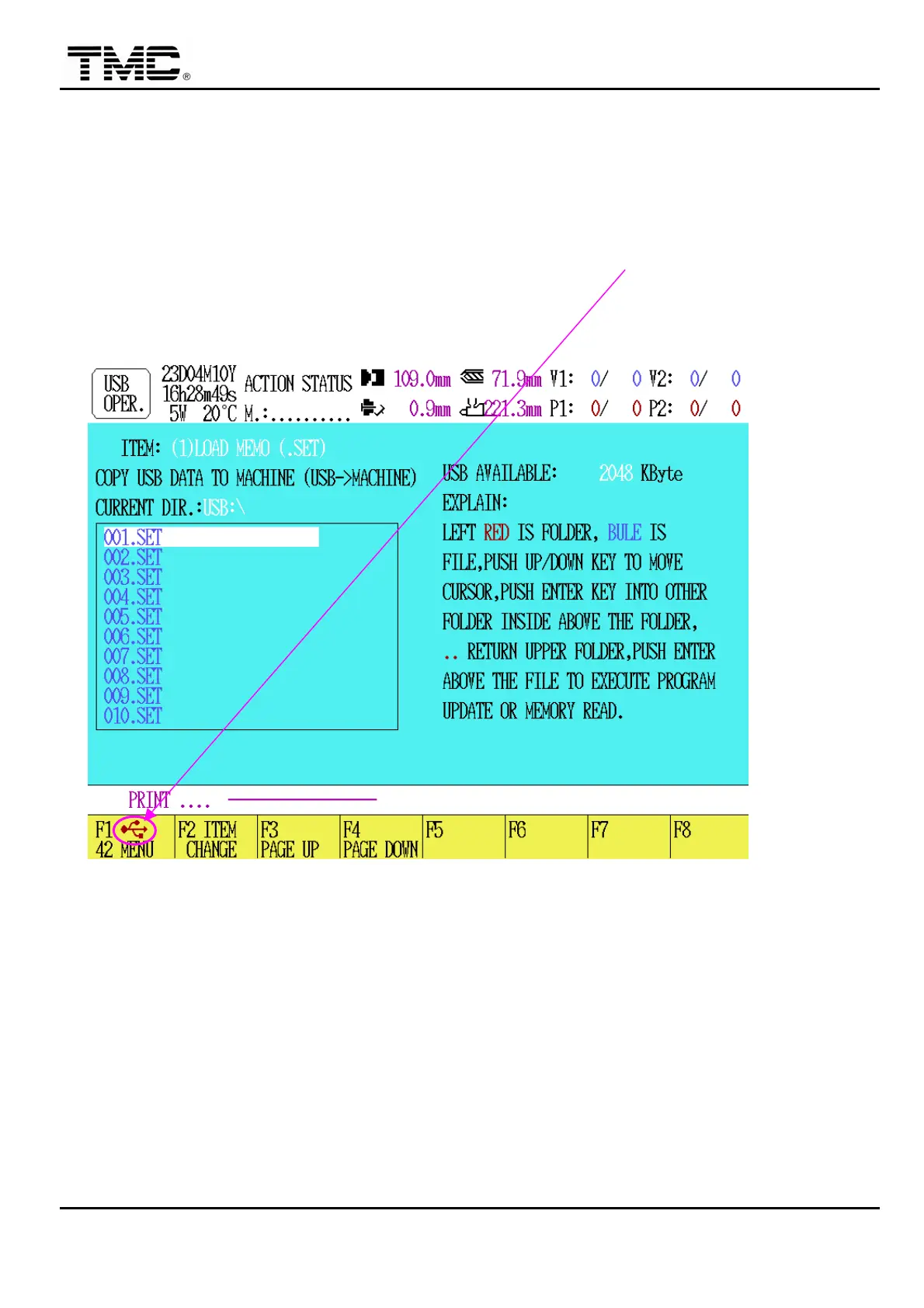
Graph (A): used in items: (1), (3), (4), (5)
3.Operation items
Press F2 to change operation item, there are 10 function items.
(1)LOAD MEMO (.SET): Load mold data from USB disk to machine.
(2)SAVE MEMO (.SET): Save present molding data to USB disk.
(3)LOAD US (.USC): Load user program in USB disk to machine.
(Stop motor power and heater power first)
(4)LOAD OS (.OSC): Load screen program in USB disk to machine.
(5)LOAD PLC (.PLC): Load PLC program in USB disk to machine.
(6)SAVE US (.USC): Backup machine user program to USB disk.
(7)SAVE OS (.OSC): Backup machine screen program to USB disk.
(8)SAVE PLC (.PLC): Backup machine PLC program to USB disk.


 To Next Page
 Loading...