Injection Molding Machine Chapter 4
V3.0
4-11
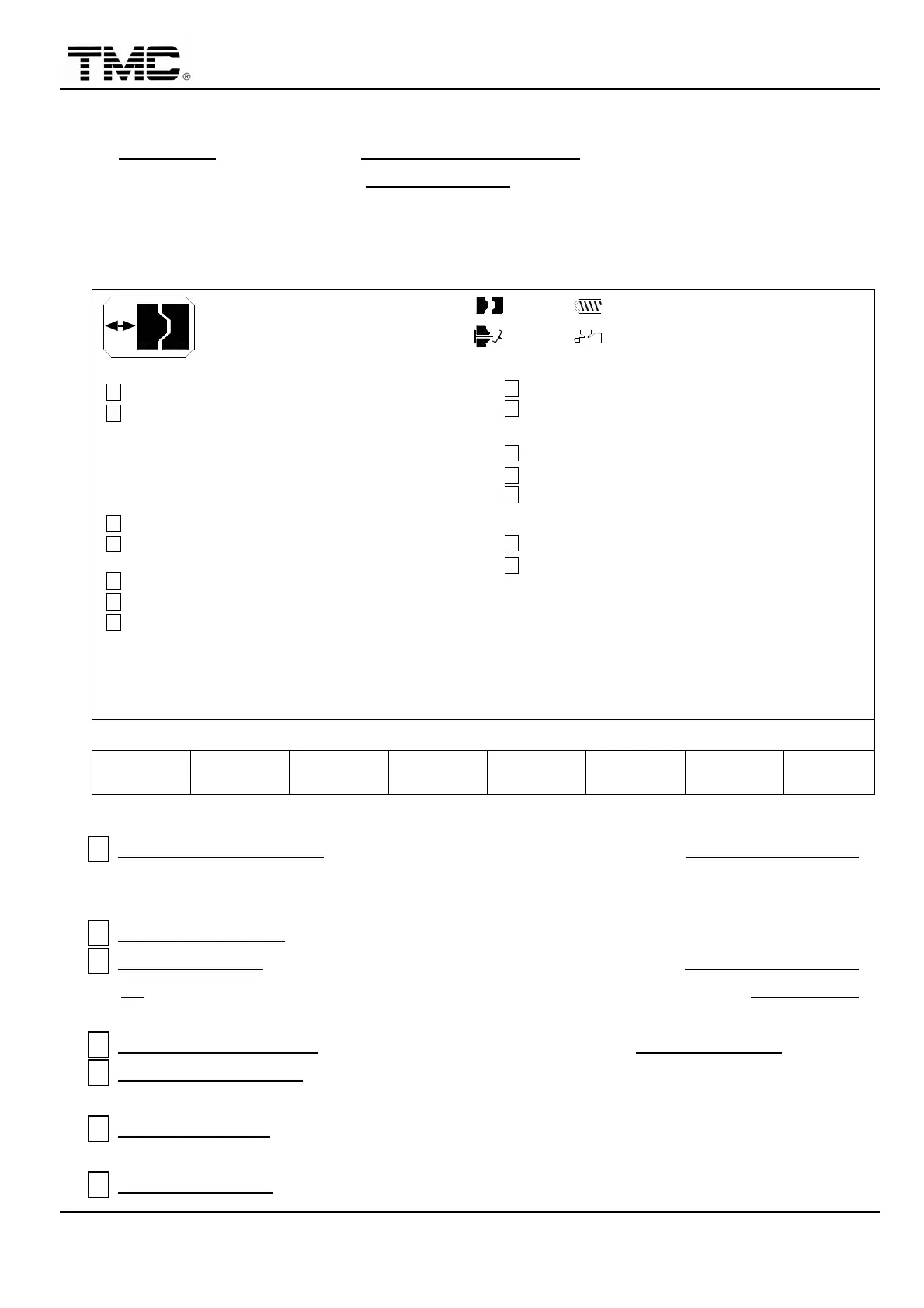
2.4 Clamping parameters
On CLAMPING screen press F2 CLAMPING PARAMETER
,
or use the directional key in the
main menu to move the cursor to CLAMPING REF.
,
press ENTER if the massage area show
[Lock mode key in password…02]
,
after the correct password is input
,
press ENTER twice to
access to this screen. (Press ENTER the first time is to confirm the password while press
ENTER the second time is to display the screen.)
V1: 0/ 0 0/ 0V2:
0/ 0P1: 0/ 0 P2:100.0mm
100.0mm210.0mm
0.5mm
ACTION STATUS
M:
03D05M07Y
10h25m10s
20°C3W
CLAMP DECOMPRESS
RE-CLOSE COUNT
OFF
< 0 > 0
F2F1 F3 F4 F5 F6 F7 F8
MOLD ADJ. LOG SUPPORT TENANCEMENU
20
I/O
EJECT ON FLY PT.
< 20.0> 0.0
LUBRICATION T.
< 100 > 10
LUB. COUNT
<200.0>
CLAMP PRESS SLOPE
OFF
OFF
CLAMP SPEED SLOPE
INJ. COMPRESS
OFF
< 45.0>
MOLD COMPRESS PT.
OFF
INTERVAL T. COUNT
OFF
CHARGE ON FLY
CLOSE RELEASE
OFF
OPEN
CLOSE
< 2 >
< 2 >
SECTION
SECTION
RAMP
DECOMPRESS PT.
< 50.0>
< 300 > 0
HR
mm
mm
P/V CHANGE MOLD EXTERN MAIN-
E
H
G
B
A
D
C
F
I
J
K
M
L
N
GREASE LUB. T. *1hr
Screen 4-7
A CLAMP DECOMPRESS:After screw charge,the mold open to DECOMPRESS PT.
position and stop waiting for the completion of cooling,then open again to open end
position.
B DECOMPRESS PT.
:Clamp pre opening position for clamp decompression function.
C INJ. COMPRESS:When this function is on,mold close will stop at MOLD COMPRESS
PT.,then injection starts,after injection process is finished,mold close to CLOSE END
position. This can achieve single stage injection compression.
D MOLD COMPRESS PT.:Mold close midway stop position for INJ. COMPRESS function.
E INTERVAL T. COUNT:Disable interval timer when set on,usually used in mold setup
mode.
F CHARGE ON FLY:Option feature. When set on,mold can be opened while charge is still
in progress.
G CLOSE RELEASE
:When set on,performing sensitive mold protection function by


 To Next Page
 Loading...