

EasyManua.ls Logo

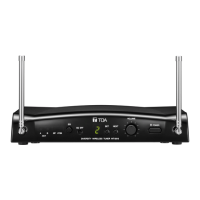
Toa WT-5810 - User Manual

Toa WT-5810
8 pages
Print Icon
To Next Page IconTo Next Page
Loading...
OPERATING INSTRUCTIONS
WIRELESS TUNER WT-5810
1. SAFETY PRECAUTIONS ........................... 2
2. GENERAL DESCRIPTION ......................... 3
3. FEATURES ................................................. 3
4. HANDLING PRECAUTIONS ...................... 3
5. NOMENCLATURE AND FUNCTIONS
Front ............................................................ 4
Rear ............................................................. 4
6. OPERATION ............................................... 5
7. CHANNEL NUMBER SETTING ................. 6
8. HOW TO CHECK AND DEAL
WITH INTERFERENCE
8.1. Order of Actions (Action Flowchart) ..... 6
8.2. Checking Ambient Signal Condition ..... 7
8.3. Reducing Radio Interference
by the Squelch Control ......................... 7
9. SPECIFICATIONS ...................................... 8
Accessory .................................................... 8
Thank you for purchasing TOA's Wireless Tuner.
Please carefully follow the instructions in this manual to ensure long, trouble-free use of your equipment.
TABLE OF CONTENTS
Question and Answer IconNeed help?

Do you have a question about the Toa WT-5810 and is the answer not in the manual?

Summary

Safety Precautions

Safety Symbol and Message Conventions

Explains the meaning of safety symbols and messages used in the manual to prevent injury or damage.

General Description and Features

General Description

Provides an overview of the WT-5810 Wireless Tuner's intended use and key technology.

Features

Lists the key specifications and benefits of the wireless tuner, such as frequency range and PLL-synthesizer.

Handling Precautions

Nomenclature and Functions

Front Panel

Details the functions and labels of the front panel controls and indicators on the wireless tuner.

Rear Panel

Explains the ports and connections available on the rear panel of the wireless tuner unit.

Operation

Basic Operation Steps

Outlines the steps for powering on, setting channels, and adjusting volume for basic tuner use.

Microphone Sensitivity Adjustment

Provides a guide on adjusting the microphone's audio level control and sensitivity.

Channel Number Setting

Interference Troubleshooting

Order of Actions (Action Flowchart)

Presents a flowchart for diagnosing and resolving interference issues with the wireless tuner.

Checking Ambient Signal Condition

Explains how to check the signal condition and what the 'squelch' feature does.

Reducing Radio Interference

Details how to reduce radio interference by adjusting the squelch control sensitivity.

Channel Detection and Emphasis Circuit

Channel Detection

Describes the procedure for detecting and setting an idle channel for the wireless tuner.

Rewriting Inner Emphasis Circuit Data

Explains how to change the built-in emphasis circuit data for improved noise suppression.
Specifications

Summary

Safety Precautions

Safety Symbol and Message Conventions

Explains the meaning of safety symbols and messages used in the manual to prevent injury or damage.

General Description and Features

General Description

Provides an overview of the WT-5810 Wireless Tuner's intended use and key technology.

Features

Lists the key specifications and benefits of the wireless tuner, such as frequency range and PLL-synthesizer.

Handling Precautions

Nomenclature and Functions

Front Panel

Details the functions and labels of the front panel controls and indicators on the wireless tuner.

Rear Panel

Explains the ports and connections available on the rear panel of the wireless tuner unit.

Operation

Basic Operation Steps

Outlines the steps for powering on, setting channels, and adjusting volume for basic tuner use.

Microphone Sensitivity Adjustment

Provides a guide on adjusting the microphone's audio level control and sensitivity.

Channel Number Setting

Interference Troubleshooting

Order of Actions (Action Flowchart)

Presents a flowchart for diagnosing and resolving interference issues with the wireless tuner.

Checking Ambient Signal Condition

Explains how to check the signal condition and what the 'squelch' feature does.

Reducing Radio Interference

Details how to reduce radio interference by adjusting the squelch control sensitivity.

Channel Detection and Emphasis Circuit

Channel Detection

Describes the procedure for detecting and setting an idle channel for the wireless tuner.

Rewriting Inner Emphasis Circuit Data

Explains how to change the built-in emphasis circuit data for improved noise suppression.

Specifications

Toa WT-5810 Specifications

General IconGeneral
BrandToa
ModelWT-5810
CategoryTV Tuner
LanguageEnglish