
 Need help?
Do you have a question about the ToKViA T221 and is the answer not in the manual?
Includes call, on-hook, softkeys, and navigation keys for operation.
Keypad, star, hash, and programmable M1/M2 keys for input and shortcuts.
Headphone/USB ports and emergency, volume, and torch buttons.
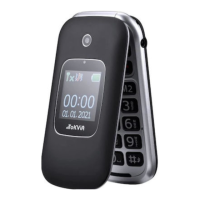
Main display, external display, and indicator lights for status.
Integrated camera and loudspeaker component.
Use standard SIM cards; micro/nano require adapters. Insert into SIM slot.
Supports up to 16GB microSD for camera and PhotoContact functions.
Open cover, align and insert battery correctly.
Connect power adapter to socket, then USB plug to phone.
Connect adapter to socket, USB to cradle, place phone in cradle.
Press and hold the On-hook key for 3 seconds.
Press and hold the On-hook key for 3 seconds.
Use navigation keys and softkeys to interact with menus and functions.
Use call key to answer, softkey to reject incoming calls.
Press the end call key to terminate an active conversation.
Use the keypad to enter numbers and characters.
Use a specific key or softkey to remove characters or data.
Trigger an emergency call using the dedicated key.
Charge the battery or connect to a computer via the USB port.
Operate the torch and adjust call volume using dedicated keys.
Configure the phone's display language via Settings menu.
Adjust the phone's clock and calendar settings.
Change ringtones, alarm tones, and profile settings.
Save names and numbers in the phone book via the main menu.
Locate contacts by typing letters of their names.
Enable number announcement for visually impaired users.
Assign contacts to M1 and M2 keys for quick dialing.
Program speed dial numbers for digits 2-9.
Configure the phone to answer calls by opening the cover.
Associate names and numbers with picture contacts.
Link images from camera or memory card to contacts.
Initiate calls by selecting a contact from the PhotoCall list.
Trigger an emergency call by pressing and holding the SOS key.
Add and manage emergency contact numbers in the SOS settings.
Turn on Bluetooth to connect wireless devices.
Reset the phone to default settings; backup data first.
Block specific numbers via Call settings > Blacklist.
Access and use the FM radio function.
Open and use the camera, requires memory card.
Control torch and set alarms via Organizer menu.
Customize ringtones, volumes, and system tones for alerts.
Adjust screen brightness and control LED indicator behavior.
Configure network selection and activate phone/SIM lock features.
Customize SOS messages and auto-redial features.
Clarifies support for 2G GSM, voice, and short messages only.
Information on supported SIM card sizes and adapters.
How to adjust call volume and activate speakerphone.
Instructions for opening the battery cover and using microSD cards.
Details on GSM and Bluetooth frequencies and sending power.
Input voltage, output, and battery capacity/life.
Screen size, phone dimensions, and weight.
Operating temperature, humidity, and connection ports.

 To Next Page
 General