BA
MD
Measuring status
Batch setting value change status
key key
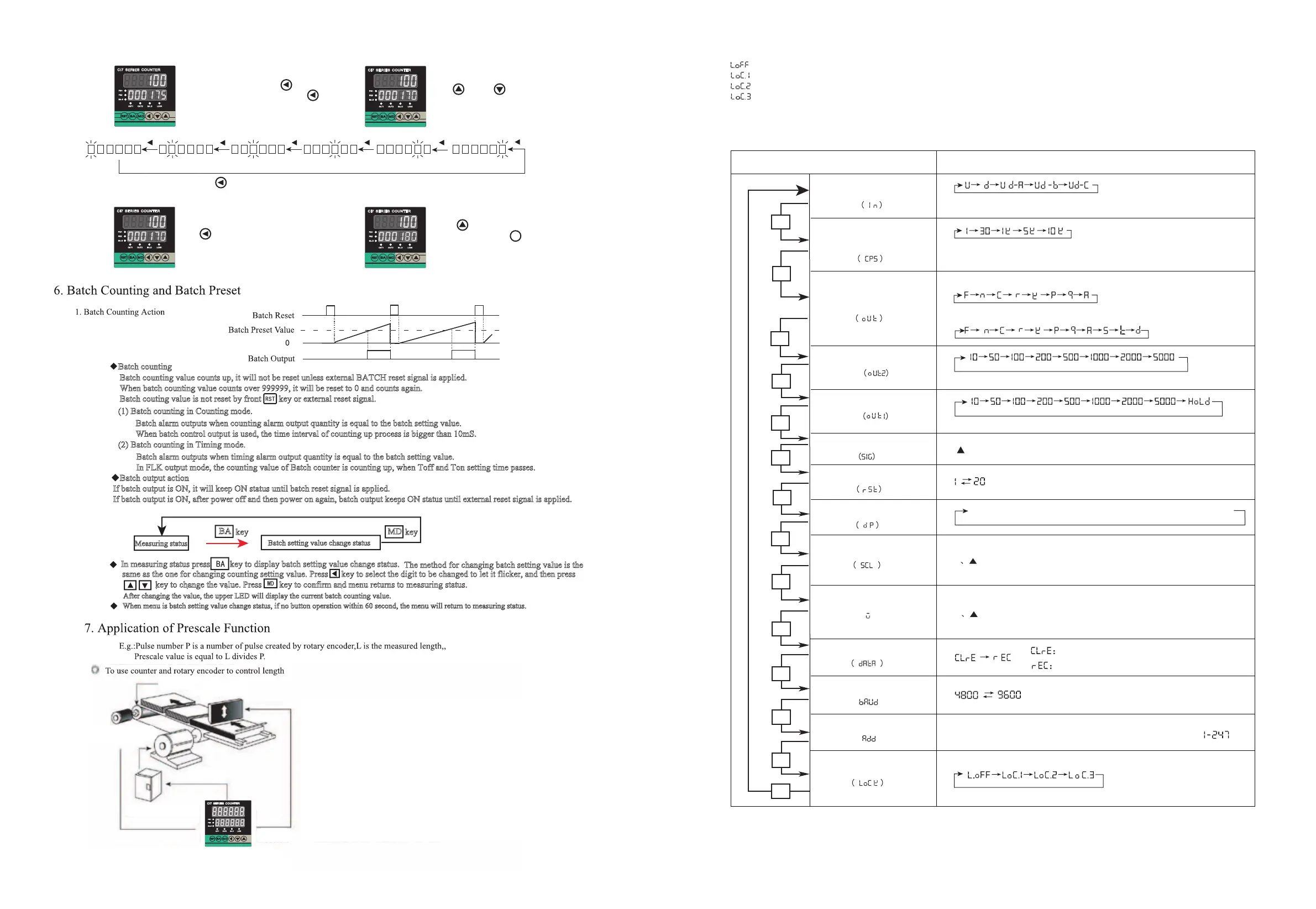
Batch counting
(1) Batch counting in Counting mode.
(2) Batch counting in Timing mode.
Batch output action
If batch output is ON, it will keep ON status until batch reset signal is applied.
If batch output is ON, after power off and then power on again, batch output keeps ON status until external reset signal is applied.
Batch counting value counts up, it will not be reset unless external BATCH reset signal is applied.
When batch counting value counts over 999999, it will be reset to 0 and counts again.
Batch couting value is not reset by front key or external reset signal.
Batch alarm outputs when counting alarm output quantity is equal to the batch setting value.
When batch control output is used, the time interval of counting up process is bigger than 10mS.
Batch alarm outputs when timing alarm output quantity is equal to the batch setting value.
In FLK output mode, the counting value of Batch counter is counting up, when Toff and Ton setting time passes.
In measuring status press key to display batch setting value change status.
The method for changing batch setting value is the
same as the one for changing counting setting value. Press key to select the digit to be changed to let it flicker, and then press
key to change the value. Press key to confirm and menu returns to measuring status.
After changing the value, the upper LED will display the current batch counting value.
When menu is batch setting value change status, if no button operation within 60 second, the menu will return to measuring status.
2. How to Change Batch Setting Value
Page 03 KKCIE01-A/2-20140318
(1)
(2)
(4)
(3)
MD
CI 7 SE RIE S CO UNTER
CI 7 SE RIE S CO UNTER
CI 7 SE RIE S CO UNTER
CI 7 SE RIE S CO UNTER
π×滚轮的直径( D )
系数值 = ------------------------
编码器旋转一周的脉冲个数
The diameter of the roller connected to the rotary encoder is 22mm,
The PPR of the encoder is 1000
Motor Control
System
Counter
π×Diameter of the Roller( D )
Prescale Value = ------------------------
PPR
3.1416×22
= ------------------
1000
= 0.069mm/pulse
CI 7 SER IES CO UNT ER
5. Operation Instruction
1. How to change counter setting value (Example: change the setting calue from 175 to 180)
Under Measuring Status, press Key to enter
into Setting Value modify status, Press Key
again m choose digit 5 and let it flickers
Press Key or Key 5 times,
change the digit from “5” to “0”
Under Measuring Status, press Key to enter into Setting Value Modify Status, the flicking digit is from right to left circularly
Press Key again, choose digit “7”
and let it flicker
Press Key for one time, change
Digit “7” to “8”, Press Key for
confirmation and return back to measuring
status
Set 0.069 of prescale value at prescale value set mode
Roller
Encoder
Motor
Cutter
8. Lock Key Setting
Lock Key be used for avoiding mis-operation
9.Setting of Counter Function Modes
( )
MD
→
- - - - - - → - - - - - - →- - - - - - → - - - - - -
MD
MD
MD
MD
MD
MD
MD
MD
MD
MD
MD
Page 04 KKCIE01-A/2-20140318
* * *
( )
( )
MD
MD
( 、▲)
▲
Setting Mode
Select setting
Input Type
Max Counting Speed
Output Mode
Time
OUT2 Output
Time
OUT1 Output
Input Logic
Min Reset Time
Decimal Point
Prescale Value
Initial Value
Memory Retention
Baud Rate
Address
Lock Key
Counting Speed means the highest frequency of INA and INB allowed input, if
the setting value is 5K, the error will be existed if the input signal over than 5K.
If the output Mode is S, T and D, then input mode just can choose Ud-A, B, C
※Up Or Down
※Up/Down - A、B、C
Input Mode
Input Mode
Units: ms
Units: ms
▲
or
: Choose NPN or PNP input type
Min Signal width of RESET (mm)
▲
▲
Setting range of prescale value is 0.00001--999999
Key: Shift the flickering digit RST Key: Modify prescale value decimal point
Key: Change the Prescale value
▲
▲
Initial Value: display value after Manual or Auto Reset
Key: Shift the flickering digit
Key: Change the Initial value Initial value range: -99999---999999
Power OFF Counting Value Reset
Power OFF Counting Value Save
Communication Baud is 4800 and 9600 can be choosed
Communication Address: Can be setting freely between
(LOCK OFF):Cancel Lock Key Function.
(LOCK LEVEL1):Lock RST Key
(LOCK LEVEL2):Lock and and Key
(LOCK LEVEL3):Lock RST and Lock and and Key
▲
▲
▲
▲
▲
▲


 To Next Page
 Loading...