20
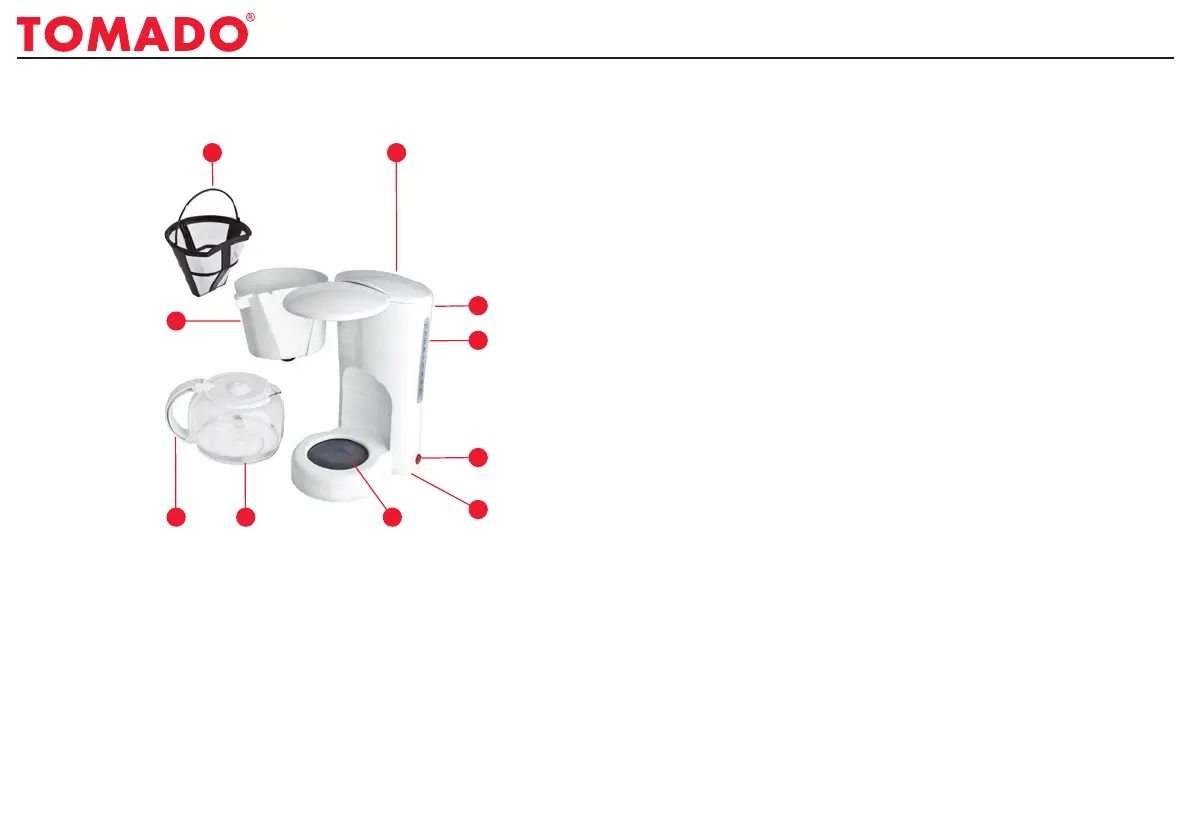
DESCRIPTION OF PARTS
1 2
4
3
5
6
789
10
1. Removablepermanentfilter
2. Lid
3. Waterreservoir
4. Levelindicator
5. On/offbuttonwithindicatorlight
6. Powercordandplug
7. Heatingplate
8. Coffeepotwithlid
9. Handle
10.Removablepivotingfilterwith
pause-and-servefunction
OPERATION
Thiscoffeemakerallowsyoutomakeupto10cups
ofcoffee.Youcanfilltheremovablepermanentfilter
directly,withouthavingtouseanypaperfilters.The
applianceisequippedwithahandypause-and-serve
function,sothatnocoffeewillcomeoutofthefilterif
thepotisremovedduringthecoffeemakingprocess.
USING FOR THE FIRST TIME
• Removeallpackagingfromtheappliance.
• Cleantheappliance,see'Cleaningand
Maintenance'.
• Thefirsttime,switchthecoffeemakeronwithafull
waterreservoirbutwithoutcoffee,inaccordance
withtheprocedurein‘Usingtheappliance’,inorder
tocleantheappliance.
• Switchtheapplianceoffusingtheon/offswitch.
• Pourthewaterinthepotaway.
• Allowtheappliancetocooldownforafewminutes.
• Continuewiththeprocedurein‘Usingtheappliance’.
USING THE APPLIANCE
• Fillthepotwithwater.
• Pourthewaterfromthepotintothewaterreservoir.
Thewaterlevelindicatorshowsyouhowmuchwater
isrequiredforthedesirednumberofcupsofcoffee.
Thewaterlevelmustnotgoabovethe‘max’mark.
• Closethelid.
Instruction manual TM-6663


 To Next Page