The device presented in this manual is the TalksUp®-BT, a portable player designed for use with the Tomatis® Method. It is a pedagogical product and should not be considered a medical device.
Function Description
The TalksUp®-BT is designed to deliver specific audio tracks for the Tomatis® Method. It works in conjunction with the Program Manager software, which is supplied on a USB flash drive and runs on Windows computers (not compatible with Mac OS). The device itself does not come with pre-installed programs; these must be transferred using the Program Manager software.
The device supports both passive listening and active work. For active work, practitioners (Level 2) and consultants (Levels 3 and 4) can purchase an omnidirectional microphone. When using the microphone, headphones must be wired to the TalksUp®-BT, as the microphone will not function in Bluetooth mode.
Important Technical Specifications
Audio Specifications:
- Frequency Response: 80Hz-20kHz @ -10dB (exclusive int. Filter setting)
- S/N Ratio: >-90 dB @ -10dB
- Headphones Connector: 3.5 mm TRS
- Headphones Output Impedance: 16-32 Ohms
- Maximum Output RMS @ 32 Ohms: 30 mW
- Microphone Connector: 3.5 mm TRS
- Microphone Input Impedance: 47k Ohms
- Mic Input Gain Range (internal trim): -26 to -46 dB
- Microphone-Type: OM01 - Omnidirectional Condenser Microphone by Tomatis®
- Maximum Input/Output Codec/A/D-D/A: 0 dB
- Sampling Rate: 48kHz
- A/D-D/A Converters: 16-bit
- DAC resolution: 16 bits
- DAC Output Sample Rate: 8 KHz to 90 KHz
- DAC SNR: 96dB
- Stereo Separation: -87.7dB
Bluetooth Specifications:
- BT Standard: 4.0 Class 2 apt-X
- Frequency Band: 2,402 MHz to 2,480 MHz
- RF Sensitivity: 0.1% BER at -88dBm
- Transmit Power: BER/EDR Class2<4dBm, BLE<10dBm
- Modulation: 8 DPSK, PI/4 DQPSK, GFSK
- Maximum Data Rate: 3Mbps (typical 1.6Mbps)
General Device Specifications:
- Accumulator Operating Time: 6-8 hours
- Power-Supply (charging – max.): USB 5V DC 1.6A
- Power-Supply (operating – avg.): 5V DC 0.25A
- Optional Memory: Micro SDHC - 32 GB minimum (class 6 or higher)
- USB Data-Connector: Mini-USB 2.0
- Weight: 270g (~0.6lbs)
- Dimensions (Height/Width/Depth): 83 mm/117 mm/21 mm
- TalksUp®-BT Program Manager Environment: Microsoft Windows (XP, Vista, 7, 8, 8.1 and 10), 64 or 32bits
- Min. Resolution: 1024 x 768
Usage Features
Package Contents:
The TalksUp®-BT package includes:
- 1x TalksUp®-BT player
- 1x USB flash drive containing the Program Manager software
- 1x USB charger and 1x USB cable
- 1x 3.5mm jack cable
- 1x Large rigid case for storing the equipment
- 1x Small rigid case to protect the TalksUp®-BT from shocks and a belt
- 1x Silicone case to protect the TalksUp®-BT during use
- 1x Headband
Getting Started:
- Switching On: Press and release the start button to switch on the TalksUp®-BT. The start screen will appear.
- Headphone Connection:
- Connect wired headphones to the mini jack.
- Alternatively, pair your BT-Headphone to the TalksUp®-BT (refer to page 8 of the manual for detailed pairing instructions).
- Main Menu: After a few seconds, the start menu displays two options: "Programs" or "Settings".
"Settings" Menu:
This menu provides information about the device and allows for adjustments:
- Date: Current date.
- TalksUp®-BT Serial Number.
- License Expiration Date.
- Device Owner Name.
- Micro-software (FW) Version.
- Display Brightness: A horizontal cursor allows adjustment of screen brightness by sliding a finger. Increasing screen brightness affects battery life.
- Bluetooth Activation: (See page 8 for details).
- Number of Headphones in BT Mode: (See page 8 for details).
"Programs" Menu:
This menu allows you to select and manage listening programs:
- Program Selection: Displays available programs.
- Day Selection: Allows selection of specific days within a program. A green rectangle highlights the selected day.
- Track Selection: Allows selection of specific tracks within a day.
- Navigation: "Previous page" and "Next days" options are available.
- Important Note: If programs are transferred in "Forward" mode, subsequent days/tracks will be grayed out and inaccessible.
Playback Screen:
The playback screen provides real-time information and controls during a listening session:
- Remaining Listening Time: Displays the time left for the current session.
- Gating Indicators (BC/AC): Lights indicate the status of gating between Channel 1 (C1) and Channel 2 (C2) for bone conduction (BC) and air conduction (AC) during audio playback.
- Volume Adjustment: Allows control of the overall volume.
- Track Information: Displays the current track being played, music reference, and filter.
- Microphone Volume Adjustment: Tap the microphone icon to choose between low, medium, or high settings (available for Levels 2, 3, or 4).
- Bone Conduction Amplification: Displays settings for 0 dB, +6 dB, or +12 dB.
- Delay/Precession: Indicates delay/precession settings.
- Channels Settings: Displays C1:1, C1:2/C2:1, C2:2.
- AC/BC Ratio: Shows the ratio between air and bone conduction.
- Lateralized Headphone Adjustment: Indicates the balance setting for lateralized headphone use (only for Levels 2, 3, or 4).
- Tomatis® Infinite Headphone Connection Status: Indicator for headphone connection.
- Battery Level: Displays the current battery charge.
- Controls: "Stop," "Play," and "Pause" buttons.
Playback Controls:
- Pause: Tapping the "Pause" icon stops music playback until "Pause" or "Play" is pressed again.
- Stop: Tapping the "Stop" icon during playback displays a "Confirm Stop..." message. Tapping "Stop" again ends the session.
- Session Done: After all tracks for a day are played, a "Session done" message appears.
Bluetooth Pairing (Tomatis® Infinite Headphones):
- Go to "Settings" on your TalksUp®-BT and switch the button from OFF to ON.
- Enable pairing detection on your Tomatis® Infinite headphones and ensure Bluetooth mode is on.
- Click the Bluetooth icon (TF) and then "Analyze" for 10 seconds.
- Click on your headphones address in the list and then on the grey round icon; the headphones icon should turn blue after a few seconds.
- Start your program.
- To pair two headphones, switch the number button from 1 to 2 on the setting menu, click on the 1st headphone address, then repeat for the 2nd headphone. Both icons should turn blue.
- If headphones disconnect during a session, click "Pause," turn headphones back on, click the re-pair icon, and then "Play" to continue.
- Important: Turn off both TalksUp®-BT and Tomatis® Infinite headphones after a session.
- Note: If you own a regular TalksUp®, a Bluetooth receiver (aptX) is needed for Tomatis® Infinite headphones.
Maintenance Features
Charging the Battery:
- Charging Indicator: When connected to a charger, one of the following icons will appear:
- : TalksUp®-BT battery is charging.
- : TalksUp®-BT is plugged into an A/C outlet.
- Charging Procedure:
- The device must be turned ON to charge.
- Use only the provided USB charger and cable. Using other chargers may damage the device.
- It is recommended to charge when the battery indicator shows 2 green squares or less. A "Please charge device" message will appear on the home screen when charging is required.
- The device charges via the USB charger plugged into an electrical outlet.
- The TalksUp®-BT will automatically turn off once fully charged.
- Battery Life: The TalksUp®-BT operates for a maximum of 8 hours (variable depending on usage and age of the device).
- Prevention: To prevent battery damage, avoid completely discharging the device, especially if it will not be used for several months.
Screen Lock and Power Saving:
- If the screen is not used for 30 seconds, the backlight dims to save energy and preserve battery life.
- The touch screen automatically locks to prevent accidental commands during a listening session.
- To reactivate the touch screen, slide your finger across the screen.
- If playback is stopped and the screen is not touched for more than 3 minutes, the device automatically turns off to optimize battery life.
Legal Warranty:
- The TalksUp®-BT pack comes with a 1-year legal warranty covering manufacturing faults or dysfunctions under normal use.
- The warranty does not cover damage from shocks, liquid contact, wrongful use, or use with inappropriate equipment.
- The warranty is void if the serial number sticker on the back of the device is removed or deteriorated.
- For difficulties or repair requests, contact info@tomatis.com, providing a description of the problem and the device's serial number (found on the back of the device or in the Settings menu).

 Need help?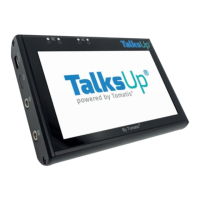

 To Next Page
 General