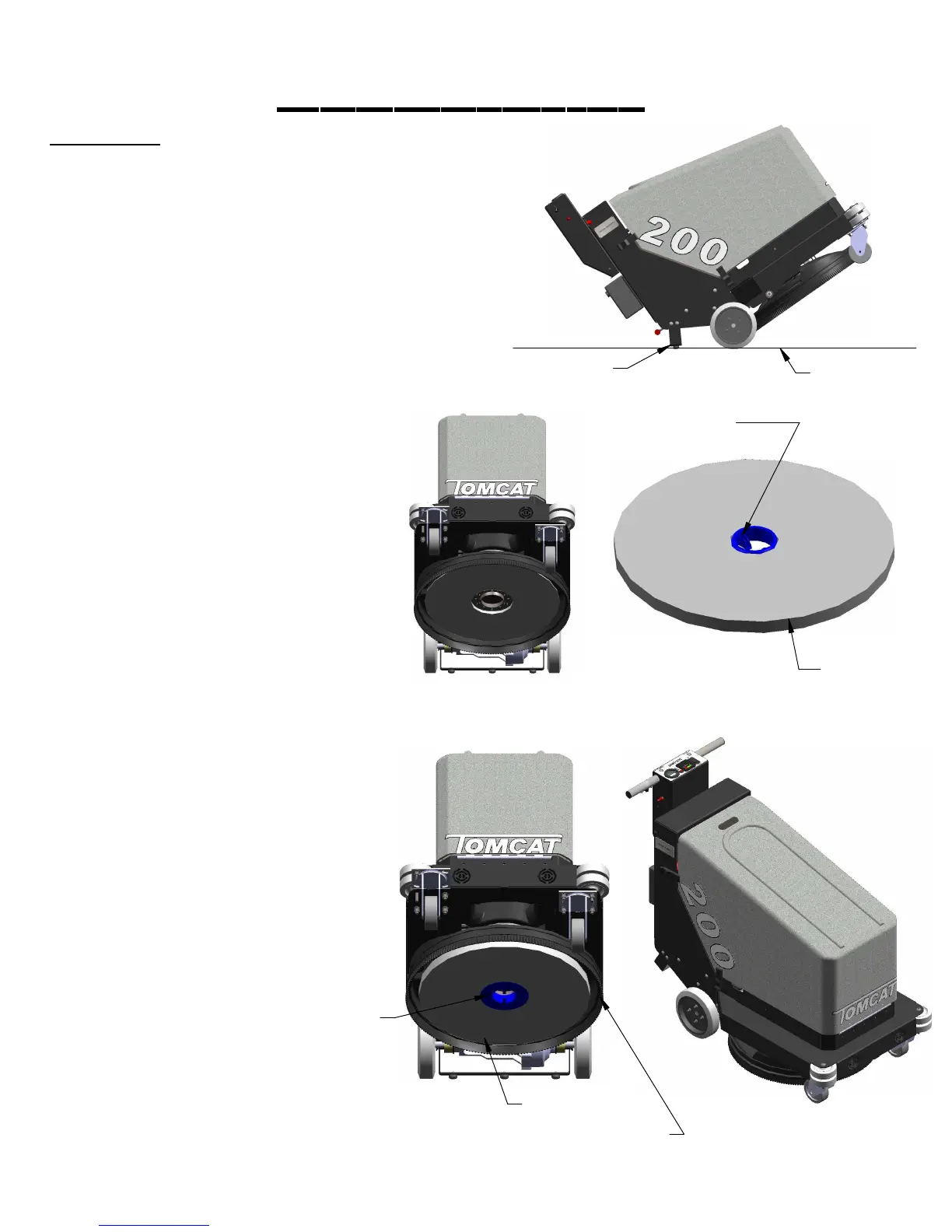
ATTACHING PAD
1. Turn machine power off.
2. Tip machine back until the tip back bar is
resting safely on floor.
3. Remove blue pad retainer clip from pad
holder.
4. Place pad on top of locking clip and slide
both below burnishing deck directly into the
center of the burnishing disk. (see right)
5. With pad and clip directly in the center of the
burnishing disk push up and screw in the pad clip.
(Hand tighten only) (see right)
6. Once the pad is in place, tip the machine
back down to the normal operating position.
7. Run machine and check for vibraitons. If
deck vibrates badly the pad may not be
centered on disk correctly. Remove pad and
reistall pad in the center of disk.
PAGE 10
***FOR CORRECT PAD APPLICATION , CALL YOUR LOCAL DEALER***
MACHINE SETUP
BLUE PAD
RETAINER CLIP
PAD
PAD
BLUE PAD
RETAINER CLIP
TIP BACK BAR
FLOOR
SHROUD AND SHROIUD CURTAIN


 To Next Page