My pictures are printing too dark / too light
• Check your brightness is set to the maximum.
• Try increasing the brightness or the contrast of the picture. Customising a dark
picture before you print will give you best printout results.
• Make sure that the background light is not too strong or too dark (normal room light
is perfect). Strong outdoor sunlight or a dark room will affect the picture quality.
• When the lm rst comes out – keep it face down (black side up) for about a minute.
This will help reduce the possibility of over-exposure (photographs being too light).
My picture came out blurry
• Ensure you print your image with one press of the shutter and turn the dial quickly in
a clockwise direction without any interruption.
• Place your hand on your phone when pressing the shutter to prevent movement.
There are white lines / light spots / marks on my picture printout
• Ensure you print your image with one press of the shutter and turn the dial quickly in
a clockwise direction without any interruption to reduce these appearing.
• If white lines do appear they will normally disappear after between 20 minutes and 2
hours after the photo is printed and as it continues to develop.
It is sometimes hard to turn the dial / My pictures are getting jammed
• Always turn the dial clockwise.
• Initially the dial will turn easily, it will then become a bit more difcult to turn whilst the
lm is released from the lm cartridge and then the dial will turn more easily again.
Keep turning until you feel a ‘bump’. Turn only until the lm is released.
• Try turning the dial whilst holding the KiiPix directly in your hands instead of on a
table. This will give you more space for your hand to rotate the dial.
Will the KiiPix work if my screen is broken or cracked?
• Anything on the screen will be reproduced on the photo – this includes cracks, marks
or foreign objects like hair or dirty marks.
Will the KiiPix work with my phone case tted?
• Your KiiPix will work with thinner phone cases tted on your phone however you
may nd that thicker cases lift the phone too far away from the frame and the Kiipix
lens resulting in poor picture quality. For best results we recommend removing your
phone from its protective case.
Pictures have stopped coming out
• If the dial continues to turn but no lm is released you could have run out of print
lm. On the bottom of the KiiPix is a small number window which shows how many
prints you have left. When you rst remove the blank protector lm the number
shown will be 10, this decreases by 1 each time you print an image. If the dial shows
an ‘S’ you have run out of prints and you need to replace your lm cartridge. (See
your Quick Start Guide for instructions).
• If the print number display shows a number from 10-1 check that you are rotating the
print release dial in a clockwise direction.
How do I know if the frame is printing the right way round?
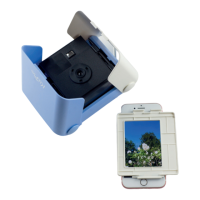
• Make sure that the person icon printed on the white frame is the right way up when
you frame your picure before placing it on the KiiPix wings and printing.
• The small reective mirror on the KiiPix can also show you which way round your
photo will print. As pinhole cameras reverse the image, with the KiiPix positioned
so that the dial and shutter botton are on the right hand side of the printer your
picture should appear to be upside down in the mirror.
My picture rotates when I lay the frame on the wings
• Turn your screen lock on to prevent the screen rotating.
My screen goes dark before I can print my picture
• Turn off auto-lock via your phone settings.
What if I get a phone call or notication when printing?
• To prevent interruptions when you are printing your picture activate ‘airplane’ or ‘Do
Not Disturb’ mode on your phone.
Will the KiiPix work with phones with premium glass screen protector?
• Yes! Your KiiPix will work with phones protected by a premium glass screen cover
tted however best results are achieved with no screen protector. Lower quality,
cheaper screen protectors can signicantly affect the quality of your prints.
Will the KiiPix work with all type of phones?
• The KiiPix will work with any phone that ts on the frame. Phones that have a
smaller screen size than the KiiPix print area will have black areas where there is no
image to print.
HINTS AND TIPS FOR PERFECT PRINTS
There are bright shadows near the edges of my picture printout
• If you are printing your picture in a very bright environment it is possible to have
some light spillage on your picture printout. To prevent this move to a less bright
location or cover the open sides of the KiiPix when pressing the shutter to prevent
excess light leaking onto your picture.
The lm in my KiiPix has jammed
• If the lm gets jammed, remove the lm case and one photo then re-insert. This
should be performed in a darkened room to reduce the risk of damage to the
remaining unused photos.


 To Previous Page
 Loading...