STEP TWO
Set your phone screen brightness to maximum,
turn off auto-lock to prevent your phone going into
standby mode and activate screen lock to keep your
screen from rotating.
This guide takes you through the process of
printing a picture and assumes you have already
installed your lm cartridge.
For instructions on how to insert lm cartridges please
refer to your Quick Start Guide.
For a complete User Manual, FAQs, trouble shooting
and care instructions visit www.tomy.com/kiipix
STEP ONE
Fully open the wings on your KiiPix and slide the
white frame from the central cover. The lens will
‘pop-up’ ready to print your image. Close the wings
until you hear them ‘click’ into place. The wings are
now ready to sit the frame on top in step 3.
STEP FOUR
Use the reective mirror to ensure photo is aligned
correctly and the screen is still on. Press the shutter
button making sure it is pressed down fully before
releasing.
STEP FIVE
As soon as you release the shutter, continually turn
the print dial in a clockwise direction until the lm is
released. It is not necessary to remove the KiiPix
frame and your phone from the wings before turning
the dial.
STEP THREE
Place the KiiPix frame on your phone and then
place on top of the KiiPix making sure to align the
double and single locating lugs on the frame and
KiiPix wings. If this is the rst time you are using the
frame, remember to remove the plastic protectors
on the anti-slip strips.
TIPS:
• Put your phone into ‘airplane’ mode to prevent
interruptions.
• If your image is printing too dark try increasing
the brightness of the image in in photo settings.
• Make sure that the background light is not too
strong or too dark (normal room light is perfect).
Strong outdoor sunlight or a dark room will affect
the picture quality.
TIPS:
• A person icon is printed on the white frame to
show you what way round your image will print.
• The white frame has two hooks on one end and
a single wider hook on the other. These align
with the locating lugs on the wings. When the
frame is in the correct position it will ‘lock’ in
place to stop the frame moving.
TIPS:
• Hold the phone on the frame to prevent
movement when you press the shutter.
• Use the KiiPix when it is placed on a solid
surface for best results.
TOP FILM TIPS
• You can store lm in the fridge for longevity. Just
remember to take it out 12 hours before using it
so the lm can reach room temperatire again.
• Do not put any pressure or press on the lm as
this will damage it.
• Do not shake the lm.
PRINTING YOUR PICTURE
IN JUST 5 STEPS

 Need help?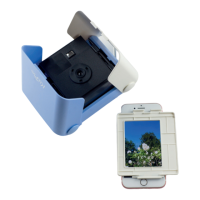

 To Next Page
 General