4. PROCESS/WORKFLOW
4.1 BREWING – MAIN BREW HEAD
Place coffee, tea or oth-
er product to be brewed
into a paper fi lter with-
in the brew basket and
place basket into the
holders below the spray-
head. Place an empty container in place be-
low the basket assuringall applicable brewer
dispense points align with vesselopening(s).
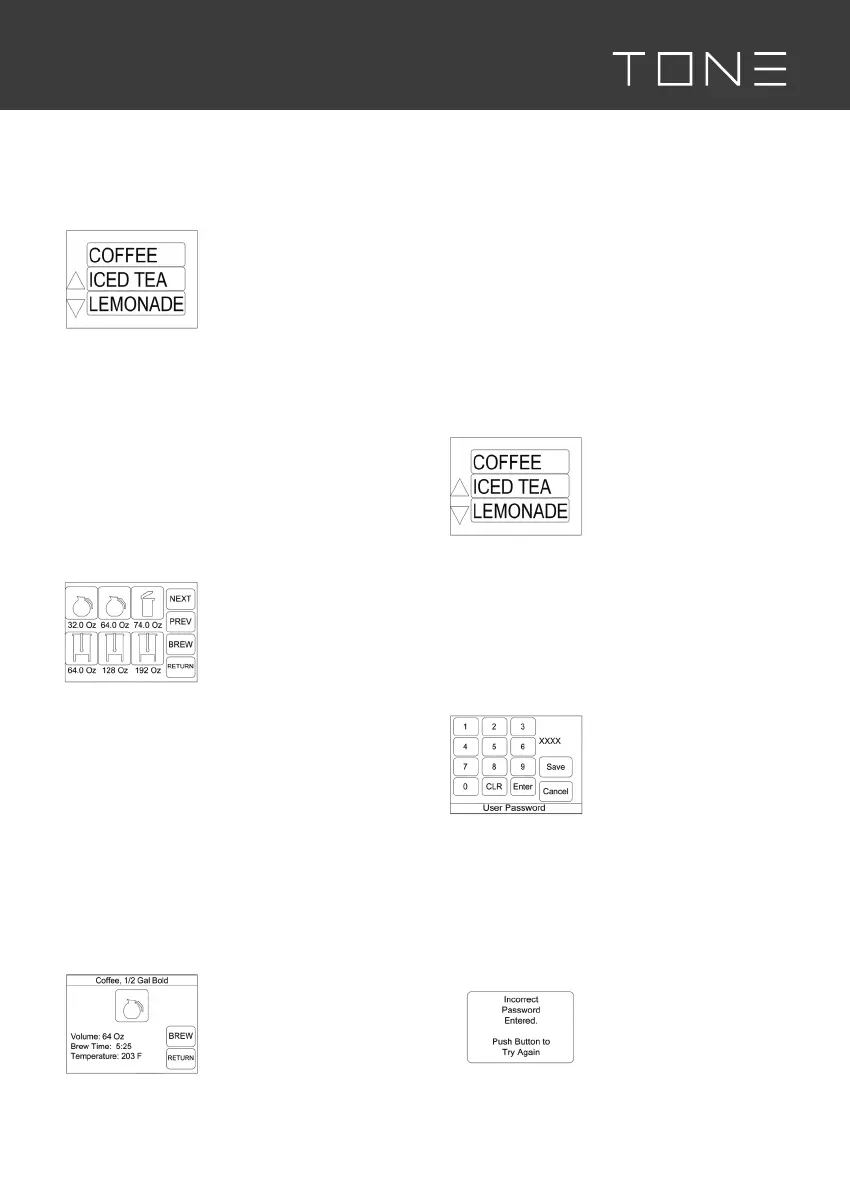
Select desired beverage type from the ‘bev-
erage selection’ screen. If an energy save
screen, a FRESH BREWED COFFEE screen,
or other screen is displayed, simply touch
the screen to return to the ‘beverage selec-
tion’ screen. Selecting beverage type will
take you to a ‘recipe selection’ screen.
On the ‘recipe selection’
screen, select the bever-
age size to be brewed by
pressing the appropriate
icon key. Various picto-
rial or descriptive icons
will be displayed with
the volume of the brew below to help dis-
tinguish between recipes. Dependent on the
number of active recipes within a beverage
type, there may be more than one screen of
recipes available. Use the next and previous
keys to navigate among multiple screens if
applicable. Press return to go back to the
beverage selection screen if desired.
After selecting a recipe to brew, the ‘recipe
detail’ screen will display providing more
details for the selected brew.
The ‘recipe detail’ screen
provides summary rec-
ipe information for the
chosen brew cycle in-
cluding a recipe name/
description, brew vol-
ume, time and tempera-
ture. Press the brew button to immediately
start the brew cycle. Press return to return
to the main/standby screen if desired. If unit
has been idle for some time, a tank fi lling
screen may display as the tank is refi lled. A
heating screen will display, if the recipe tem-
perature is set higher than the current tank
temperature, while the brewer heats. The
brew cycle may be canceled at any point
by touching the heating or brewing screen
when displayed.
4.2 PROGRAMMING – MAIN BREW
HEAD
To enter programming
mode, press the upper
left corner (indicated
with dashed lines) of
the ‘beverage selec-
tion’ screen and hold
for 3-4 seconds. A beep
will sound if beeper is enabled. Release the
touch screen. Many of the steps outlined
below are applicable to programming of
the side brew arm spray heads. Applicable
sections below are the calibration and reci-
pe sections. Other settings are controlled by
the main brew head settings.
A ‘User Password’
screen with keypad will
be displayed. Type in the
4 digit user password
(3650). The entered
number will display in
the blank area in the upper right side of the
screen as you type it. Press enter. CLR will
clear entry without exiting the screen.
Pressing cancel will exit the screen.
It is not possible to save the user password.
The following screen
displays if the incorrect
value is entered. Push
the large button on the
display and you will be
returned to the user
password screen to try again. Enter the
correct password.



 To Next Page