
 Need help?
Do you have a question about the Tongdy MSD Series and is the answer not in the manual?
Instructions on installing USR-VCOM and creating virtual serial ports for RJ45 communication.
Steps to configure PC network settings (IP and gateway) for connecting to the device.
Detailed configuration of USR-K2 parameters including Local IP Config and RS232/RS485 settings.
The MSD Indoor Air Quality Detector is a commercial-grade device designed for comprehensive air quality monitoring. With over a decade of experience in IAQ product design and production, this detector offers robust performance and reliability, having been extensively exported to Europe and America. It is engineered with rigorous design principles, professional testing, and calibration to ensure accuracy and consistency in commercial environments.
The MSD detector serves as a versatile tool for real-time monitoring of various indoor air quality parameters. It is designed to be a cost-effective alternative to more expensive professional instruments, while still coordinating seamlessly with data collection and analysis systems. This allows for multi-purpose monitoring placements, making it suitable for a wide range of applications.
The device is particularly well-suited for intelligent buildings, smart home systems, and dedicated air quality data collection systems. It also plays a crucial role in green building evaluation systems and advanced ventilation systems, providing essential data to maintain healthy indoor environments.
The MSD detector is designed for easy installation and configuration. To install the device, the backboard is first separated from the detector by rotating it clockwise. A screwdriver is then used to pry open the threading hole on the backboard, allowing the cable from the wall to pass through. The terminal block is unplugged from the contact pin, the cable is connected to the terminal block, and the mounting screw is tightened. Finally, the terminal block is plugged back into the contact pin, and the detector is aligned with the vertical lines on the backboard and rotated until it is tight.
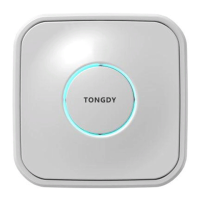
The device features a circular indicator light in the center of its housing, which visually represents the concentration range of measured values. This indicator light can be controlled by any of the measured values, such as PM2.5, CO2, or TVOC, via RS485 communication commands. The color of the light changes depending on the concentration level, providing an intuitive visual cue of air quality. Users can also select whether the indicator light's change is based on a one-minute average, one-hour average, or 24-hour average value. By default, the indicator light is controlled by the one-minute average value of PM2.5. DIP switches allow for further control, enabling the indicator light to be constantly on (green) or turned off entirely.
For models equipped with Wi-Fi, the device offers convenient wireless connectivity. A reset button located in a hole on the side of the MSD allows users to reset the device's Wi-Fi settings. After powering on the MSD, a thin rod can be inserted into the RESET hole and held for 6 seconds to initiate the reset. To configure Wi-Fi, users open the WLAN function on their mobile device, search for "MXCHIP_" hotspots, and connect. The device's unique serial number will be displayed on the Wi-Fi module's surface. Users then access the device's settings via a browser, typically at 10.10.10.1, and log in with default credentials (admin/admin). From the Wi-Fi module settings interface, users can select "Station Mode" and save the setting. The device will then prompt for a restart, which should be deferred until all parameters are set. Users can then scan for and connect to their desired Wi-Fi hotspot, entering a password if encryption is enabled. Finally, network settings, including protocol (TCP Client) and server address/port for data upload, are configured and saved, followed by a module restart. Once configured, the device can upload monitoring data to a corresponding server site for user access.
For models with RJ45 connectivity, the device supports Modbus RS485 communication. To set up RJ45 communications, users first install USR-VCOM and Modbus Poll software on their PC. The USR-K2 network port can be restored to factory settings by holding down the RESET button on the device while powering it on, then releasing after 5 seconds. The USR-VCOM software automatically detects the device, allowing users to create a virtual serial port. The PC's IP and gateway settings must be configured to be in the same frequency band as the USR-K2 port. This involves accessing the local connection properties and setting the "Internet protocol version 4 (TCP/IPv4)" parameters. Finally, the USR-K2 parameters are configured via a web browser by accessing the device's IP address (e.g., 192.168.0.7) and logging in. Within the interface, users set the "Local IP Config" to "DHCP/Auto IP" and configure the "RS232/RS485" settings according to the QLEAR site requirements or other data collection systems. After saving all settings, the module is reset, and the device can then upload monitoring data to the QLEAR site via Ethernet.
To ensure optimal performance and longevity, the MSD detector requires periodic maintenance. The product should be maintained every six months after initial use. In environments with significant decoration or gray matter, or in larger spaces, the maintenance interval should be shortened.
Maintenance procedures include cleaning the strainer and using an air pump or air suction tube to remove dust from inside the product. If the device has been placed on a construction site, it needs to be maintained to ensure normal operation. If measured value deviation occurs, or if embedded dust and debris cannot be cleaned, the device should be returned to the factory for re-cleaning and calibration (paid maintenance).
It is important to note that the MSD is a precise measuring device. If customers plan to decorate the house after installation, the unit should be protected by wrappings to prevent paint coating and dust from entering. The MSD cover should not be painted with other pigments, and care should be taken to avoid plugging the stoma or allowing paint to enter the MSD gas chamber.
The product's installation location should be carefully selected to prevent direct sunlight exposure and keep it away from heat sources, power sources, or electrostatic precipitator equipment, as these can affect product accuracy. The device should also be protected from dropping or impact, which can cause sensor beam deviation in the gas chamber and lead to CO2 measurement inaccuracies. Long-term exposure to high concentrations of total organic volatile gases should be avoided, as this can lead to sensor poisoning that may not be reversible, especially if concentrations exceed the MSD TVOC range.
When multiple MSDs are wired and connected and share a power supply, it is crucial to ensure that the power supply wiring uses the correct polarity at the same name, as incorrect connections can damage the equipment.
It is not recommended to use cigarette smoke to test PM2.5 measurements. Cigarette particles are predominantly in the 0.1 to 0.5 micron range, and the resolution of laser detection is significantly reduced for particles smaller than 0.3 microns. Therefore, cigarette concentration does not accurately represent true PM2.5 concentration. For instance, a burning cigarette in a sealed box can result in concentrations over 10000ug/m³, and blowing cigarette smoke into a sealed box can lead to concentrations over 5000ug/m³. Using cigarettes for PM2.5 measurements can cause substantial deviation in measured values.
The MSD is designed for ceiling and wall installations and is not intended for outdoor use.
 General
| Microwave Frequency | 10.525GHz |
|---|---|
| Operating Temperature | -20°C to +50°C |
| Output Signal | Relay output |
| Detection Method | Microwave |
| Alarm Output | NC/NO |
| Detection Principle | Doppler Effect |
| Operating Humidity | ≤95% RH |
| Power Supply | 12-24V DC |
| Operating Voltage | 12-24V DC |

 To Next Page