Always follow the instructions in this chapter in sequence.
Connect power
Caution
- Risk of product damage! Ensure that the power supply voltage
corresponds to the voltage printed on back or the underside of the
unit.
- Risk of electric shock! When you unplug the AC power cord, always
pull the plug from the socket. Never pull the cord.
- Before you connect the AC power cord, make sure that you have
completed all other connections.
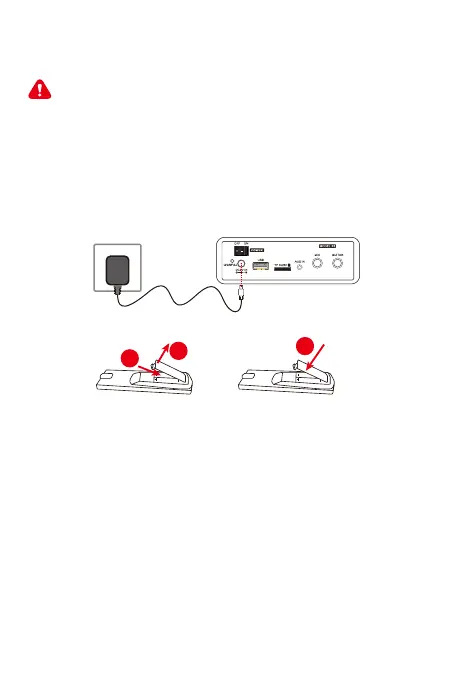
Connect the adapter cable to the wall socket:
Prepare the remote control
To insert the remote control batteries:
1. Open the battery compartment.
2. Insert 2xAAA batteries with correct polarity (+/-) as indicated. The
2xAAA battery not include in our products, please purchase from
Authorized Seller.
3. Close the battery compartment.
Please Note:
- If you are not going to use the remote for a long time,remove the
batteries.
- Do not use old and new or different type of batteries in
combination.
- Batteries contain chemical substances, so they should be disposed
of properly.
1
06
2
3


 To Next Page