EasyManua.ls Logo

Toolkraft 910A - Table Adjustment and Blade Squaring; Table Adjustment Procedures; Blade Squaring and Alignment

Default Icon
25 pages
Print Icon
To Next Page IconTo Next Page
To Previous Page IconTo Previous Page
Loading...
tabie
support
and
base
and
install the
remaining
square
nuts
and
nut
retainers
as
shown
in Fig.
6.
Lay
the
remaining
table
sections
behind
the
S"
section
in
the following
order:
slotted
6" section,
4%"
section,
6"
section
and
fence.
Tighten
the
table
clamp
screws.
__
THEN SQUARE
BLADE
WITH
TABLE:
(FIGURE
13)
I.
Place
the
blade
in
the
cut
off
position,
move
the
cutting
head
forward
over
the
center
of
the
front
table
section
and
lock all
clamps.
2.
Place a
square
against
the
saw
blade
so
that
the
edge
rests between
the gullets
of
the
blade
and
not
against
the
teeth.
3.
If
the
blade
is
not
square,
loosen
the
hex bolts
on
both
sides
of
the
bevel index pin
bracket
and
loosen
the
bevel tilt lock. Tilt
the
motor
by
hand
until the
blade
is
flush
against
the
edge
of
the
square.
See Fig. 13.
4.
Tighten
the
bevel tilt lock
to
hold
the
saw
in
square
position
and
then
tighten
the
hex
bolts
on
both
sides
of
the
index pin
bracket.
5.
Loosen
the
screw
on
the
bevel tilt
pointer,
set
the
pointer
at
location
on
the
bevel tilt scale
and
tighten
the
screw.
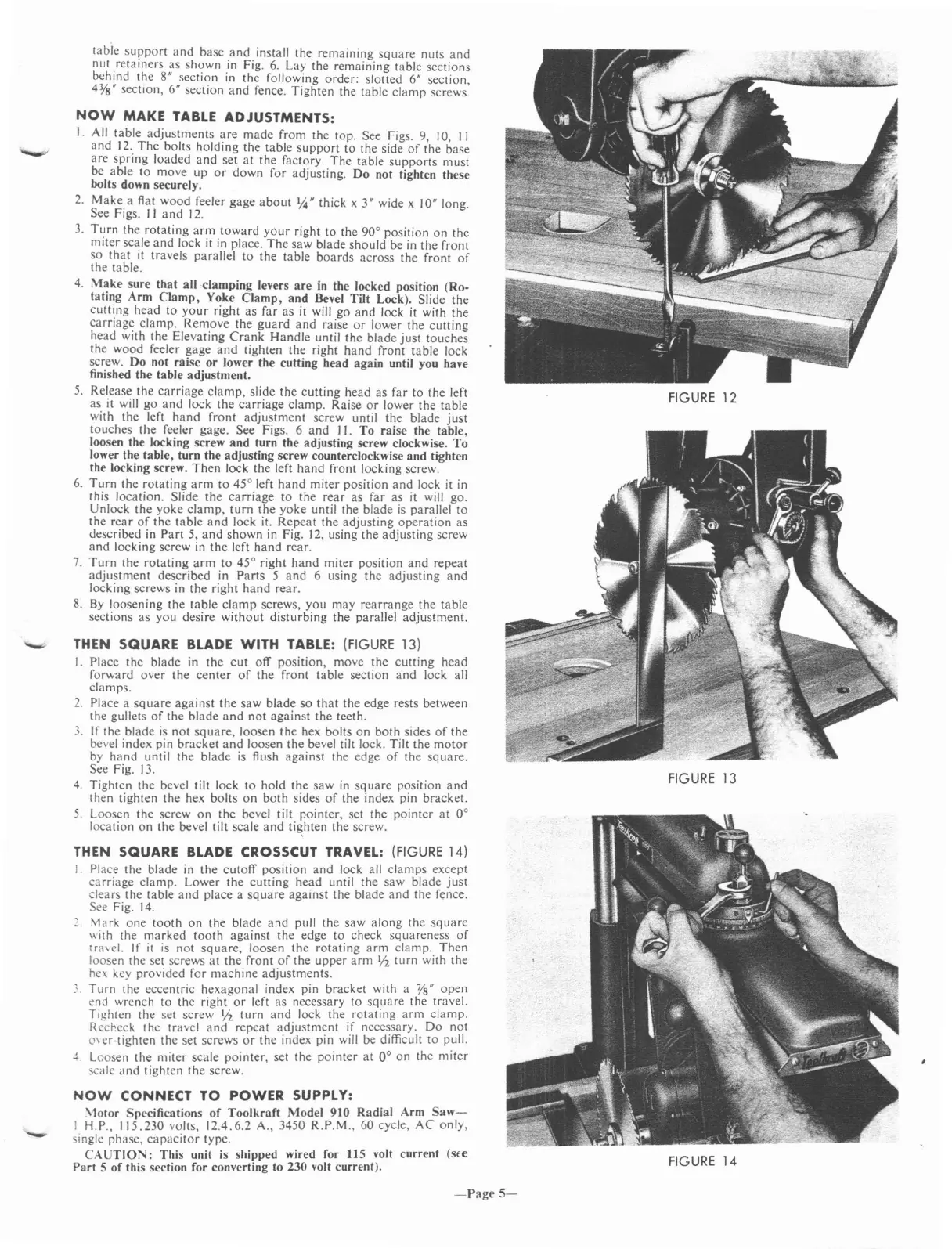
FIGURE
12
FIGURE
14
FIGURE
13
THEN SQUARE
BLADE
CROSSCUT TRAVEL:
(FIGURE
14)
I.
Place
the
blade
in
the
cutoff
position
and
lock all
clamps
except
carriage
clamp.
Lower
the
cutting
head
until
the
saw
blade
just
clears
the
table
and
place
a
square
against
the
blade
and
the
fence.
See Fig.
14.
2.
Mark
one
tooth
on
the
blade
and
pull
the
saw
along
the
square
"ith
the
marked
tooth
against
the
edge
to
check
squareness
of
tra\el.
If
it
is
not
square,
loosen
the
rotating
arm
clamp.
Then
loosen
the
set screws
at
the
front
of
the
upper
arm
Y2
turn
with
the
hex key
provided
for
machine
adjustments
.
..
Turn
the
eccentric
hexagonal
index pin
bracket
with a
Ys"
open
end
wrench
to
the
right
or
left
as
necessary to
square
the
travel.
Tighten
the set
screw
Y2
turn
and
lock
the
rotating
arm
clamp.
Recheck
the
travel
and
repeat
adjustment
if necessary.
Do
not
o\er-tighten
the
set screws
or
the
index pin will be difficult
to
pull.
J.
Loosen
the
miter
scale
pointer,
set
the
pointer
at
on
the
miter
scale
and
tighten
the
screw.
NOW
CONNECT
TO
POWER SUPPLY:
\totor
Specifications
of
Toolkrafl
Model
910
Radial
Arm
Saw-
I H.P.,
115.230
volts,
12.4.6.2
A., 3450
R.P.M.,
60 cycle,
AC
only,
single
phase,
capacitor
type.
CAUTION:
This
unit is
shipped
wired for 115 voll
current
(s£e
Part
5
of
this section for converting to 230 voll
current).
NOW
MAKE
TABLE
ADJUSTMENTS:
1.
All
table
adjustments
are
made
from
the
top.
See Figs. 9, 10, II
and
12.
The
bolts
holding
the
table
support
to
the side
of
the
base
are
spring
loaded
and
set
at
the
factory.
The
table
supports
must
be
able
to
move
up
or
down
for
adjusting.
Do
not tighten these
bolts down securely.
2.
Make
a flat
wood
feeler
gage
about
'4" thick x 3" wide x 10" long.
See Figs.
II
and
12.
3.
Turn
the
rotating
arm
toward
yOur right
to
the
90°
position
on
the
miter
scale
and
lock it in place.
The
saw
blade
should
be in
the
front
so
that
it
travels
parallel
to
the
table
boards
across
the
front
of
the
table.
4.
Make
sure
that
all
clamping
levers
are
in the locked position
(Ro-
tating
Arm
Clamp,
Yoke
Clamp,
and
Bevel
Tilt
Lock). Slide
the
cutting
head
to
your
right
as
far
as
it will
go
and
lock
it
with
the
carriage
clamp.
Remove
the
guard
and
raise
or
lower
the
cutting
head
with
the
Elevating
Crank
Handle
until
the
blade
just
touches
the
wood
feeler
gage
and
tighten
the
right
hand
front
table
lock
screw.
Do
not
raise
or
lower the
cutting
head
again
until you have
finished the
table
adjustment.
5.
Release
the
carriage
clamp,
slide
the
cutting
head
as
far
to
the
left
as
it will
go
and
lock
the
carriage
clamp.
Raise
or
lower
the
table
with
the
left
hand
front
adjustment
screw until
the
blade
just
touches
the
feeler gage. See Figs. 6
and
)
1.
To
raise
the
table,
loosen the locking screw
and
turn
the
adjusting screw clockwise.
To
lower the
table,
turn
the
adjusting
screw counterclockwise
and
tighten
the locking screw.
Then
lock
the
left
hand
front
locking screw.
6.
Turn
the
rotating
arm
to
45°
left
hand
miter
position
and
lock
it
in
this
location.
Slide
the
carriage
to
the
rear
as
far
as
it
will
go.
Unlock
the
yoke
clamp,
turn
the
yoke
until
the
blade
is
parallel
to
the
rear
of
the
table
and
lock it.
Repeat
the
adjusting
operation
as
described in
Part
5,
and
shown
in
Fig. 12, using
the
adjusting
screw
and
locking
screw in
the
left
hand
rear.
7.
Turn
the
rotating
arm
to
45°
right
hand
miter
position
and
repeat
adjustment
described
in
Parts
5
and
6 using
the
adjusting
and
locking
screws in
the
right
hand
rear.
S.
By
loosening
the
table
clamp
screws,
you
may
rearrange
the
table
sections
as
you
desire
without
disturbing
the
parallel
adjustment.
-
-Page
5-