EasyManua.ls Logo

Toolkraft 910A - Bevel Tilt Lock Handle Adjustment; Yoke-Motor Bracket and Pedestal Adjustments; Yoke-Motor Bracket Play Removal

Default Icon
25 pages
Print Icon
To Next Page IconTo Next Page
To Previous Page IconTo Previous Page
Loading...
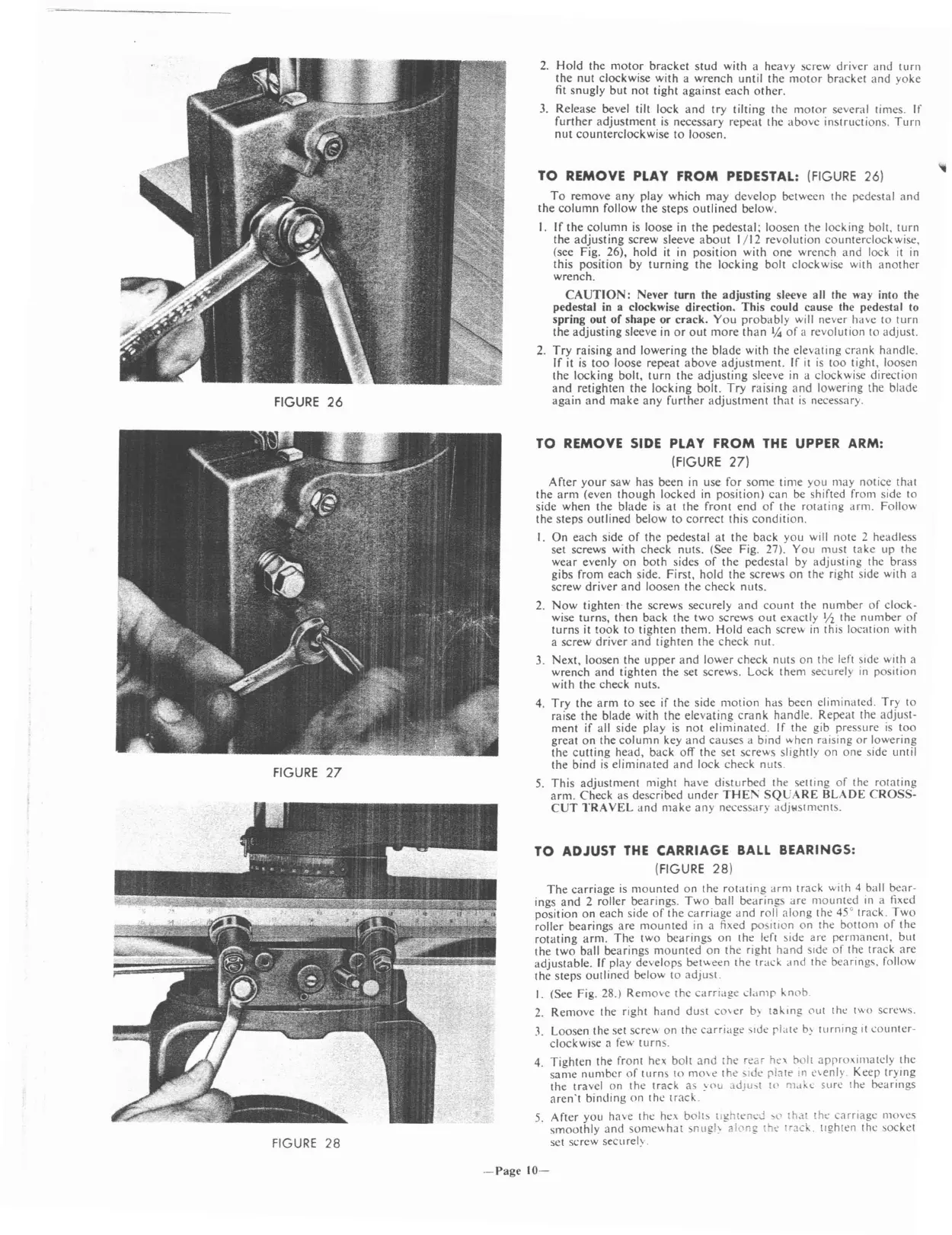
FIGURE
26
FIGURE
27
FIGURE
28
2.
Hold
the
motor
bracket
stud
with
a
heavy
screw
driver
and
turn
the
nut
clockwise
with
a
wrench
until
the
motor
bracket
and
yoke
fit
snugly
but
not
tight
against
each
other.
3.
Release
bevel
tilt
lock
and
try
tilting
the
motor
several
times.
If
further
adjustment
is
necessary
repeat
the
above
instructions.
Turn
nut
counterclockwise
to
loosen.
TO
REMOVE PLAY
FROM
PEDESTAL: (FIGURE 26)
To
remove
any
play
which
may
develop
between
the
pedestal
and
the
column
follow
the
steps
outlined
below.
I.
If
the
column
is
loose
in
the
pedestal;
loosen
the
locking
bolt.
turn
the
adjusting
screw
sleeve
about
1/12
revolution
counterclockwise,
(see
Fig.
26),
hold
it in
position
with
one
wrench
and
lock
it
in
this
position
by
turning
the
locking
bolt
clockwise
with
another
wrench.
CAUTION:
Never
turn
the
adjusting
sleeve all
the
way into
the
pedestal
in a
clockwise
direction.
This
could
cause
the
pedestal
to
spring
out
of
shape
or
crack.
You
probably
will
never
have
to
turn
the
adjusting
sleeve in
or
out
more
than
'/.s
of
a
revolution
to
adjust.
2.
Try
raising
and
lowering
the
blade
with
the
elevating
crank
handle.
If
it is
too
loose
repeat
above
adjustment.
If
it
is
too
tight,
loosen
the
locking
bolt,
turn
the
adjusting
sleeve in a
clockwise
direction
and
retighten
the
locking
bolt.
Try
raising
and
lowering
the
blade
again
and
make
any
further
adjustment
that
is
necessary.
TO REMOVE SIDE PLAY
FROM
THE
UPPER ARM:
(FIGURE
27)
After
your
saw
has
been
in use
for
some
time
you
may
notice
that
the
arm
(even
though
locked
in
position)
can
be
shifted
from side
to
side
when
the
blade
is
at
the
front
end
of
the
rotating
arm.
Follow
the
steps
outlined
below
to
correct
this
condition.
I.
On
each
side
of
the
pedestal
at
the
back
you
will
note
2
headless
set
screws
with
check
nuts.
(See
Fig. 27).
You
must
take
up
the
wear
evenly
on
both
sides
of
the
pedestal
by
adjusting
the
brass
gibs
from
each
side.
First,
hold
the
screws
on
the
right
side
with
a
screw
driver
and
loosen
the
check
nuts.
2.
Now
tighten
the
screws
securely
and
count
the
number
of
clock-
wise
turns,
then
back
the
two
screws
out
exactly
'/2
the
number
of
turns
it
took
to
tighten
them.
Hold
each
screw
in this
location
with
a
screw
driver
and
tighten
the
check
nut.
3.
Next,
loosen
the
upper
and
lower
check
nuts
on
the
left
side
with a
wrench
and
tighten
the
set
screws.
Lock
them
securely
in
position
with
the
check
nuts.
4.
Try
the
arm
to
see
if
the
side
motion
has
been
eliminated.
Try
to
raise
the
blade
with
the
elevating
crank
handle.
Repeat
the
adjust-
ment
if
all
side
play
is
not
eliminated.
If
the
gib
pressure
is
too
great
on
the
column
key
and
causes
a
bind
"hen
raising
or
lowering
the
cutting
head,
back
off
the
set
screws
slightly
on
one
side
until
the
bind
is
eliminated
and
lock
check
nuts.
5.
This
adjustment
might
have
disturbed
the
setting
of
the
rotating
arm.
Check
as
described
under
THE1'\
SQLJARE
BLADE
CROSS-
CUT
TRAVEL
and
make
any
necessary
adjlolstments.
TO ADJUST
THE
CARRIAGE
BALL
BEARINGS:
(FIGURE
28)
The
carriage
is
mounted
on
the
rotating
arm
track
with 4 ball
bear-
ings
and
2
roller
bearings.
Two
ball
bearings
are
mounted
in a fixed
position
on
each
side
of
the
carriage
and
roll
along
the
45°
track.
Two
roller
bearings
are
mounted
in a fixed
position
on
the
bOllom
of
the
rotating
arm.
The
two
bearings
on
the
left side
are
permanent,
but
the
two
ball
bearings
mounted
on
the
right
hand
SIde
of
the
track
are
adjustable.
If
play
develops
bet"een
the
track
and
the
bearings.
follow
the
steps
outlined
below
to
adjust.
I.
(See Fig. 28.)
Remove
the
carriage
damr
knob.
2.
Remove
the
right
hand
dust
cover
b\
taking
(\ut
the
two screws.
J.
Loosen
the
set
sere'"
on
the
carriage
SIde
rlate
b~
turning
It
counter-
clockwise
<l
few
turns.
4.
Tighten
the
front
hex
bolt
and
the
rear
he'
boll
aprroxill1ately
the
same
number
of
turns
to
move
the
Sltle
rlate
In
e\enly.
Keep
trying
the
travel
on
the
track
as
~()U
3J)U>t
l<'
mdke
surc
the
bearings
aren't
binding
on
the
track.
5.
After
you
have
the
he>.
bolts
tlghlen"J
>t' th,l
the
carriage
moves
smoothly
and
some"
hat
snuglY al(\ng
the
track.
tIghten the
socket
set
scrcw
securel~
.
-Page
10-