Customer Helpline 1300 889 028
12
Operating Instructions
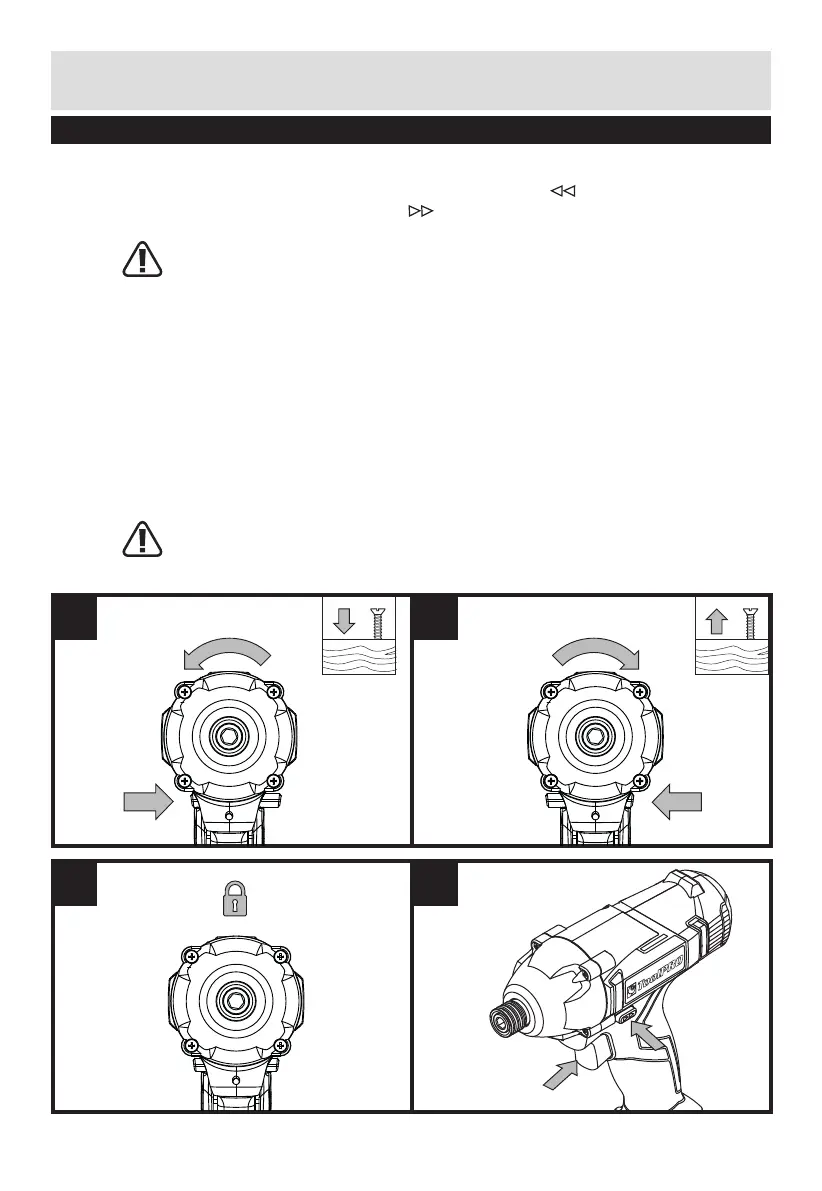
5. REVERSIBLE (SEE FIG E1, E2)
For drilling and screw driving use forward rotation marked “ ” (lever is moved to the
left). Only use reverse rotation marked “ ” (lever is moved to the right) to remove
screws or release a jammed drill bit.
WARNING: Never change the direction of rotation when the chuck is rotating, wait
until it has stopped!
6. SWITCH LOCK (SEE FIG F)
The switch trigger can be locked in the OFF position. This helps to reduce the possibility
of accidental starting when not in use. To lock the switch trigger, place the rotation
control in the center position.
7. ON/OFF SWITCH (SEE FIG G)
Depress to start and release to stop your driver.
The On/Off Switch is fitted with a brake function which stops your chuck immediately
when you quickly release the switch.
It is also a variable speed switch that delivers higher speed and torque with increased
trigger pressure. Speed is controlled by the amount of switch trigger depression.
WARNING: Do not operate for long periods at low speed because excess heat will
be produced internally.
E1
F
E2
G



 To Next Page