EasyManua.ls Logo

TOOLSTATION Hawksmoor CLM36LW - User Manual

TOOLSTATION Hawksmoor CLM36LW
24 pages
Print Icon
To Next Page IconTo Next Page
Loading...
Original User’s Instructions
36V (2x18V) 34cm Cordless Lawnmower
SKU: 44788
PLEASE KEEP THESE INSTRUCTIONS FOR FURTHER REFERENCE
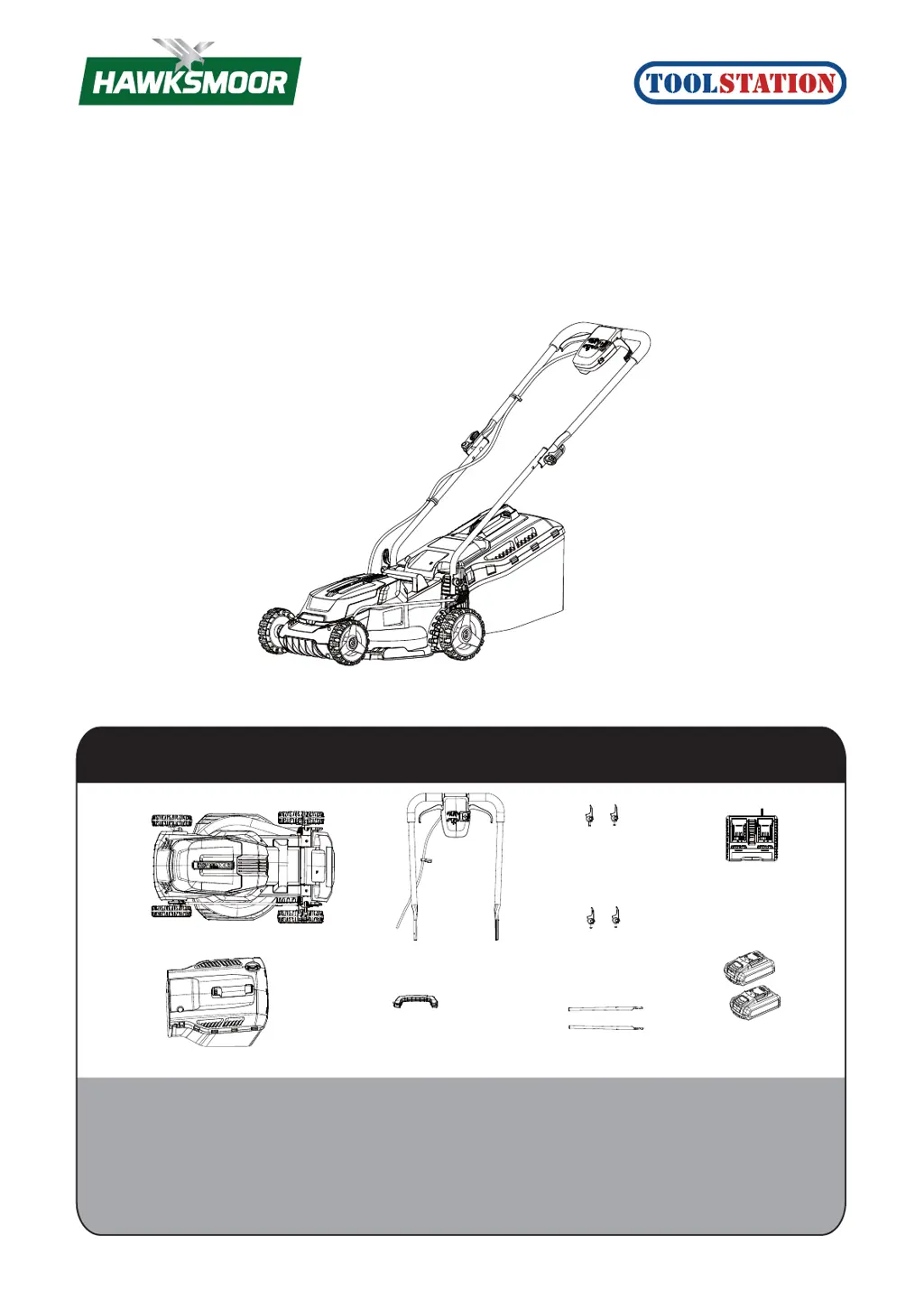
WHAT’S IN THE BOX
If you do not have all these items, please contact:
www.toolstation.com/contact
Telephone 0345 6460997
Email info@toolstation.com
Mower x 1
Upper hadnle x 1
Upper handle
locking knob
with washer x 2
Lower handle
locking knob
with washer x 2
Lower handle x 2
Grip handle for
grass collection bag x 1
Grass collection bag x 1
Charger x 1
Battery pack x 2

Questions and Answers

  • R
    Rebekah WilsonAug 13, 2025
    What to do if my TOOLSTATION Lawn Mower does not work or stops suddenly?
    • P
      paliAug 13, 2025
      If your TOOLSTATION Lawn Mower suddenly stops or doesn't work, it might be due to several reasons. Check underneath the mower for any clogging and clear it out wearing gardening gloves. Ensure the battery is fully charged and properly inserted. If the grass is too long, increase the cutting height and tilt the machine to reduce the starting load. Also, verify that the safety key is correctly fitted and not damaged. The motor protector might have activated; allow the motor to cool or increase the cutting height. If the battery is too hot or cold, let it cool or warm to the proper temperature.
  • K
    Kristen GarciaAug 16, 2025
    Why is the area of cut not large enough with my TOOLSTATION Hawksmoor CLM36LW Lawn Mower?
    • J
      Joseph DouglasAug 16, 2025
      If the area cut by your TOOLSTATION Lawn Mower isn't large enough on a single battery charge, try increasing the cutting height and walking slower. This issue can also arise if the grass is too high, wet, damp, or dense. Adjusting the cutting height, slowing your pace, and mowing more frequently can help. Waiting until the grass is dry before cutting can also extend battery duration.
  • S
    Scott OlsonAug 20, 2025
    How to fix a ragged finish with my TOOLSTATION Hawksmoor CLM36LW?
    • L
      Lauren CabreraAug 20, 2025
      If your TOOLSTATION Lawn Mower is leaving a ragged finish, the cutting height might be too low; try increasing it. Also, check underneath the machine for any clogging and clear it if necessary, always wearing gardening gloves.
  • B
    Brian BakerAug 25, 2025
    What to do if the cutting blade is not rotating on my TOOLSTATION Lawn Mower?
    • C
      Christopher KellerAug 25, 2025
      If your TOOLSTATION Lawn Mower's cutting blade isn't rotating when the machine is switched on, switch off the machine and check for any obstructions, removing them while wearing gardening gloves. Also, make sure the blade nut and bolts are tightened properly.
  • T
    Tyler BarryAug 27, 2025
    Why is my TOOLSTATION Lawn Mower making excessive vibrations or noise?
    • G
      Gina AlvarezAug 27, 2025
      If your TOOLSTATION Lawn Mower is producing excessive vibrations or noise, ensure the blade nut and bolts are tightened.
  • J
    Jeffery WalkerAug 31, 2025
    What to do if the charge control LED doesn't light up on my TOOLSTATION Hawksmoor CLM36LW?
    • J
      John SmithSep 1, 2025
      If the charge control LED does not light up after inserting the mains plug into the socket for your TOOLSTATION Lawn Mower, ensure the mains plug of the battery charger is fully inserted into the socket outlet. Also, check the power supply voltage and the battery charger.
  • M
    Michael VegaSep 4, 2025
    Why does my TOOLSTATION Lawn Mower function intermittently?
    • M
      Michael LittleSep 4, 2025
      If your TOOLSTATION Lawn Mower functions intermittently, the motor protector may have activated; allow the motor to cool, or increase the height of cut.
  • M
    Michaela SmithSep 7, 2025
    What to do if there is no charging procedure possible for my TOOLSTATION Hawksmoor CLM36LW?
    • R
      Russell LawrenceSep 7, 2025
      If no charging procedure is possible for your TOOLSTATION Lawn Mower, clean the battery contacts by inserting and removing the battery several times.

Summary

HEALTH AND SAFETY

GENERAL SAFETY WARNINGS

General safety advice and warnings for operating the lawnmower.

SAFETY WARNINGS FOR BATTERY PACK

Crucial safety guidelines for handling and charging battery packs.

GENERAL SAFETY WARNINGS FOR BATTERY CHARGER

Safety instructions specific to the battery charger unit.

Additional safety instructions for your battery charger

Further specific safety advice for operating the battery charger.

ASSEMBLY AND USE

Intended Use

Specifies the intended domestic use of the lawnmower.

FITTING THE HANDLE

Step-by-step guide for assembling the lawnmower handles.

GRASS COLLECTION BAG ASSEMBLY

Instructions on how to assemble the grass collection bag.

FITTING THE GRASS COLLECTION BAG TO THE MOWER

Guide on attaching the assembled grass collection bag to the mower.

ADJUSTING THE CUTTING HEIGHT

Instructions for adjusting the lawnmower's cutting height.

CHARGING PROCEDURE

Step-by-step guide for charging the battery packs.

OPERATION

General operational procedures for using the lawnmower.

MOWING TIPS

Advice for effective mowing, including handling different grass conditions.

CARE AND CLEANING

REGULAR MAINTENANCE WORK

Routine checks and tasks to keep the lawnmower in good working order.

CLEANING THE MOWER

Instructions on how to clean the lawnmower safely and effectively.

CHECKING AND RENEWING THE CUTTING BLADE

Procedures for inspecting, sharpening, or replacing the cutting blade.

BLADE SHARPENING

Detailed guide on how to sharpen the lawnmower blade.

STORAGE

Guidelines for safe and proper storage of the lawnmower and battery.

TROUBLE SHOOTING

GUARANTEE

CUSTOMER SUPPORT

TOOLSTATION Hawksmoor CLM36LW Specifications

General IconGeneral
BrandTOOLSTATION
ModelHawksmoor CLM36LW
CategoryLawn Mower
LanguageEnglish

Related product manuals