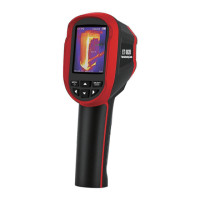
This document describes a thermal imaging camera, model ET 692B, designed for surface temperature measurement and real-time thermal imaging. It integrates a visible light camera to enhance image differentiation and allows for the storage of both thermal and visible images. The device is compact, easy to operate, and suitable for various applications including electric power, electronic manufacturing, and industrial inspection.
Function Description
The thermal imaging camera captures infrared thermal images and measures surface temperatures. Unlike traditional inferred thermometers that require individual component measurement, this device displays potential problems clearly on a color screen, saving time. A central point measurement cursor quickly and accurately locates and measures the temperature of the target object. The product supports image overlapping, which combines visible and infrared images to better understand temperature distribution and share information. It also offers video recording capabilities.
Important Technical Specifications
- Infrared Detector Type: Vanadium Oxide Uncooled Infrared Focal Plane
- Infrared Resolution: 160x120
- Infrared Response Band: 8 to 14µm
- Cell Size: 12µm
- NETD: ≤50mK @25 °C, @F/1.1
- Lens Focal Length: 3.2mm
- IFOV: 3.75mrad
- Field Angle: 35°×27°
- Focus Mode: Free focus
- Temperature Measurement Range: -20 °C to +550 °C (-4 °F to 1022 °F)
- Measurement Accuracy: ±2 °C (35.6 °F) or ±2%
- Temperature Measurement Resolution: 0.1°C
- Temperature Measurement Mode: Center point/hot and cold spot tracking
- Color Palettes: Rainbow, iron oxide red, cold color, black & white, white & black
- Emissivity Setting: Adjustable from 0.01 to 1.00
- Thermal Imaging Frame Rate: ≤25Hz
- Visible Light Resolution: 640×480
- Display Size: 2.8-inch (240×320)
- Image Display Mode: Infrared/visible light/dual light fusion
- Lighting System: LED fill light
- Device Storage: Built-in 4G eMMC (user available storage space is about 3G)
- Storage Image/Video Format: JPG/MP4
- Image/Video Export Method: USB connection to computer export
- Image Analysis Function: Support offline analysis on PC
- Menu Language: English, Chinese, Italian, German
- Battery Type: Removable Rechargeable Lithium Battery (18650)
- Battery Capacity: 2200mAh
- Working Time: 2 to 3 hours
- Power Interface: Micro USB
- Power Configuration: 5 minutes / 20 minutes / no automatic shutdown
- Work Temperature: -10°C to +50°C
- Storage Temperature: -20°C to +60°C
- Relative Humidity: 10% to 85%RH (non-condensing)
- Product Weight: 389g
- Product Size: 96mm×72mm×226mm
Usage Features
The device features a user-friendly interface with a display screen, keypad, and handheld design.
Display Description:
The display shows:
- Temperature range: The overall range of temperatures being measured.
- Current emissivity: The emissivity value currently set (e.g., e=0.90).
- Battery power: An icon indicating the remaining battery life.
- Color code: A scale marking colors corresponding to relative temperatures from low to high.
- Central point temperature cursor: A white cursor indicating the central position on the screen, with its temperature value displayed in the top left corner.
- Highest temperature cursor: A red cursor indicating the highest temperature position, moving with the highest temperature, with its value displayed in the bottom left corner.
- Lowest temperature cursor: A red cursor indicating the lowest temperature position, moving with the lowest temperature, with its value displayed in the central position of the screen.
- Maximum/minimum value of field temperature: Displays the maximum and minimum temperatures detected in the current field of view.
- Time: Current time.
Key Description and Initial Operation:
- Menu key/On/off key: Used to access the main menu and power the device on/off. Press and hold for about 3 seconds to turn on/off.
- Selection key/Entry key: Used to confirm selections.
- Navigation key (Up, down, left, right): Used to navigate through menus and adjust settings.
- Image capture key: Press to capture an image. Long press for about 3 seconds to turn the LED lighting lamp on/off. Long press to start/stop video recording.
- Image/Visible Image Fusion: Use the left/right navigation keys to switch the degree of fusion between infrared thermal images and visible images (0%, 25%, 50%, 75%, and 100%).
- Image Output: Saved images can be viewed and output by connecting the device to a computer via Micro USB. Supported operating systems include WinXP, Win7, Win8, Win10, and Apple systems.
- Menu Navigation: Press the MENU key to access the main menu, which includes "Image overlapping," "Image," "Color palette," "Emissivity," and "Setting" submenus.
Menu Options:
- Image Overlapping: Allows adjustment of visible image shift to align with infrared images, enhancing understanding of temperature distribution.
- Image/Video Management: View and delete captured images and recorded videos.
- Color Palette: Select from five palettes (rainbow, iron red, cool, white hot, black hot) to optimize visual representation of thermal contrast for different applications.
- Emissivity Setting: Adjust emissivity from 0.01 to 1.00. Predefined modes include Coarse (0.95), Semi-matte (0.85), Semi-shiny (0.60), and Shiny (0.30) objects, plus a custom setting. Correct emissivity is crucial for accurate temperature measurement.
- Settings:
- Auto Shutdown: Configure automatic shutdown after 5 or 20 minutes, or disable it.
- Intensity Settings: Adjust screen brightness (low, medium, high).
- Language Settings: Select from English, Chinese, Italian, and German.
- Unit Setting: Choose between Celsius and Fahrenheit.
- Temperature Range Setting: Set the measurement range to low (-20°C to 120°C) or high (120°C to 550°C).
- Time Format Setting: Select 24-hour or AM/PM format.
- Time Setting: Adjust year, month, day, hour, minute, and second.
- Spot: Enable/disable the highest and lowest temperature cursors.
Maintenance Features
- Cleaning: The product's shell should be cleaned with a damp cloth or diluted soapy water. Abrasives, isopropyl alcohol, or solvents should not be used on the lens and screen. Professional optical lens cleaners are recommended for the lens.
- Lens Maintenance:
- Handle the infrared lens carefully due to its anti-reflection coating.
- Avoid forceful cleaning to prevent damage to the coating.
- Use alcohol-based commercial lens cleaners, alcohol, and a lint-free cloth or paper towel.
- Compressed air tanks can remove loose particles from the lens surface.
- To clean, blow loose particles, then gently wipe with an alcohol-dipped lint-free cloth in circular motions. Use a new cloth for repeated cleaning.
- Battery Charging:
- The device has built-in rechargeable 18650 lithium batteries.
- Charge promptly when the battery level is low using the Micro USB interface.
- Disconnect the USB cable after full charging.
- Avoid charging for more than 24 hours.
- Charge the device for at least two hours every three months to extend battery life.
- Do not charge in extremely cold environments.
- General Precautions:
- Do not assemble or dismantle the product without permission. Repairs should only be performed by designated technical personnel.
- Avoid direct exposure of the probe to strong heat sources.
- A light clicking sound every few seconds during operation is normal, indicating the lens capturing images.
- If the product case is damaged, stop use immediately and contact distributors.
- If smoke, sparks, or a burning smell are detected, power off immediately and contact distributors.
- Do not remodel the adapter or data line to prevent short circuits or fire.
- Do not weld the battery without permission to avoid leakage or explosion.
- Protect the battery from impacts (collisions, falls).
- Disconnect the adapter from the power socket when not charging to prevent overheating.
- Ensure the adapter plug matches regional electrical specifications to prevent overheating, electric shock, fire, or battery leakage.
- Stop using immediately if the adapter plug or wire is damaged.
- Do not touch electrical wires with wet hands.
- Avoid immersing the product in water or exposing it to rain. If liquid enters, power off immediately.
- Clean dust from the adapter plug and data line regularly.
- Use only the original adapter for charging.
- Do not use abrasives, isopropanol, or solvents to clean the device enclosure.
- The product temperature may increase during prolonged charging.
- Avoid rapid temperature changes (e.g., moving from cold to hot environments) to prevent water condensation inside the instrument. If condensation occurs, power off and wait for it to dissipate.
- Store the product in a cool, dry environment. For long-term storage, charge the battery regularly to prevent discharge and extend service life.
Troubleshooting:
A troubleshooting guide is provided for common issues such as the device not starting (battery not installed or used up) or powering off automatically (automatic power-off time set). If problems persist, contact the manufacturer.


 To Next Page
 General