15 16
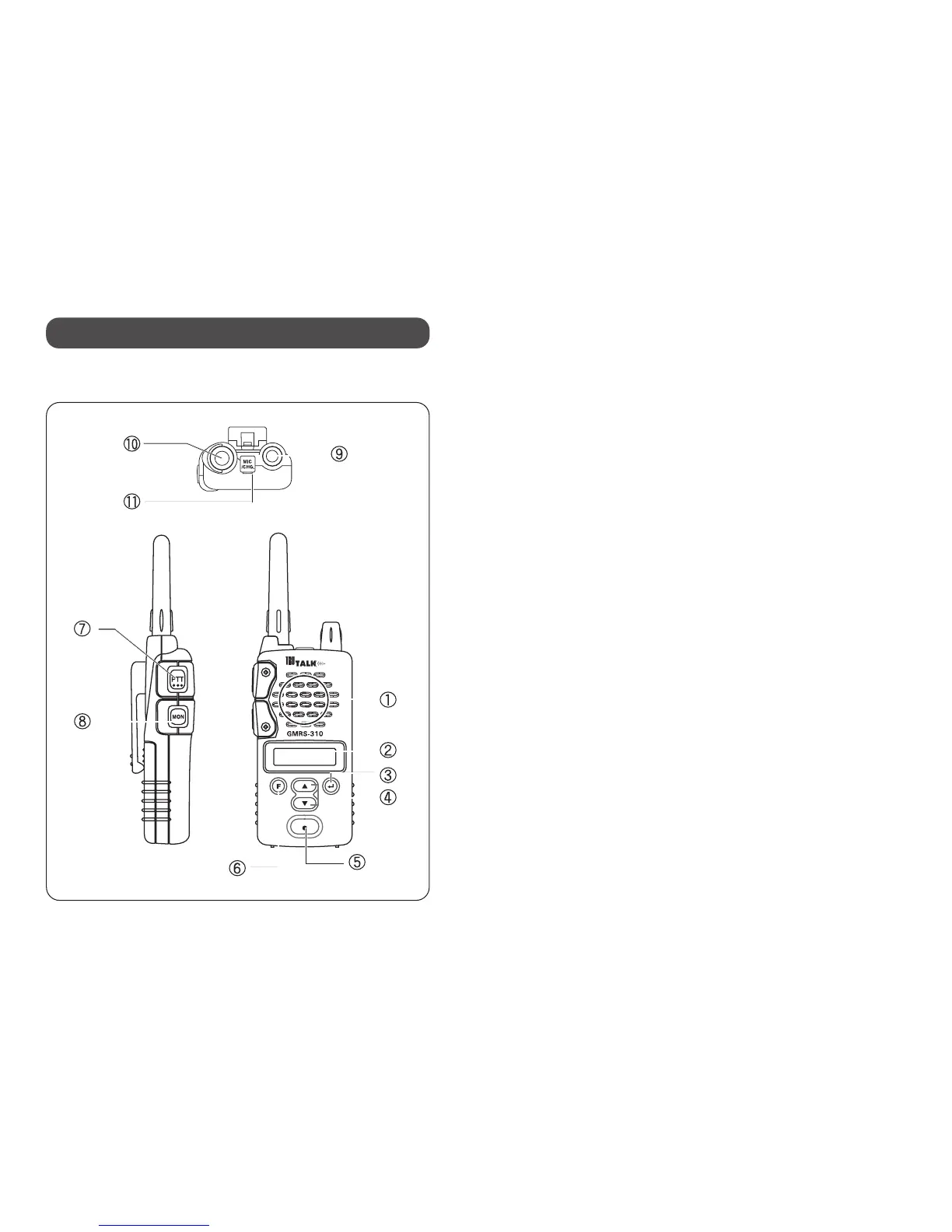
GMRS-310 Radio
1. Speaker
2. LCD Window
3. ENTER Button: Selects and enters
functions from the menu. When not in the
function menu it is used to send the CALL
signal.
4. 5/b(UP/DOWN) Buttons: Use to select
the function options, scroll through
channels and sub-codes.
5. Microphone
6. FUNCTION Button: Use to select a desired
function menu. Press and hold it to lock the
buttons.
7. P-T-T (Push-To-Talk) Button: Press and
hold to talk on the radio.
8. MONITOR / SCAN Button: Press and hold
to hear other radio traffic. Press and
release to scan channels.
9. Power/Volume Knob: Turns the radio
on/off, and adjusts the radio volume.
10. Antenna
11. External Speaker Microphone / Charger
Jack: Plug ear bud speaker microphone or
optional battery charger into this jack.
10. Controls and Functions



 To Next Page