10
BD-4601 (BPM Arm 1500)
12 Memory function
12.1 Storing data
After each measurement, the systolic and diastolic pressure, heart rate with the time and date will be
automatically stored.
The monitor features a 3 zone memory capability. Each memory zone holds the last 40 measurements,
replacing the oldest data with new one.
12.2 Recalling data
• Press the mode button
4
repeatedly to select the desired
memory zone.
• Press the memory button
to enter memory mode.
• Press the memory button
6
again to see the last
measurement result.
• Press the memory button
6
repeatedly for prior records
stored.
• To stop reading the data, press the start/stop button
5
to
switch back to stand-by.
To erase all data from one memory zone:
• Press the mode button
4
repeatedly to select the desired
memory zone.
• Press the memory button
6
to see the last measurement
result.
• Press the mode button
4
and set button
3
simultaneously
to erase all data from the selected memory zone.
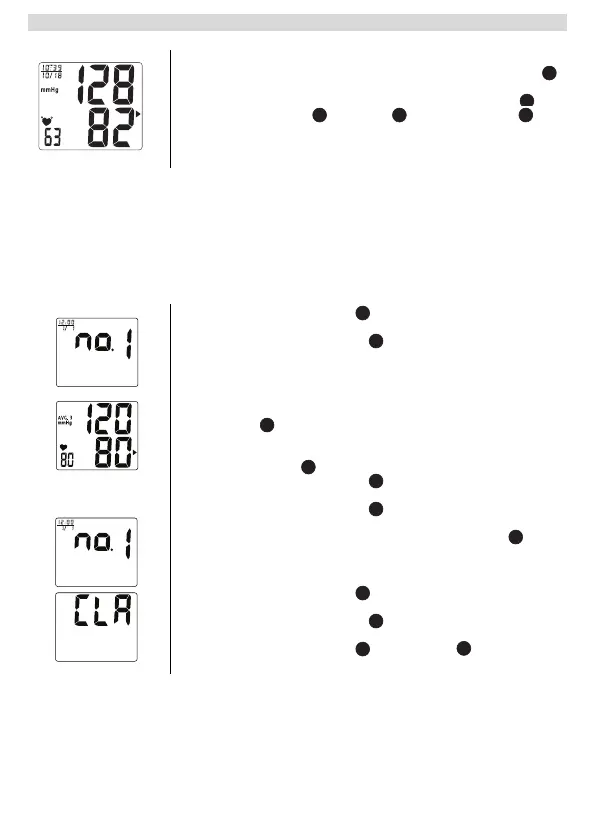
• After the initial inflation of the cuff, the pressure will slowly
decrease and when a pulse is detected, the heart rate symbol
will start flashing.
• When the measurement is finished, the systolic pressure ,
diastolic pressure , heart rate and WHO indicator will
be displayed for 1 minute.
• The monitor will automatically shut off after 1 minute if no button is
pressed.
– If there is no data in the selected memory zone, nothing
(except month, date, time and memory zone number) will
appear on the display.
– If there’s 1 record, the first reading will be the only
measurement records, indicates with the average symbol
.
– If there are multiple records, the first reading will be the
average of the last 3 records, indicated with the average
symbol .
14
13 14 12
20
20


 To Next Page