Topcom Twintalker 1000 3
ENGLISH
1 DESCRIPTION
(see front cover)
2 INSTALLATION
2.1 REMOVING/INSTALLING THE BELT CLIP
• To remove, pull the plastic lever located on top of the belt clip.
• Gently slide the belt clip away from the antenna until it’s separated from the
transeiver.
• To install the Belt Clip, slide the clip from bottom to the top into the appropriate
quides on the back of the transeiver until it locks.
2.2 BATTERY INSTALLATION
• Remove the belt clip (2.1)
• Push the battery cover and slide away from the antenna.
• Install four ‘AAA’ alkaline or rechargeable batteries following the polarity as shown.
• Re-install the Battery Cover and Belt Clip
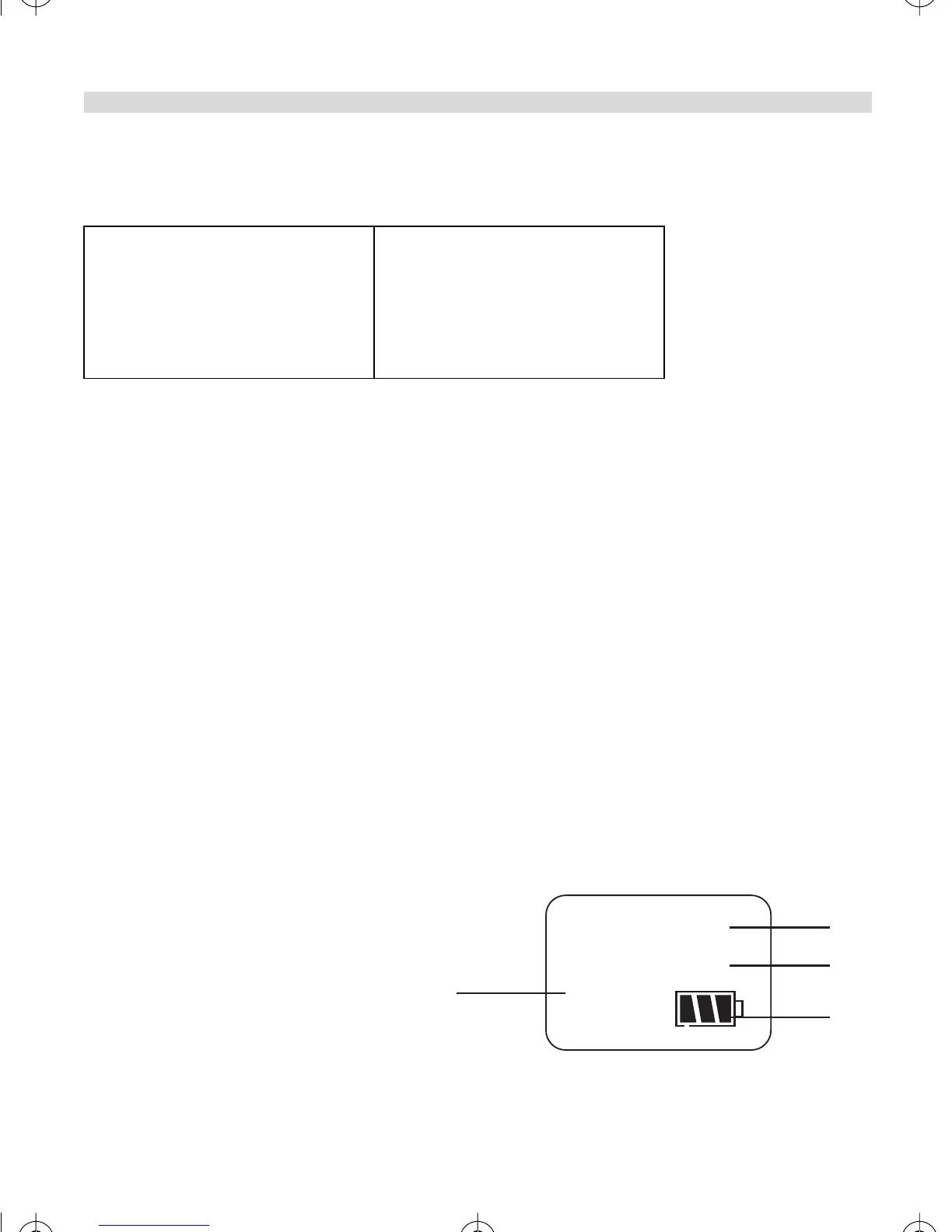
3 LCD SCREEN
a Channel number
b Battery level indicator
c Power save on icon
d Busy indicator
1. Talk button
2. Monitor button
3. Channel up
4. Channel down
5. Charger connector
6. Microphone
7. Call Button
8. Power On-Off/volume button
9. Antenna
10.Transmission LED
11. Battery cover
12.Belt clip
13.Belt clip lever
8
BUSY
P. SAVE
a
b
c
d
Def_HL_TT_1000.fm Page 3 Wednesday, March 5, 2003 10:42 AM


 To Next Page