EN
12 13
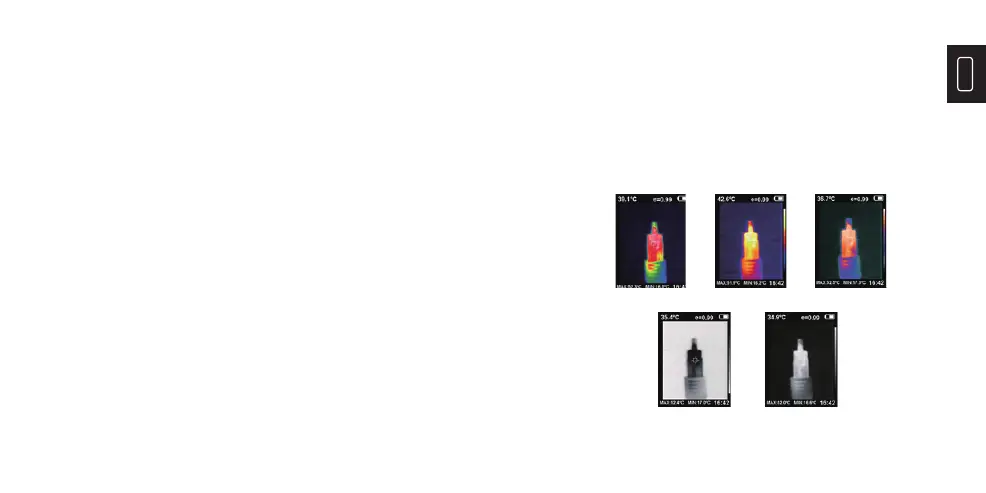
2. “Color Palette” Sub-menu
2.1 Color Palette Description
The palette can be used to change the pseudo-color
display of the infrared image on the display. The
palette is divided into: rainbow, iron red, cool, white
hot, black hot. These palettes work best with high
thermal contrast and provide additional color contrast
between high and low temperatures.
Suitable selection of color palette displays the details
of the target objective better. Rainbow, iron oxide
red and cold color palettes focus on display of color,
1) Press the “MENU” and select “Image Calibration”.
2) Press the “ENTER” to enter the image overlap
adjustment mode.
3) Press the navigation keys (up, down, left and right
buttons) to perform the visible image shift operation.
4) Press the “BACK” to exit the image blending mode
(If there is no operation for more than 6 seconds, it will
automatically exit the image blending mode).
Rainbow Iron oxide red Cold color
White heat Black heat
which are very suitable for high heat contrast and
are used to improve the color contrast between high
temperature and low temperature. But the black &
white and white & black color palettes display even
linear color.
The following is the image of the same object with
different color palettes.


 To Next Page