16
4.2 Diagnostics
4.2.1 Auto Scan and Individual System Diagnostics
Identifying the Vehicle
The Diagnostics module allows you to scan all supported vehicle
systems at one time (Auto Scan) for Diagnostic Trouble Codes (DTCs)
or select an individual system to perform Read Trouble Code, Clear
Trouble Code, Read Data Stream, Read Version Information and
Active Test. You can also access EOBD and Diagnostic Feedback
through this module.
To perform Auto Scan or Individual System Diagnostics, you need
to identify your vehicle rst.
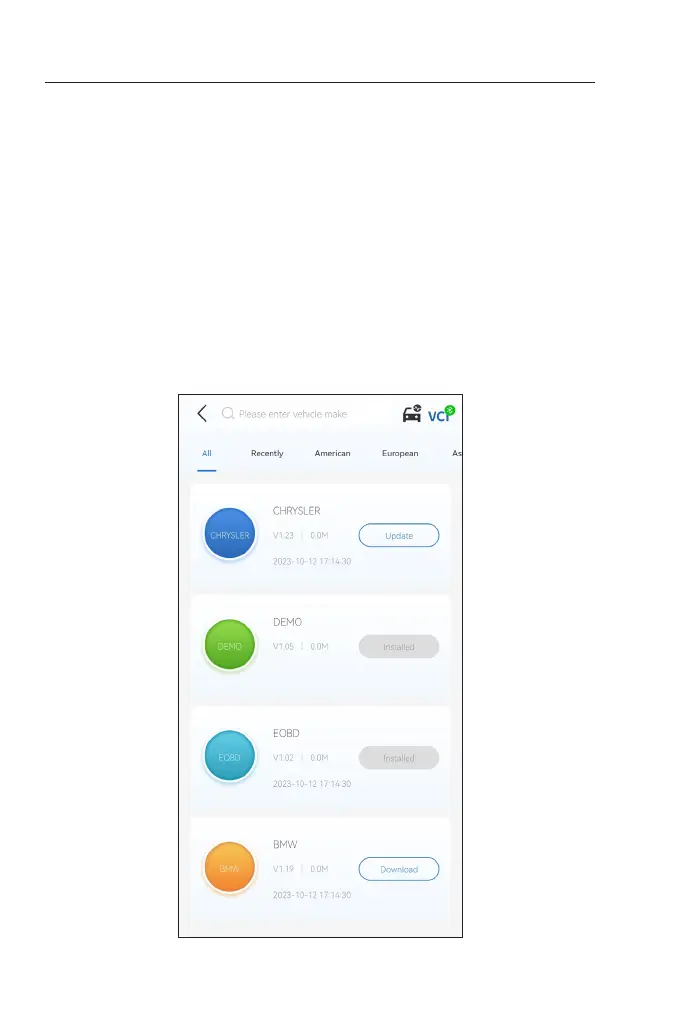
1. Tap Diagnostics from the home screen. A list of vehicle-specic
diagnostic software will display.
Figure 4-2


 To Next Page